

 Home
HomePage 9 of 11: Setting Selection & Source Selection
If you would like to change your settings, you will notice 3 words on the left hand side. They are "Settings", "Source", and "Audio". Click on each one to change specific settings for that category.
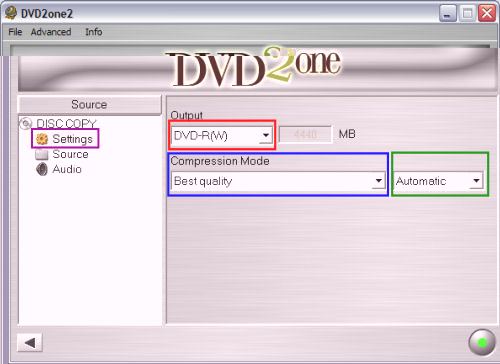
In Settings (purple) you can change the output size (If you are burning to SL disc's, DL disc's, or you can set your own custom size) (red), the compression Mode (Good quality or Fast) (blue), and at what level you want it (Automatic, Low, Medium, High) (green). (Screen Shot Below)
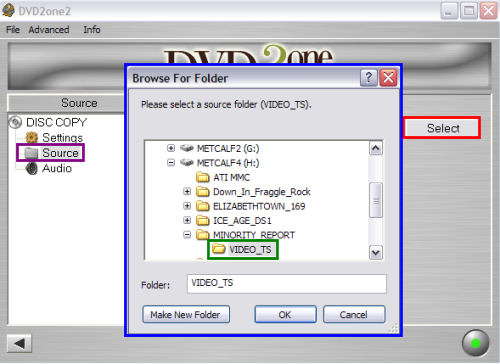
In Source (purple) you can set the input directory for DVD2One to use to create your backup by clicking the Select button (red), then choosing a VIDEO_TS folder (green) or the folder with your files in it on the "Browse For Folder" (blue) screen that pops up. (Screen Shot Below)
In Settings (purple) you can change the output size (If you are burning to SL disc's, DL disc's, or you can set your own custom size) (red), the compression Mode (Good quality or Fast) (blue), and at what level you want it (Automatic, Low, Medium, High) (green). (Screen Shot Below)
In Source (purple) you can set the input directory for DVD2One to use to create your backup by clicking the Select button (red), then choosing a VIDEO_TS folder (green) or the folder with your files in it on the "Browse For Folder" (blue) screen that pops up. (Screen Shot Below)


