

 Home
HomePage 4 of 11: Burning Section 3
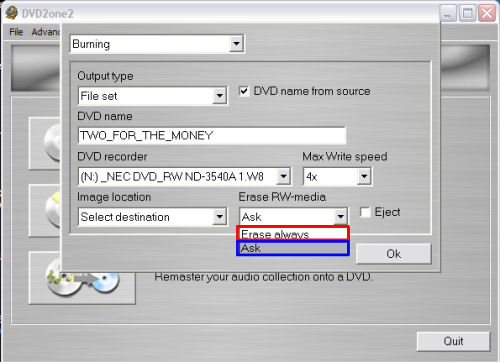
Next is "Erase RW-media".
When you insert a rewritable (RW) disc, DVD2One will detect whether the disc is empty or already has data on it.
If you select "Erase always" (red), DVD2One will erase the disc without asking, even when it already contains data.
If you select "Ask" (blue), DVD2One will ask if the data on this disk may be overwritten.
(Screen Shot Below)
When you insert a rewritable (RW) disc, DVD2One will detect whether the disc is empty or already has data on it.
If you select "Erase always" (red), DVD2One will erase the disc without asking, even when it already contains data.
If you select "Ask" (blue), DVD2One will ask if the data on this disk may be overwritten.
(Screen Shot Below)


