

 Home
HomePage 3 of 11: Burning Section 2
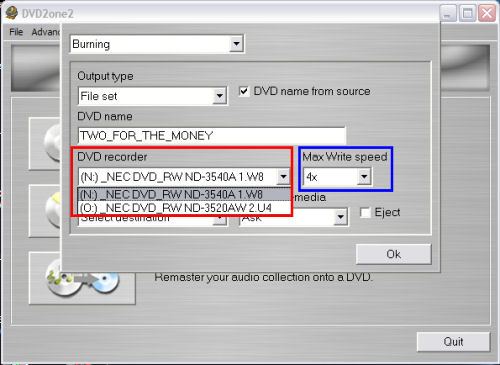
Next thing is "DVD recorder" & "Max Write speed".
"DVD recorder" box is where you would select which drive you want DVD2One to use when burning for you (red). in case you have more than 1 recorder.
"Max Write speed" box is where you can also tell DVD2One the max speed to be used when burning (blue). Warning: Burning to fast on low quality media could result in undesirable playback. I recommend burning at 4X for the best results. (Screen Shot Below)
Next thing is "Image location".
The "Image location" option is only used when the output type is set to burn.
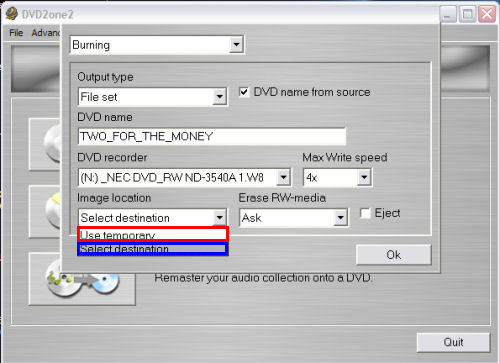
If you select "Use temporary" (red), DVD2One will put the image file in a temporary folder and will delete it after burning is completed. Do not use this option if you need to burn more than 1 copy.
If you select "Select destination" (blue), DVD2One will ask you where you want to save the image file, just like it will do when the output type is set to image. After burning, the image file is not deleted, so that you can burn it again.
(Screen Shot Below)
"DVD recorder" box is where you would select which drive you want DVD2One to use when burning for you (red). in case you have more than 1 recorder.
"Max Write speed" box is where you can also tell DVD2One the max speed to be used when burning (blue). Warning: Burning to fast on low quality media could result in undesirable playback. I recommend burning at 4X for the best results. (Screen Shot Below)
Next thing is "Image location".
The "Image location" option is only used when the output type is set to burn.
If you select "Use temporary" (red), DVD2One will put the image file in a temporary folder and will delete it after burning is completed. Do not use this option if you need to burn more than 1 copy.
If you select "Select destination" (blue), DVD2One will ask you where you want to save the image file, just like it will do when the output type is set to image. After burning, the image file is not deleted, so that you can burn it again.
(Screen Shot Below)


