
News Articles
Movies Software
DivX, XviD, DVD Subtitles Forum
DigiWiki Codecs

Username:
Password:  
Remember Login?
Sign Up
 

Articles - > Using Nero Burning ROM 6.x/7.x to Burn a DVD

Printer Friendly Version Printer Friendly Version

User Rating:

Details / Vote Now

User Comments:
Rocker22: When I try to burn it...
More / Post Your Comments

Page Select:

  1   2   3   4   5   6   7   8   9  

Page 9 of 9: Burn Screen

Related Articles:
  1. Using Nero Burning ROM 6.x - Burning a DVD
  2. Burning a VideoCD using Nero Burning ROM
  3. Burning a SVCD using Nero Burning ROM
  4. Archive: Nero Vision 4 DVD Authoring Guide
  5. Nero Vision 5 DVD Authoring Guide
On the burn screen, it shows you all kinds of detailed information.
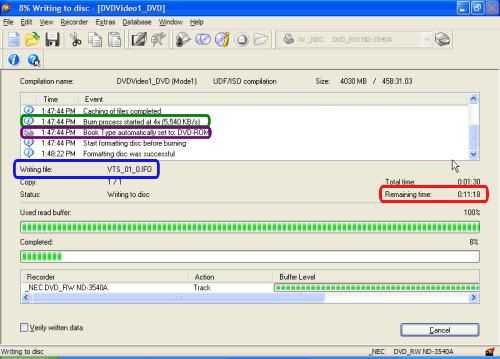
  1. Estimated time until it finishes (red)
  2. Which file its currently burning (blue)
  3. What speed you are burning at (green)
  4. It shows that it automatically book typed it to "DVD-ROM" if your burner supports booktype/bitsetting and if you are using +R/RW media (purple).
(Screen Shot Below)


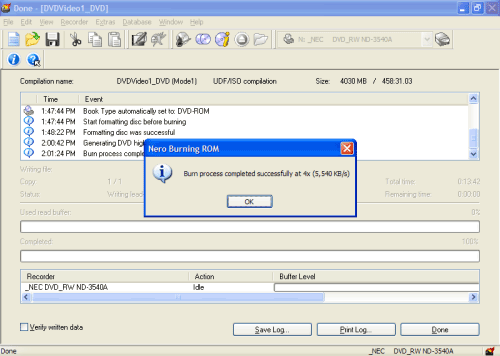
When its done, this screen will come up. Go watch your DVD! (Screen Shot Below)


  1   2   3   4   5   6   7   8   9  

Article Navigation:

Page 1: Introduction
Page 2: Media Type & Video Format
Page 3: ISO Tab & Label Tab
Page 4: Dates Tab & Misc Tab
Page 5: Burn Tab & Main Compilation Screen
Page 6: File Browser Section & Selecting Files
Page 7: Highlight Files & Copy to Compilation
Page 8: Selecting Burner & Burn Speed
Page 9: Burn Screen <--

User Rating:

  Average Rating: Your Rating:
Registered Users:
Non-Registered Users: (123 votes)

User Comments:

When I try to burn it the burn button says OK and it does nothing,and it will not let me pick the write speed,anybody have a idea why?
Posted by: Rocker22, 07:39:21, May 7, 2006


Do you have your DVD drive selected or does it say "Image Recorder"?
Posted by: jmet, 13:53:29, May 30, 2006


I am trying to burn dvds with nero7.2.7 9 I am also using Dvd Shrink first saving the files as an ISO), I did it no problem until my computer crashed a few days ago, now when I click burn it brings me a screen asking me where to save image file, or if does start to burn it will always stop telling me illegal disk....what is it I need to do...........................
Posted by: prettyla, 03:00:51, Sep 15, 2006


One or more files could not be added to a compilation. The following files may not reside in the VIDEO_TS directory of a DVD-Video compilation. Only compliant DVD-Video files VIDEO_TS.IFO, VIDEO_TS.VOB, VIDEO_TS.BUP, VTS_nn_0.IFO, VTS_nn_0.VOB, VTS_nn_0.BUP and VTS_nn_m.VOB can be added to the VIDEO_TS folder. Please add files from a completed DVD-Video title or use an authoring software like Nero Vision to create DVD-Video files from standard video files such as *.avi and *.mpg. C:\Documents and Settings\Erxi S\My Documents\eMule\Incoming\[YYSoR]阿有正传16.国语.v-vb.rmvb When i click the copy to compliation the msg show up just like above some 1 tell me why??
Posted by: triples8679, 13:58:55, Nov 11, 2006


hi. i am trying to burn dvd using the nero 7, but some odd reason it gives me error after 1-2 mintues later. anyone might be able to help me out.
Posted by: j_j_haveone, 06:13:17, Nov 20, 2006


i followed the directions and everytime i burn and put it in my dvd player it says that there is not a playback feature what am i doing wrong
Posted by: tonkpils666, 16:32:46, Jan 9, 2007


I have Nero 7 Ultra Edition and when I try to burn a dvd by going into my video_ts folder the .bup files are not shown. The window at the bottom of the screen says "all supported video files". I change the setting to show " all files" and then they appear, however when I try to move them over Nero says that it can't move them. Are my settings incorrect or am I doing something wrong? Thanks.
Posted by: JOESMILEY1234, 05:07:18, Jan 31, 2007


hi can nero 5 burn full movie downloads...thanks cueking
Posted by: CUEKING, 13:31:52, Jan 28, 2008


Comments: