
News Articles
Movies Software
DivX, XviD, DVD Subtitles Forum
DigiWiki Codecs

Username:
Password:  
Remember Login?
Sign Up
 

Articles - > Using Nero Burning ROM 6.x/7.x to Burn a DVD

Printer Friendly Version Printer Friendly Version

User Rating:
(2 votes)
Details / Vote Now

User Comments:
Rocker22: When I try to burn it...
More / Post Your Comments

Page Select:

  1   2   3   4   5   6   7   8   9   Next Page

Page 4 of 9: Dates Tab & Misc Tab

Related Articles:
  1. Using Nero Burning ROM 6.x - Burning a DVD
  2. Burning a VideoCD using Nero Burning ROM
  3. Burning a SVCD using Nero Burning ROM
  4. Archive: Nero Vision 4 DVD Authoring Guide
  5. Nero Vision 5 DVD Authoring Guide
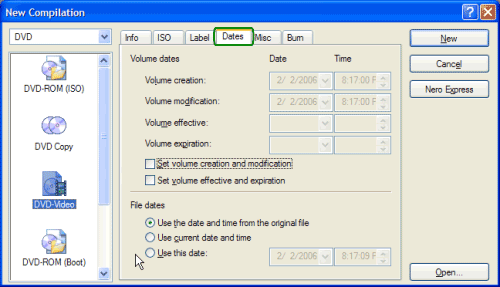
The third tab I will be showing is the "Dates" tab (green). There really isn't anything to change here, so I recommend just leave it the way it is. (Screen Shot Below)


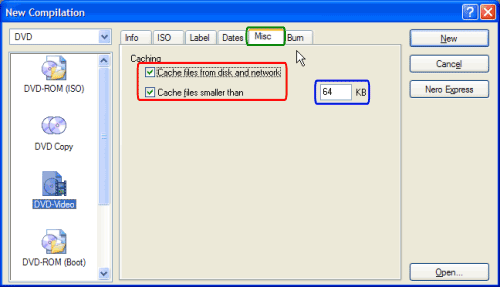
The fourth tab I will be showing is the "Misc" tab (green). Make sure both boxes have a check mark in them (red) and the number 64 is in the "cache files smaller than" input box (blue). (Screen Shot Below)


  1   2   3   4   5   6   7   8   9   Next Page

Article Navigation:

Page 1: Introduction
Page 2: Media Type & Video Format
Page 3: ISO Tab & Label Tab
Page 4: Dates Tab & Misc Tab <--
Page 5: Burn Tab & Main Compilation Screen
Page 6: File Browser Section & Selecting Files
Page 7: Highlight Files & Copy to Compilation
Page 8: Selecting Burner & Burn Speed
Page 9: Burn Screen

User Rating:

  Average Rating: Your Rating:
Registered Users: (2 votes)
Non-Registered Users: (124 votes)

User Comments:

When I try to burn it the burn button says OK and it does nothing,and it will not let me pick the write speed,anybody have a idea why?
Posted by: Rocker22, 07:39:21, May 7, 2006


Do you have your DVD drive selected or does it say "Image Recorder"?
Posted by: jmet, 13:53:29, May 30, 2006


I am trying to burn dvds with nero7.2.7 9 I am also using Dvd Shrink first saving the files as an ISO), I did it no problem until my computer crashed a few days ago, now when I click burn it brings me a screen asking me where to save image file, or if does start to burn it will always stop telling me illegal disk....what is it I need to do...........................
Posted by: prettyla, 03:00:51, Sep 15, 2006


One or more files could not be added to a compilation. The following files may not reside in the VIDEO_TS directory of a DVD-Video compilation. Only compliant DVD-Video files VIDEO_TS.IFO, VIDEO_TS.VOB, VIDEO_TS.BUP, VTS_nn_0.IFO, VTS_nn_0.VOB, VTS_nn_0.BUP and VTS_nn_m.VOB can be added to the VIDEO_TS folder. Please add files from a completed DVD-Video title or use an authoring software like Nero Vision to create DVD-Video files from standard video files such as *.avi and *.mpg. C:\Documents and Settings\Erxi S\My Documents\eMule\Incoming\[YYSoR]阿有正传16.国语.v-vb.rmvb When i click the copy to compliation the msg show up just like above some 1 tell me why??
Posted by: triples8679, 13:58:55, Nov 11, 2006


hi. i am trying to burn dvd using the nero 7, but some odd reason it gives me error after 1-2 mintues later. anyone might be able to help me out.
Posted by: j_j_haveone, 06:13:17, Nov 20, 2006


i followed the directions and everytime i burn and put it in my dvd player it says that there is not a playback feature what am i doing wrong
Posted by: tonkpils666, 16:32:46, Jan 9, 2007


I have Nero 7 Ultra Edition and when I try to burn a dvd by going into my video_ts folder the .bup files are not shown. The window at the bottom of the screen says "all supported video files". I change the setting to show " all files" and then they appear, however when I try to move them over Nero says that it can't move them. Are my settings incorrect or am I doing something wrong? Thanks.
Posted by: JOESMILEY1234, 05:07:18, Jan 31, 2007


hi can nero 5 burn full movie downloads...thanks cueking
Posted by: CUEKING, 13:31:52, Jan 28, 2008


Comments: