
Articles - > Using NeroVision Express - Making a DVD with Menus
Printer Friendly Version Printer Friendly Version

User Rating:
No ratings recorded - Vote Now

User Comments:
Doobie: What would cause the error unable...
More / Post Your Comments

Page Select:

1   2   3   4   5   6   Next Page

Categories:

Page 1 of 6: Using NeroVision Express - Making a DVD with Menus


In the guide I will show you how to make a DVD with menus from various video clips using NeroVision Express.

Software you will need:

NeroVision Express (Part of the Update-Package 2 download)


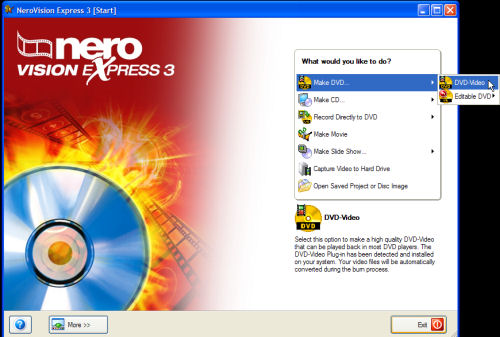
Start up NVE and click "Make DVD" and then click "DVD-Video". (Screen Shot Below)


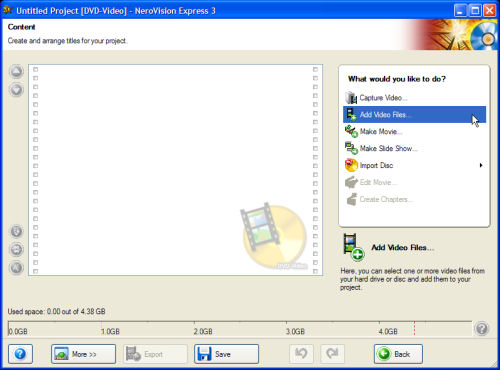
Now click "Add Video Files..." on the right, that will bring you to the content screen. (Screen Shot Below)


1   2   3   4   5   6   Next Page

Article Navigation:

Page 1: <--
Page 2:
Page 3:
Page 4:
Page 5:
Page 6:

Revision History:

Version 1.0:
  • Date Updated: Feb 7, 2006

User Rating:

  Average Rating: Your Rating:
Registered Users: No ratings recorded
Non-Registered Users: (20 votes)

User Comments:

What would cause the error unable to open file? This happens at the add files step.
Posted by: Doobie, 01:53:29, May 31, 2006


What is the extension of the file?
Posted by: jmet, 11:09:28, Jun 28, 2006


Comments: