

 Home
HomePage 5 of 6: Using NeroVision Express - Making a DVD with Menus
On this screen, you have few different options as to what way you want to output the DVD.
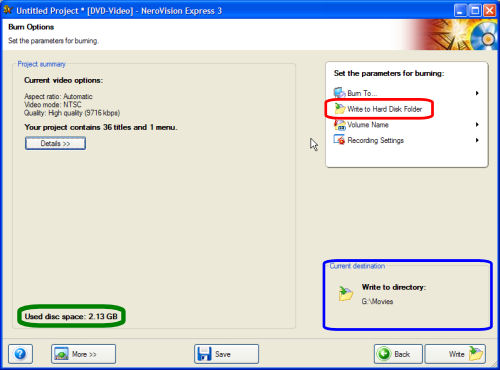
Depending on the current size of the DVD (green) it may be too big to fit on a single layer blank DVD, not a problem though! Just select "Write to Hard Disk Folder" (red) so that once its finished writing to your hard drive, you can use DVD Shrink or similar to compress it down to fit on single layer DVD-R/DVD+R. You will also have to select a destination directory so that NVE knows what folder to save files in (blue). (Screen Shot Below)
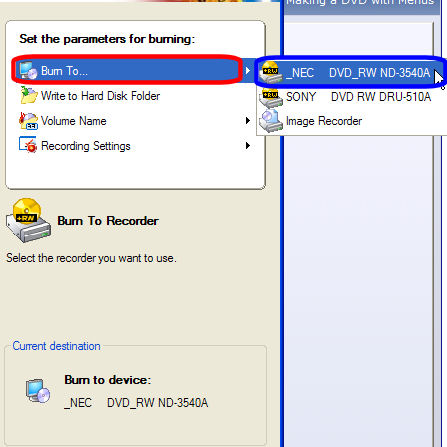
If you know it will fit, you can configure NVE to go ahead and burn it to a blank disc by selecting "Burn To..." (red) and selecting which drive you want to burn it (blue). Do not click the burn button yet, read the next page. (Screen Shot Below)
Depending on the current size of the DVD (green) it may be too big to fit on a single layer blank DVD, not a problem though! Just select "Write to Hard Disk Folder" (red) so that once its finished writing to your hard drive, you can use DVD Shrink or similar to compress it down to fit on single layer DVD-R/DVD+R. You will also have to select a destination directory so that NVE knows what folder to save files in (blue). (Screen Shot Below)
If you know it will fit, you can configure NVE to go ahead and burn it to a blank disc by selecting "Burn To..." (red) and selecting which drive you want to burn it (blue). Do not click the burn button yet, read the next page. (Screen Shot Below)


