

 Home
Home


Page 1 of 3: Using VirtualDubMod - Splitting/Cutting AVI Files
Software you will need:
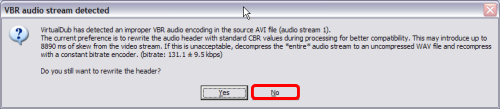
Go ahead and start up VirtualDubMod and load your video file. After loading, this warning message might come up and ask you if you "still want to rewrite the header". If it does, click "NO". (Screen Shot Below)
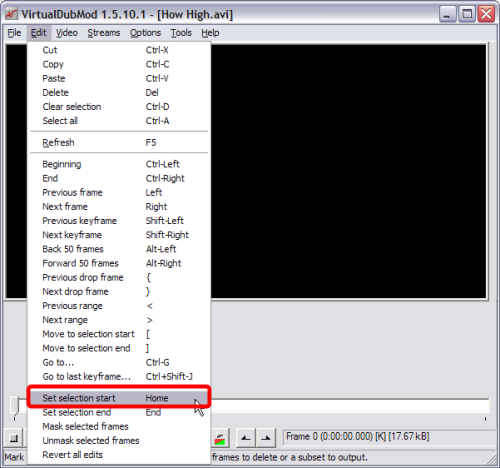
After clicking "NO" it will return you to the VirtualDubMod screen, go ahead and click "Edit" at the top, then click "Set selection start" or press the "Home" key on your keyboard. (Screen Shot Below)
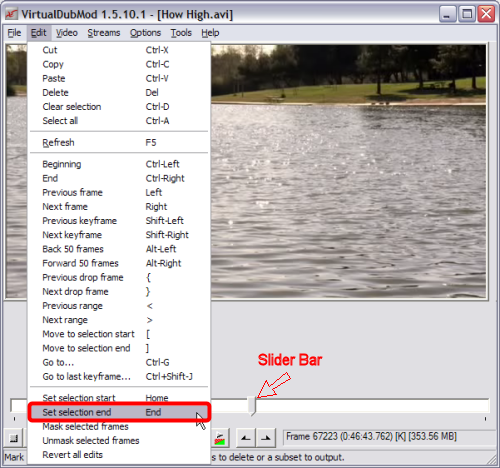
Now we are going to set the "Ending" for the first part of the avi file. Press and hold down the "Shift" key and drag the slider bar to the point you wish to split at (When moving the slider manually, it is very important that you press down the Shift button on your keyboard which will make sure that your positions are at a keyframe, so that you don't lose any frames in the splitting process). Alternatively, you can press Ctrl+G to jump to either a specific frame or specific time in the movie. Now once you find the spot, click "Edit" then click "Set selection end" or press the "End" button on your keyboard. (Screen Shot Below)
Go ahead and start up VirtualDubMod and load your video file. After loading, this warning message might come up and ask you if you "still want to rewrite the header". If it does, click "NO". (Screen Shot Below)
After clicking "NO" it will return you to the VirtualDubMod screen, go ahead and click "Edit" at the top, then click "Set selection start" or press the "Home" key on your keyboard. (Screen Shot Below)
Now we are going to set the "Ending" for the first part of the avi file. Press and hold down the "Shift" key and drag the slider bar to the point you wish to split at (When moving the slider manually, it is very important that you press down the Shift button on your keyboard which will make sure that your positions are at a keyframe, so that you don't lose any frames in the splitting process). Alternatively, you can press Ctrl+G to jump to either a specific frame or specific time in the movie. Now once you find the spot, click "Edit" then click "Set selection end" or press the "End" button on your keyboard. (Screen Shot Below)

