

 Home
Home

Page 1 of 4: DVD Backup using Nero Recode 2
Nero Recode 2 is a very useful program for shrinking or compressing DVD video streams. If you have used DVD Shrink before, you will notice a great similarity between the two programs. Nero Recode is not only faster but, in most cases provides better results. It is rumored the creator of DVD Shrink got a job at Nero and designed Nero Recode 2. If you like DVD Shrink, then Nero Recode 2 is the program for you.
(Nero Recode only processes unprotected/unencrypted DVDs)
Software you will need:
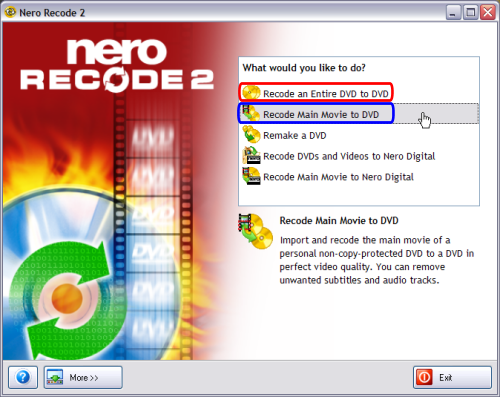
When you first start up Nero Recode, it gives you 5 options to choose from. The first 2 is what I will be dealing with in this guide. Perhaps later I will write a guide on how to "Remake a DVD". Since I want to make a DVD, I am going to choose either "Recode an Entire DVD to DVD" (red) or "Recode Main Movie to DVD" (blue). If your worried about the "quality" of your DVD, I highly suggest in just copying the main movie. If you want the menus, extras, etc. I suggest you do the entire DVD to DVD option. Warning, "Recode an Entire DVD to DVD" typically results in using large amount of compression resulting in poor video quality. (I personally always just copy the main movie as I don't care for all the menus and extras. Specially when it degrades the video quality if you keep them.) (Screen Shot Below)
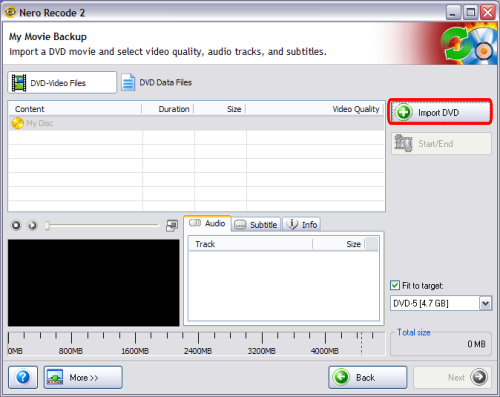
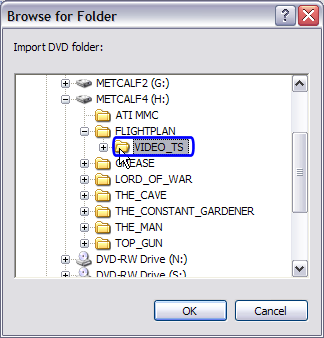
After choosing either "Recode Entire DVD to DVD" or "Recode Main Movie to DVD", you will be presented with this screen where you can load your non-encrypted video files. Go ahead and click the "Import DVD" button (red) and select the folder with your non-encrypted files (usually a VIDEO_TS folder) (blue). (Screen Shot Below)
(Nero Recode only processes unprotected/unencrypted DVDs)
Software you will need:
When you first start up Nero Recode, it gives you 5 options to choose from. The first 2 is what I will be dealing with in this guide. Perhaps later I will write a guide on how to "Remake a DVD". Since I want to make a DVD, I am going to choose either "Recode an Entire DVD to DVD" (red) or "Recode Main Movie to DVD" (blue). If your worried about the "quality" of your DVD, I highly suggest in just copying the main movie. If you want the menus, extras, etc. I suggest you do the entire DVD to DVD option. Warning, "Recode an Entire DVD to DVD" typically results in using large amount of compression resulting in poor video quality. (I personally always just copy the main movie as I don't care for all the menus and extras. Specially when it degrades the video quality if you keep them.) (Screen Shot Below)
After choosing either "Recode Entire DVD to DVD" or "Recode Main Movie to DVD", you will be presented with this screen where you can load your non-encrypted video files. Go ahead and click the "Import DVD" button (red) and select the folder with your non-encrypted files (usually a VIDEO_TS folder) (blue). (Screen Shot Below)

