

 Home
HomePage 2 of 4: DVD Backup using Nero Recode 2
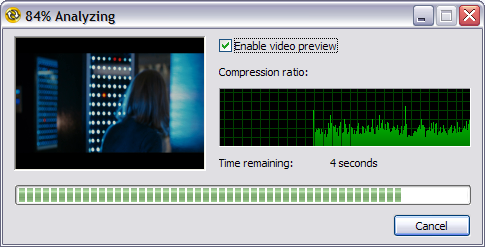
After selecting the VIDEO_TS folder of your choice, Nero Recode will do a quick analysis of the video files to gather the compression that it needs to apply for it to fit on your destination media if any compression is necessary. (Screen Shot Below)
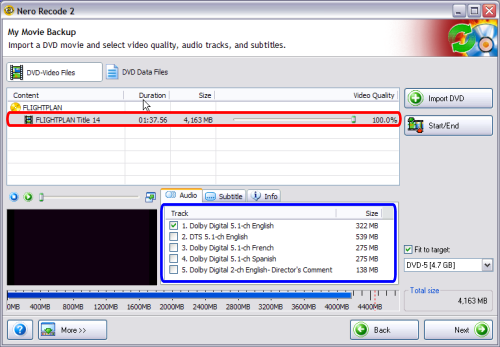
After it finishes with the quick analysis it will present with this screen showing you the compression its going to use (In my screen shot it says "100.0%", that means its not going to use any compression, which is great! (red) Depending on the bitrate of the video, anything below 70% is below acceptable video quality). On that screen, it will also list all of the audio streams available (blue). You can select/de-select the ones you want and don't want. I only want Dolby Digital 5.1-ch English, so I de-select all others. Dolby Digital 5.1-ch English is 99.9% what you want to have main movie dialog. Dolby Digital 2-ch is usually the director commentaries or the extras audio. You can safely remove those if you are only doing the main movie only. You can also click the "Subtitle" tab to select/de-select the subtitles you want and don't want. (Screen Shot Below)
After it finishes with the quick analysis it will present with this screen showing you the compression its going to use (In my screen shot it says "100.0%", that means its not going to use any compression, which is great! (red) Depending on the bitrate of the video, anything below 70% is below acceptable video quality). On that screen, it will also list all of the audio streams available (blue). You can select/de-select the ones you want and don't want. I only want Dolby Digital 5.1-ch English, so I de-select all others. Dolby Digital 5.1-ch English is 99.9% what you want to have main movie dialog. Dolby Digital 2-ch is usually the director commentaries or the extras audio. You can safely remove those if you are only doing the main movie only. You can also click the "Subtitle" tab to select/de-select the subtitles you want and don't want. (Screen Shot Below)


