Note : This is an archived review for an older version of PowerDVD. For the latest review, please refer to this page.
New in 6.0
This page tries to list all the significant new features of PowerDVD 6.0 - if you want to see a complete review of the latest version of PowerDVD, please refer to this page.
Note that there are two versions of PowerDVD : Standard and Deluxe. All descriptions below are for the Standard version of PowerDVD, unless otherwise stated.
As with the previous version of PowerDVD, there are two major versions of PowerDVD for sale - Standard and Deluxe. The Standard version does not include Dolby Pro Logic IIx decoding, Dolby Digital EX decoding, MLP decoding, DTS decoding, DivX Pro playback and DVD-Audio playback.
New Video Features
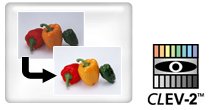
The previous version of PowerDVD saw the introduction of CLEV ("Cyberlink Eagle Vision" - video filtering) and CLPV ("Cyberlink Pano Vision" - non linear fullscreen/widescreen conversion). The new version of PowerDVD features the second generation CLEV-2. CLEV-2 adjusts a scene's chroma and luminance to enhance image detail in scenes that are normally too dark or too bright.
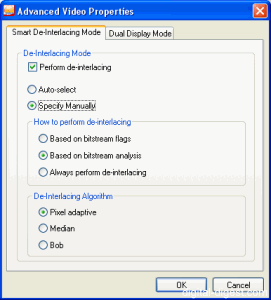
PowerDVD 6.0 also introduces "Smart De-Interlacing Mode" has three de-interlacing algorithms, Pixel Adaptive, Median and Bob. All three algorithms can be selected manually or a smart algorithm used to determine when de-interlacing should be used (can also be set to turn on based on the bitstream flag, a bitstream analysis or to always perform de-interlacing).
New Audio Features
Most of PowerDVD's changes are in the audio department this time round...
The biggest single new audio feature of PowerDVD 5.0 was CLMEI (Cyberlink Multi-Channel Environment Impression). In plain speak, this is Cyberlink's own "simulated surround" engine, which allows you to up-convert standard stereo audio into multi-channel audio. PowerDVD 6.0 now features the second generation implementation of this technology, suitably called CLMEI-2.
You can also use the alternative Dolby Pro-Logic IIx (available in the Deluxe version) to perform the same task of expanding 2 channel audio for multi-channel use.
The previous version of PowerDVD also introduced Dolby Virtual Speaker, which is the opposite of the above technologies as it turns an multi-channel audio source into 2 channel audio that sounds like it has multi-channels by using audio tricks. Cyberlink now has it's own version of the same technique called CLVS (Cyberlink Virtual Speaker).
DVD-Audio (MLP decoding) support is also now available in the Deluxe version of PowerDVD, bringing it in line with WinDVD's support for the same format.
And again following the trend, PowerDVD 5.0 added TruSurroundXT Headphone while PowerDVD 6.0 implements Cyberlink's own version of the same technology, CLHP (Cyberlink Headphones).
Audio equalizer presets have also been introduced. Available presets include "Classical", "Techno", "Country" - altogether 14 different audio presets. There is also audio pitch scaling.
New Playback Modes
WMV-HD support is a new playback feature for PowerDVD 6.0 - this feature is supported in both the Standard and Deluxe versions.
DivX Pro playback is now integrated into the player for the Deluxe version, meaning that you no longer required to download the DivX codec for playing back DivX Pro content. Note that most of the advanced features (such as zooming, CLPV and CLEV) are not supported during DivX playback.
DVD±VR support has also been improved since the last version. DVD-VR is now supported on DVD-R media and DVD+VR playback/random access support is not available. For those that don't know, DVD±VR is a kind of DVD that can be edited after is has been produced, making it an ideal format for standalone DVD recordable. You can find out more about DVD±VR here.


 Home
Home