Note : This is an archived review for an older version of PowerDVD. For the latest review, please refer to this page.
New in 5.0
Click here to read the official PowerDVD 5.0 readme file for a brief of what's new in this release.
This page tries to list all the significant new features of PowerDVD 5.0 - if you want to see a complete review of the latest version of PowerDVD, please refer to this page.
Note that there are two versions of PowerDVD : Standard and Deluxe. All descriptions below are for the Standard version of PowerDVD, unless otherwise stated.
As with the previous version of PowerDVD, there are two major versions of PowerDVD for sale - Standard and Deluxe. The Standard version does not include DTS and Dolby Virtual Speakers support, but includes all the other functions that is included in the Deluxe edition.
New Video Features
Being consistent with their trademarked technology naming convention, new video features for PowerDVD are appropriately named CLEV and CLPV.
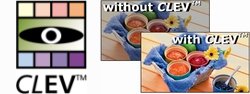
CLEV stands for "Cyberlink Eagle Vision" and is PowerDVD's new filtering capability. It dynamically adjusts contrast/brightness/colors to bring out details in the picture.
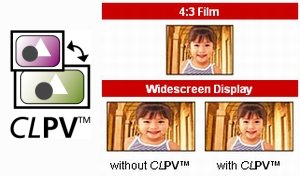
CLPV stands for "Cyberlink Pano Vision". Now this must be a truly first in terms of software DVD player - the first non-linear zoom. Where CLPV comes in handy is display full screen content on widescreen monitors (and vice versa). It will take a 4:3 picture, stretch the picture around the edges more so than in the middle, and thereby turning it to fit into 16:9 displays. This way, the center of the picture is always less distorted than the outer edges, and assuming most of the action appears in the center of the picture, the overall distortions will be less alarming.
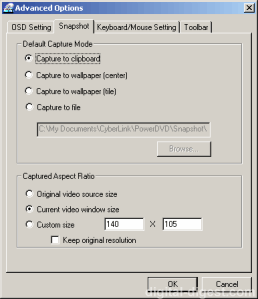
Still capturing has been improved with the option to capture at different pre-set resolutions.
New Audio Features
The biggest single new audio feature of PowerDVD 5.0 is the newly added CLMEI (Cyberlink Multi-Channel Environment Impression). In plain speak, this is Cyberlink's own "simulated surround" engine, which allows you to up-convert standard stereo audio into multi-channel audio.
Also new (in the Deluxe version of PowerDVD only) is Dolby Virtual Surround (DVS). This is sort of the anti-thesis of CLMEI, as DVS tries to give you the impression of multi-channel audio using only standard stereo speakers.
WinDVD 3.0 first introduced the concept of time stretching, and PowerDVD 5.0 now also includes this feature. Time stretching allows you to playback the movie faster, but retain the natural pitch of the audio.
And with the release of new sounds cards (eg. Sound Blaster Audigy 2) with higher definition audio output, 24bit/96kHz LPCM audio output will be something that you'll probably want, especially when playing back high resolution audio.
PowerDVD 5.0 also adds TruSurroundXT Headphone, based on existing TruSurroundXT technology already present in PowerDVD 4.0.
New Playback Modes
DivX playback is now integrated into the player, meaning that you no longer required to download the DivX codec for playing back DivX content. Note that most of the advanced features (such as zooming, CLPV and CLEV) are not supported during DivX playback.


 Home
Home