
News Articles
Movies Software
DivX, XviD, DVD Subtitles Forum
DigiWiki Codecs

Username:
Password:  
Remember Login?
Sign Up
 

Articles - > Convert any video file to a 3GP file for your mobile phone using Super

Printer Friendly Version Printer Friendly Version

User Rating:

Details / Vote Now

User Comments:
magiver_105: thanks...
More / Post Your Comments

Page Select:

  1   2   3   4   5   6  

Page 6 of 6: Convert any video file to a 3GP file for your mobile phone using Super

Related Articles:
  1. Convert .avi to iPod video using 3GP Converter
  2. Basic Guide How to Convert AVI Files to DVD with Avi2DVD
  3. Nintendo Wii Video Conversion Guide
  4. YouTube, Google Video Download and DivX Conversion Guide
  5. Xbox 360 H.264 Conversion Guide
When you are ready, click the "Encode" button (purple). [Screen Shot Below]



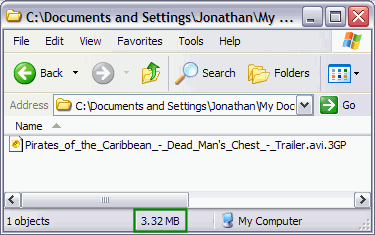
After it is finished, you will have a 3gp file in the "Output Folder" you specified. Transfer the file to your phone and enjoy the video anywhere you go. With the settings I used in this guide, my file was 3.32MB (green). [Screen Shot Below]


  1   2   3   4   5   6  

Article Navigation:

Page 1:
Page 2:
Page 3:
Page 4:
Page 5:
Page 6: <--

User Rating:

  Average Rating: Your Rating:
Registered Users:
Non-Registered Users: (20 votes)

User Comments:

thanks
Posted by: magiver_105, 06:42:19, Oct 2, 2007


Comments: