

 Home
HomePage 3 of 6: Convert any video file to a 3GP file for your mobile phone using Super
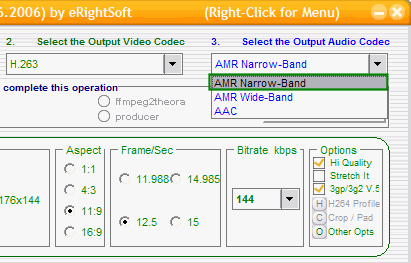
Now onto "Output Audio Codec". Here you want to pick "AMR Narrow-Band" (green). ***Actually you can pick "AMR Narrow-Band" or "AMR Wide-Band", AMR Narrow-Band is compatible with more phones though*** [Screen Shot Below]
This guide is not specific enough for all phones. You will have to experiment with the settings for different phone types.
If you have a newer model phone that you know supports video files, try changing the "Video" codec to "MPEG-4" and the "Audio" codec to "AAC" for better quality. [Screen Shot Below]

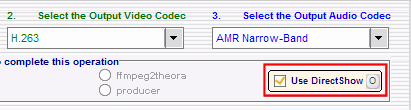
Next thing we will look at it is the "Use DirectShow" box (red). Basically with this checked, it allows you to play anything you can play with Windows Media Player. Its a good idea to turn it on (put a check mark in the box) and only turn it off if it causes problems. [Screen Shot Below]
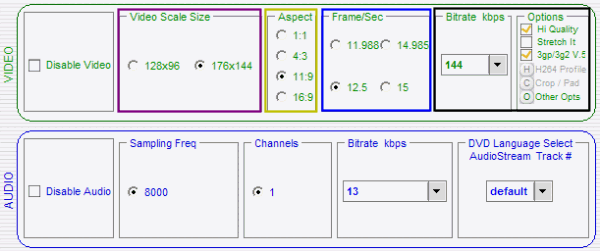
Now lets look at the "Video" settings. Now this will be different for everyone depending on which phone they have and the required specifications. If you can't select your exact resolution, just select the closest one that doesn't go over the limitations (purple). Set the "Aspect" to your liking (gold). Set the "Frame/Sec" to 12.5 (blue). Lets move on to the "Bitrate kbps" box, I recommend anywhere between "128" and "192" (black). [Screen Shot Below]
***The higher the "Bitrate", the better quality you will have, however the file size gets bigger when the "Bitrate" increases. Consult your owners manual to the phone to see its required specs***
This guide is not specific enough for all phones. You will have to experiment with the settings for different phone types.
If you have a newer model phone that you know supports video files, try changing the "Video" codec to "MPEG-4" and the "Audio" codec to "AAC" for better quality. [Screen Shot Below]
Next thing we will look at it is the "Use DirectShow" box (red). Basically with this checked, it allows you to play anything you can play with Windows Media Player. Its a good idea to turn it on (put a check mark in the box) and only turn it off if it causes problems. [Screen Shot Below]
Now lets look at the "Video" settings. Now this will be different for everyone depending on which phone they have and the required specifications. If you can't select your exact resolution, just select the closest one that doesn't go over the limitations (purple). Set the "Aspect" to your liking (gold). Set the "Frame/Sec" to 12.5 (blue). Lets move on to the "Bitrate kbps" box, I recommend anywhere between "128" and "192" (black). [Screen Shot Below]
***The higher the "Bitrate", the better quality you will have, however the file size gets bigger when the "Bitrate" increases. Consult your owners manual to the phone to see its required specs***


