

 Home
HomePage 5 of 6: Convert any video file to a 3GP file for your mobile phone using Super
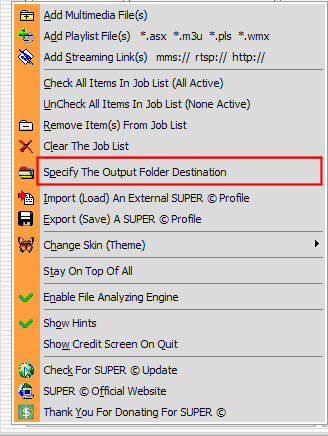
After you have loaded each video file you want to convert its time to set the "Output Folder Destination". Right click in the Super? window and then left click on "Specify The Output Folder Destination" (red). [Screen Shot Below]
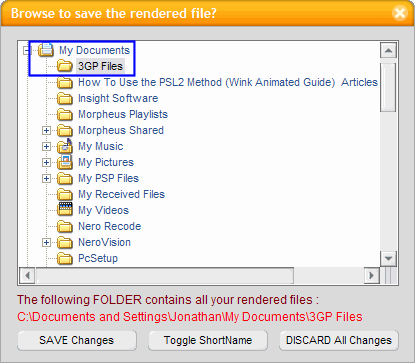
After clicking "Output Folder Destination", the browse for folder window will come up. Here you need to select the folder you want Super to put the files in that it creates (blue). ***I recommend creating a new folder for this, whether it be on your desktop or in your documents*** [Screen Shot Below]
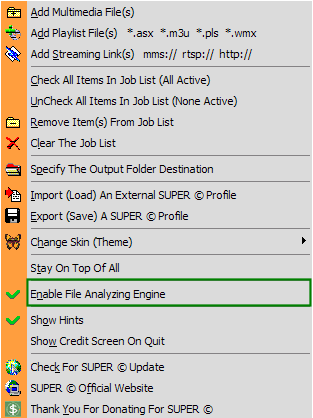
After picking your "Destination Folder", right click again in the Super window and left click "Enable File Analyzing Engine" (green). [Screen Shot Below]
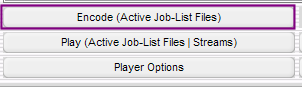
When you are ready, click the "Encode" button (purple). After it finishes, transfer the file to your phone and enjoy the video anywhere you go. [Screen Shot Below]
After clicking "Output Folder Destination", the browse for folder window will come up. Here you need to select the folder you want Super to put the files in that it creates (blue). ***I recommend creating a new folder for this, whether it be on your desktop or in your documents*** [Screen Shot Below]
After picking your "Destination Folder", right click again in the Super window and left click "Enable File Analyzing Engine" (green). [Screen Shot Below]
When you are ready, click the "Encode" button (purple). After it finishes, transfer the file to your phone and enjoy the video anywhere you go. [Screen Shot Below]


