Software - > Nero Vision

Screenshot
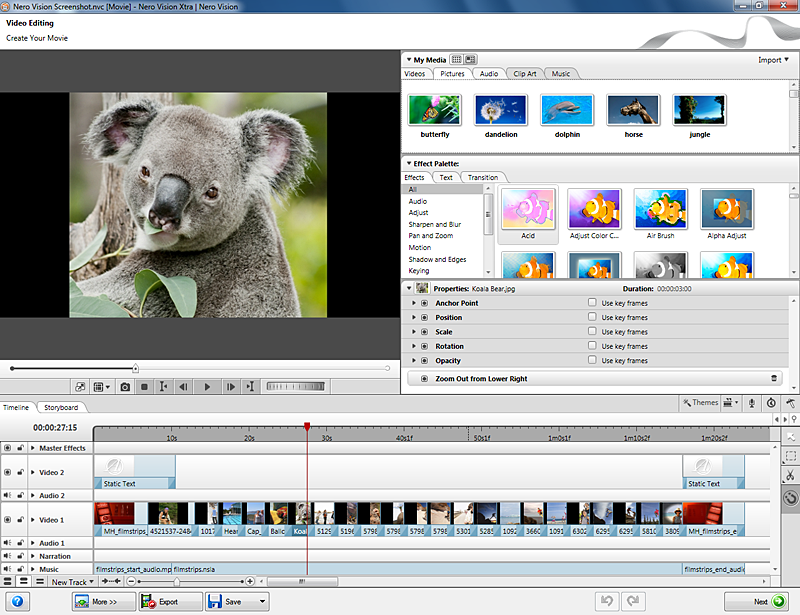
Enlarge Image Enlarge Image: Screenshot
More Images More Images

Downloads


Join Our Newsletter

DigiWiki: DVD Authoring Tool Roundup
Title: Nero Vision
Author/Publisher: Nero
Ease of use: Not Rated
Latest Version: 6.4.9.0 (details)
OS Support: Windows 2000 Windows XP Windows 2003 Windows Vista
License: Commercial, $USD79.99 (details)
Date Added: Jan 17, 2007
Last Updated: Jun 3, 2009
Page Viewed: 115695 times

  Email Updates
email me whenever this software gets updated

Send to Friend   Send to Friend

User Rating:
(3 votes)
Details / Vote Now
User Comments:
manojt: i will comment arter use this...
More / Post Your Comments

Summary Links Images Ratings History Tools

Categories:

Supported File Formats:

Input Files: AVI, DivX, DV, DVR-MS, MP4, MPG, VCD, VOB, WMV, XviD
Output Files: DVD, IFO/BUP, NRG, SVCD, VCD, VOB

Description:

Capture, author, and burn video with Nero Vision software. The user-friendly interface makes it easy to capture your videos from DV cameras and other external video devices and record them to DVD-Video, Video CD (VCD), Super Video CD (SVCD), and miniDVD. With the many features offered in this powerful multimedia software, you will have numerous options for creating and managing your digital memories. Even those who are new to the world of video will find using Nero Vision easy and enjoyable.

Main features:
  • Export content to Nero Digital™ file format*
  • Capture to Nero Digital™ file format*
  • Trim your videos quickly and flexibly
  • Create chapters using automatic scene detection and/or set chapter marks manually
  • Automatic creation of animated 3D menu scenes
  • Create video discs with your own and customized menus using pre-defined layout templates and button frames
  • Add your own background pictures and text design
  • Use the preview mode and the handy remote control to view your video project
  • “Fit-to-disc” automatically sets the highest encoding quality before burning to disc
  • Easily access all your media files with Nero Scout
  • Simulation/preview of the project
  • Splitting and merging of titles
  • Support for chapter menus
  • Setting or removing write protection for single titles
  • Possibility to overwrite unprotected titles automatically if disc space is low
  • Burn-at-once feature
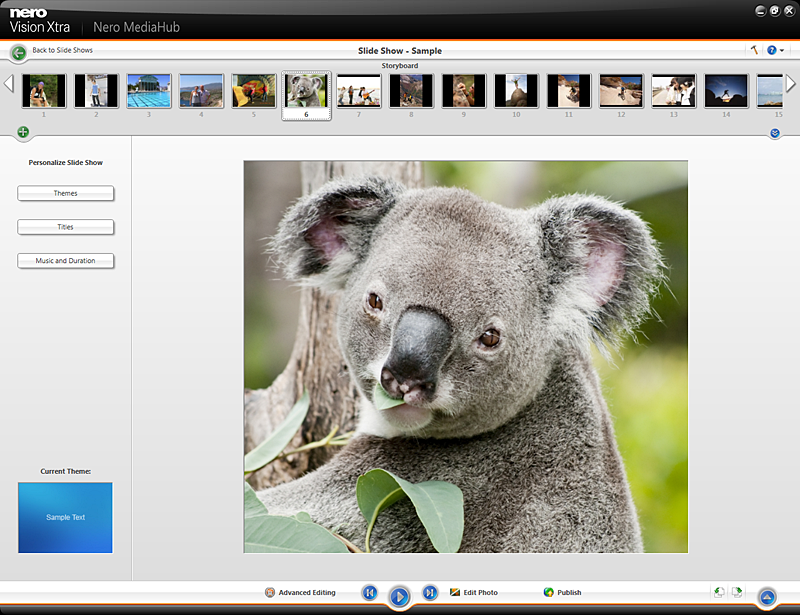
  • Playback of slideshows
  • Adding or removing images from slideshows
  • Importing of slideshows to hard disk
  • Option to add original slide show pictures to the disc
  • Improved SmartEncoding for audio/video
  • Support of VBR encoded MP3 files for video editing
  • Support for MP3 files with image
  • HDV capturing support
  • Support for DVD camcorder media (8 cm)
  • Full support of Dolby® Digital 5.1 audio
  • Support for DVD-R Dual Layer media type*
  • Support for DVD-Video, SVCD, VCD, DVD+VR, DVD-VR
  • Support (import/editing) of DVD−VR on DVD−RW/DVD−RAM
  • Support (import/editing) of DVD-VFR/video mode on DVD-RW/DVD-RAM
  • Support (import/editing) of DVD+VR on DVD+R / DVD+RW
  • Support for Quarter D1 NTSC

License Details:

Part of the Nero Ultra Edition bundle

Revision History:

Version 6.4.9.0
  • Release Date: Jun 3, 2009
  • New Features:
    • Import your PowerPoint® presentations and convert to DVD-Video or BD for TV playback (requires installed Microsoft Office PowerPoint® 2003 or 2007)
    • Archive HD movies in highest quality AVCHD format to HDD including USB stick and flash memory card, SD Card and
    • Memory Stick(TM), even without the use of an optical recorder
  • Changes/Bugfixes:
    • After exporting files from Nero Vision, it is possible to return to the original file.
    • Text effects in Nero Vision work properly after using the "static" effect.
    • Support for *.m2v files added to Nero Vision.
    • Nero Vision supports previous version project files.
    • .wmf files are displayed correctly in preview window.
    • Nero Vision no longer prompts for DTS Plug-in when adding *.m2ts file with both Dolby and DTS audio tracks.
    • All *.mov files play back with audio in the preview screen.
    • The text effect "Space Scroller" no longer inserts white squares when line breaks are in the text.
    • Temporary files are removed automatically after burning to disc or to Image Recorder.
    • Smart3D menus play back correctly on DVD+VR.
    • Eliminated "runtime error" when burning large AVCHD projects.
View complete revision history

Downloads:

Download: Download Trial Version Title: Download Trial Version
Link: Download

Description: Download a trial version of Nero Vision (part of the Nero 7 Bundle)


Related Articles:

Read Article: Using NeroVision Express - Making a DVD with Menus Title: Using NeroVision Express - Making a DVD with Menus
Link: Read Article   Editor's Pick  

Description: Basic guide on creating a DVD from various types of video files.


Read Article: Nero Vision 5 DVD Authoring Guide Title: Nero Vision 5 DVD Authoring Guide
Link: Read Article   Editor's Pick  

Description: A guide on how to use Nero Vision 5 to create your own DVD, complete with menus


Read Article: Nero Vision 5 AVCHD Authoring Guide Title: Nero Vision 5 AVCHD Authoring Guide
Link: Read Article   Editor's Pick  

Description: A guide on how to use Nero Vision 5 to create your own AVCHD, complete with menus


Read Article: Archive: Nero Vision 4 DVD Authoring Guide Title: Archive: Nero Vision 4 DVD Authoring Guide
Link: Read Article

Description: A guide on how to use Nero Vision 4 to create your own DVD, complete with menus


User Rating:

  Average Rating: Your Rating:
Registered Users: (3 votes)
Non-Registered Users: (13 votes)

User Comments:

Sorry, but you must be logged in to use this feature.

Please note that the forum has a separate login/registration system. You will need to sign up and login to the forum separately.

Username:
Password:
Remember Login?
 

Don't have an account? Sign up here
Lost your login/password?
Top Deals
Features

H.264 Zone: H.264 news, articles and downloads


High Definition DVD Zone: Blu-ray/HD DVD news, articles and downloads


Software Submissions