Software - > Magix Movie Edit Pro

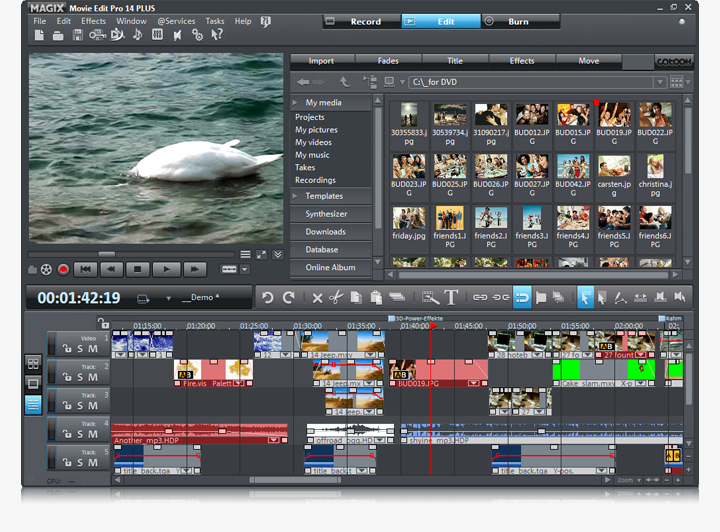
Screenshot
Enlarge Image Enlarge Image: Screenshot

Downloads


Join Our Newsletter
Title: Magix Movie Edit Pro
Author/Publisher: Magix
Ease of use: Not Rated
Latest Version: 15 (details)
OS Support: Windows XP Windows Vista
License: Commercial, $USD89.99
Date Added: Mar 12, 2008
Last Updated: May 8, 2009
Page Viewed: 9002 times

  Email Updates
email me whenever this software gets updated

Send to Friend   Send to Friend

User Rating:

Details / Vote Now / Post Your Comments

Summary Links Images Ratings History Tools

Related Forum Threads:

Loading

Downloads:

Download: Official Download Page Title: Official Download Page
Link: Download

Description: Find out more information about Magix Movie Edit Pro, and download a trial version from the official site


Description:

Experience the new standard for perfect video editing: MAGIX Movie Edit Pro 14 PLUS. The 65-time award winner** convinces not only with its high-quality edit functions and a excellent dubbing, but also with countless special effects and many new improvements that will excite you!

Features:
  • NEW! Up to 99 tracks for freely arranging video, audio, photos, and text
  • IMPROVED! Current HD camcorder support Complete HDV support from recording to burning onto HD discs
  • NEW! Surround Sound settings with Dolby Digital 5.1 creator (fee-based plug-in required)
  • NEW! 3D design for perspective-based arrangement and 3D scrolling text
  • NEW! Screen capture: Save Internet movies, etc. directly to hard disk from your screen
  • MAGIX Music Editor for detailed sound optimization and editing
  • NEW! Advanced DVD menu design (freely editable background)
  • NEW! Ambient Synth 2.0 with thematic video soundsets
  • NEW! Audio Mastering Suite 2.0 for audio editing at the highest level
  • NEW! Seamless proDAD Vitascene embedding
  • NEW! Publish image sequences as animated graphics for the Internet (animated GIF export)
  • Burn HD DVD-ready recordings in HD DVD format to inexpensive blank DVD discs
  • NEW! Templates for professional-looking picture-in-picture animations (e.g. for opening credits)
  • NEW! Burn videos on high-resolution Blu-ray discs with menus
  • NEW! Publish disc projects as an ISO image for repeated burning, burning with other software, and PC playback
  • NEW! Freely configurable keyboard shortcuts with the Shortcut Editor
  • MAGIX Xtreme Photo Designer 6: Design your own backgrounds, menus, and much more
  • BONUS! Reallusion iClone 2 SE: Brand new 3D animation software for virtual scenes

Categories:

Supported File Formats:

Input Files: AVI, DV, MOV, MP4, MPG, WMV
Output Files: AVI, DV, MOV, MP4, MPG, RM/RMVB, WMV

Revision History:

Version 15
  • Release Date: May 8, 2009
  • Multicam editing (for 2 cameras) Perfectly synchronize recordings from 2 different cameras
  • Animated menus for Blu-ray Discs™ Created professionally animated menus for Blu-ray Disc™
  • 3D presets for realistic 3D title effects Over 100 templates for top-quality three-dimensional effects
  • Easy color correction (color wheel) Conveniently adjust the color of your recordings with just a click
  • Native AVCHD editing Import & edit AVCHD recordings without recalculation
  • Supports Flip Mino and Flip MinoHD ("Flip HD") Import, edit, dub and burn recordings from your Flip Video Camcorder
  • Simplified effects control All video effects have been concentrated centrally and clearly laid-out in the new Media Pool
  • Flexible user interface All user interface elements can be adjusted and moved individually
  • Quick navigation via shortcuts Navigate at lightning speed with the help of keyboard shortcuts like J, K, and L through your project
  • Batch conversion (for complete folders) Convert entire folders containing videos into any format you like
  • Many new DVD menu templates(also for Blu-ray Discs™) Choose from many professionally designed menu templates for DVDs and Blu-ray Discs™
View complete revision history

User Rating:

  Average Rating: Your Rating:
Registered Users:
Non-Registered Users: (3 votes)

User Comments:

it is beutifulle
Posted by: belkhir789, 20:44:23, Apr 3, 2008


isiank you
Posted by: muhammed21977, 15:01:19, May 4, 2008


i havent try'd how can i comment abou'it
Posted by: Lendaz86, 13:02:51, Nov 24, 2008


Sorry, but you must be logged in to use this feature.

Please note that the forum has a separate login/registration system. You will need to sign up and login to the forum separately.

Username:
Password:
Remember Login?
 

Don't have an account? Sign up here
Lost your login/password?
Top 10
Features

High Definition DVD Zone: Blu-ray/HD DVD news, articles and downloads


Software Submissions