Dream Machine

September 19th, 2007

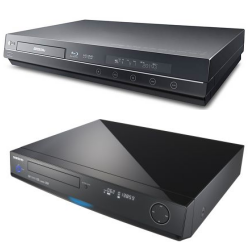
Lately, I’ve been dreaming about the perfect hardware video player. Currently, I have a Momitsu V880N upscaling DVD/networked video player. I like this machine because it allows networked DivX/XviD playback, as well as DVD upscaling up to 1080i. I know that eventually, I will have to replace it with probably a dual-format (Blu-ray/HD DVD) HD player, but looking at the current selection, none of them really gives me exactly what I want.

LG and Samsung’s dual-format HD playersThe early dual-format offerings by Samsung and LG looks pretty good, but neither offers networked DivX/XviD playback (although I could probably do without it since I’ve connected my PC to the TV and I’ve been using it more and more). I’m also concerned about their region-free status when it comes to playing DVDs – region-free DVD is perfectly legal here in Australia.

So anyway, here’s a wishlist of what I want in terms of my next video player (some obvious ones, such as HDMI, has been left out since these features are not optional). It’s unlikely a player will ever have all of these features, but one can dream …

  • DVD/video upscaling using Silicon Optix’s Reon VX chip
  • Region-free DVD playback
  • Blu-ray (profile 2.0) and HD DVD playback
  • DivX/XviD playback
  • H.264 and VC-1 (WMV) playback
  • Networked video playback through wired ethernet or wireless
  • 1080p/24 output
  • 50, 60, 72/96/120 Hz output for video playback

If such a machine does eventually exist, it will come pretty close to being a media center PC, so perhaps going down the PC route might be the most realistic.

HD DVD Combos, stop the Wii comparisons and HD-VMD

September 14th, 2007

HD DVD Combos

HD DVD & DVD Combo Discs

During the unfortunately short lived Amazon “Buy 2 HD DVD/Blu-ray movies, get the 3rd free” promotion, I purchased 3 HD DVD movies (300, The Departed and Happy Feet … with the discount, it was even cheaper than buying the DVD versions of these movies locally). What made me want to buy the US version of these discs (remember, HD DVD is region-free, so any disc sold will play anywhere, unlike Blu-ray) is that they are all combo discs – HD DVD on one side, DVD on the other. These are not available here in Australia, so I was interested in getting my hands on one of these discs and see what it was like. I did run into a problem with the Happy Feet HD DVD side, in that it would not play in my Xbox 360 HD DVD player, but it was easily solved by using tissue paper to clean the disc (it looked slightly oily to me). Anyway, the DVD side worked fine and the single disc widescreen DVD versions of these films were present (300 and The Departed were without extra features, but Happy Feet had the same set of features as the HD DVD side).

But I can’t help but feel it’s all a bit gimmicky, and that do I really need the DVD version of the film? If I were to, say, travel and want to play the movie on my notebook (which only has a DVD drive), I suppose this could be handy. But I suspect the HD DVD side won’t like the wear and tear associated with flipping the disc over and having fingerprint smudges all over the place as the disc is being handled. Buying the HD DVD only version, and then getting the DVD version when it goes on sale seems to make more sense to me. Or if they made a 2 disc set, one disc is the HD DVD version and the other is the DVD version, then I could go for it (assuming they keep it at the same price). Or if the studios were really keen on promoting HD DVD, then they can forgo the DVD version of the film at release, and then only issue the HD DVD combo version for the first few weeks (they would have to lower the price to at least be competitive with other DVD new release titles). This would (albeit, artificially) lift the sale of HD DVDs, but I think it’s good for the consumer too (again, assuming the price is right), because they would have a HD DVD verison of the film ready to watch when they go down the HD route in the future, and all without spending any extra money.

In any case, Warner are re-issuing all their combos as HD DVD only versions now, and with the associated price drop too. The extra price that is put on these combos means that Blu-ray movies appear to be cheaper, and that can’t help the HD DVD camp.

My Wii is bigger than your Xbox
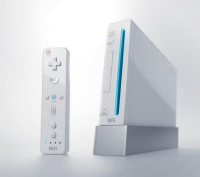
Nintendo Wii: Don't compare it with the Xbox 360 I’m sick and tired of hearing people comparing Wii and Xbox 360/PS3 sale figures. Let me first say that I own a Wii and a Xbox 360, and I’m looking at buying a PS3, so I’m not biased towards any of the consoles (well maybe slightly biased against the PS3). While it is true that all 3 consoles are so called “next-gen” systems, to put the Wii in the same bracket as the Xbox 360/PS3 is ridiculous. The Wii is aimed at an entirely different gaming demographic, and the games released on it demonstrate this fact. Hardcore gamers are not likely to be captivated by the graphics and gameplay of the Wii. Plus, the Wii is selling at an entirely different price range, although the Xbox 360 Core package is starting to compete at the same price range. Comparing the Xbox 360 to the PS3 is fair (even though the PS3 is priced much higher), since both consoles attempt to do pretty much the same things. Comparing the Wii to either of the other consoles is like comparing a VW Beetle to a Hummer … I’m sure one sells a lot better than the other too.

HD-VMD
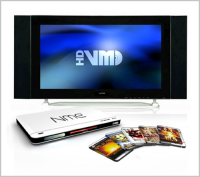
HD-VMDJust like the world needs another blog like this one, the world also needs another HD format. Seriously, “**** off” is  what I say to the marketing people who thought another HD format would be a great idea. Do they really think people will buy yet another HD media player? Do they really think that the major studios, all of them have already backed HD DVD or Blu-ray (or both), will back yet another media format? (so far, HD-VMD’s content providers include VCL, Lazy Town, Eros Entertainment and Channel Nine here in Australia … not exactly the big names in movies)

Back when DVDs first came onto the scene, there were tons of other competing formats, some still based on CD technology. All of them failed, badly, and rightly so. I just can’t see any other outcome other than total failure for HD-VMD, or any other new HD media formats, especially when neither HD DVD nor Blu-ray, even with all their financial muscle and studio support, can be considered much of a success.

New blog, some TV buying tips

September 12th, 2007

Some of you may already know about my original blog, The Perfect Pitch, which covered anything from Arsenal Football Club to plasma TVs. It was a bit confusing to be honest, and so I’ve decided to separate the football stuff from the non football stuff … and all the non football stuff are now here, in this new blog. All the non football blog entries from TPP are now here too.

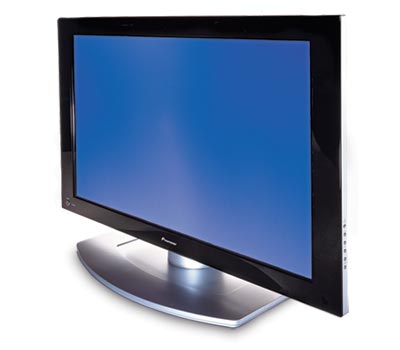
Choosing a new TV is hard workTo start off, I want to talk about some TV buying tips. The questions of buying a new LCD or plasma has come up quite a few times on the forum recently, so I thought I would collect all my thoughts in this blog post.

I’m not going to go into another LCD vs Plasma debate simply because it’s getting quite boring, and that I’ve already covered it in a previous blog entry. Instead, I’ll list some of the features that you should be looking at:

  1. HDMI Inputs – regardless of what you feel about this massively copy protected connection system, it is here to stay and it’s going to get more popular. The Xbox 360, PS3, Blu-ray/HD DVD players, DVD recorders, DVD upscalers, HDTV boxes and pretty much every digital video device will be using them. You need to make sure the TV has as many of these as possible, otherwise you may need to invest in a HDMI receiver or switcher (both are quite expensive, although this HDMI switcher from Joytech is quite affordable). HDMI also have version numbers, the latest (at the time of this post) is version 1.3a. You should aim to get the latest version, but in all honest truths, it probably won’t matter much to you unless you need pass-thru support for the latest Dolby/DTS audio formats (if your player can decode them, then you won’t even need the pass-thru support).
  2. Resolution – I would say the time is now right to start thinking about buying 1080p displays. Not just displays that can accept 1080p input, but displays with native resolution of 1920×1080. It might not matter much to smaller screens (say less than 42/46″), but people do notice a difference even on 32″ displays. Of course, if you plan on doing PC work on the display, then having a higher resolution is essential. Also look for displays that can do 1080p/24. These displays can refresh at 72/120Hz to avoid the need for 3:2 pulldown on film content – in other words, it will display Blu-ray/HD DVD without the judder effect, to give you full flowing motion just like in the cinemas.
  3. PC Input – There is a very good chance that you will want to connect your PC to your new TV, especially if you are running a HTPC setup. So it’s essential that your TV has PC input. While HDMI can be used (with a DVI -> HDMI cable), but it’s not really great for PC input because unless the TV accepts PC resolutions/refresh through the HDMI input, you’ll be limited to 720p/1080i/p, which is not ideal for things like games (that usually only support PC resolutions such as 1024×768). If the TV has a dedicated VGA or DVI input, then that’s good (for the DVI input, check to make sure it supports HDCP copy protection), as it usually means PC resolutions are supported (but check the manual to make sure). The common resolutions that it will hopefully support should be 1024×768, 1280×768, 1280×720, 1600×1200, 1920×1080. The refresh rate is also important, and it should support 50/60/72/75/100/120 Hz if possible.
  4. Other issues – If you own an Xbox 360, and you are in a PAL territory, then you will also need the TV do support PAL-60 mode, basically PAL at 60 Hz. This is because Xbox 360 games are sometimes 60 Hz only games (actually I think the majority are PAL-60), and if your TV does not support PAL-60, you won’t be able to play these games. It’s one of those things people often don’t think about, but you may be surprised at how many TVs do not support PAL-60 (but mostly older ones though). You should also check to see (in the store) if the TV displays non HD content well or not … some HD displays only display HD content well, but SD content looks quite bad and blurry. It’s to do with the internal scaler, and some TVs have better scalers than others.

So there you have it, some tips to help you find the perfect TV. Of course, one that matches all the above criteria might cost quite a bit more than the cheapest one available, but I think it’s worth it. If the thing is going to cost $1,500 or something, you might as well spend an extra $500 to get the best.

Happy Shopping!

BD/HD on PCs – Why it’s not taking off

July 2nd, 2007

In my previous blog, I talked about a possible end scenario for the HD wars, albeit a fairly optimistic one. In this blog entry, I will look more at the present.

Neither Blu-ray or HD DVD has much of a foothold on the PC market as yet. This is not surprising when the cheapest HD DVD reader drive is actually an Xbox 360 accessory, and when the cheapest writer drive is, well, anything but cheap. And don’t get get me started on blank media – $18 for 25 GB works out to be about $0.72 per GB, 3 times more than DVD media (and an expensive brand of DVD media at that).

I have to say that HD DVD might have an advantage here, because their single layer media has less capacity than Blu-ray’s (as strange as this argument might seem). 15 GB, 30 GB and 45 GB seems like sensible sizes for storage media to me, the smaller size of the single layer media making things a bit more flexible, and seem like a more natural increment going from DVD storage to HD storage. 25 GB, 50 GB and 75 GB just seem a tad too big for my liking, and the prices will reflect that as well. Backups aside, I think I will find it very difficult to even find 50 GB worth of stuff to fit onto a single disc, let alone find the will to fork out $35 for the pleasure (not when, for double this amount, I can buy myself a 250 GB HDD). I’m also weary of putting so much stuff onto a single disc – if it gets damaged, rots or goes missing, losing 25 GB worth of stuff just because your dog has found a new chew toy will be a disaster. But being able to carry around 75 GB worth of stuff in a single disc is tempting I have to say, something that HD DVD will struggle to achieve unless it produces a 5-layer media …

CDs and DVDs all came out with reader-only (ROM) drives for the PC market long before writer drives took over (and many like me still have both ROM and writer drive on the same PC, to enable easier disc to disc copying). The writer drive delay was necessary from a technical point of view because writer drives and media were developed much later, but also made sense from a marketing point of view in that reader drives costs less and can be a good way to introduce people to the new media format. Sony’s strategy seems to skip the ROM drive altogether, and skip straight to writer drives. This could work to strengthen their grip on the format wars, or it could backfire and make the prices of these drives so high, that nobody is looking at them seriously. HD DVD writer drives are still rare, but it’s no surprise that the Xbox 360’s HD DVD reader drive is selling well, and many use it as a PC reader drive too. For me at least, I’m happy with my DVD writer/external HDD combo, but I would like a cheap BD/HD ROM drive to play with for the time being.

Tech savvy people will also want dual format readers, because future proofing is important, and nobody wants a piece of hardware that is useless in 3 years time, and certainly not two reader drives in the same PC.

To get me (a fairly early adopter of these kind of things) to buy a BD/HD drive for my computer, I think at the very least, these criteria have to be met first:

  • Has to at least read both BD/HD formats
  • Has to be able to write to all kinds of DVD media
  • Under $200 for a BD/HD writer drive, $100 for a BD/HD read-only drive
  • If buying a BD/HD writer drive, 15 GB HD media to drop below $4, 25 GB BD media drops to below $6

I say companies like Lite-on should forget about BD/HD writer drives for now and concentrate on dual format reader + DVD writer drive combos – if the cost is only slightly higher than standard DVD writers, I can definitely see people opting for these drives in their next computers instead, which would be a victory for both HD formats.

The High Definition DVD War: The Final Chapter

June 20th, 2007

Sony vs Toshiba. Blu-ray vs HD DVD. The war has really just started, and like a lot of other people, I’m already sick and tired of it. One side declares victory, the other produces stats to counter than, and then declares victory themselves … and it continues.

In this blog entry, I’ll peer into my crystal ball to try and predict what the final outcome might be for this format war. It will probably be totally wrong, but what the hell!

So the year is 2010. DVDs are still selling in large numbers, but more and more people are choosing HD over SD. Standard definition TVs are no longer available in the shops either, replaced by affordable high definition sets from China. Still no flying cars …

So who won? Blu-ray or HD DVD? Well, I’m sad to say that nobody has won. If you go into the store that you usually buy your movies from, you’ll see Blu-ray and HD DVDs sitting side by side – a quick glance and you see that for every Blu-ray movie, a HD DVD version is available, and vice versa. A quick look at the back of the movie container shows that they have identical features too. Sure, the prices differ a little, but for all practical purposes, both formats are the same. Most of the studios have gone dual format, except for the obvious ones (Sony owned MGM, Sony Pictures, Columbia/Tristar titles).

The same store also sells electronic equipment, so you decide to check out a new high definition DVD player. Sony has a Blu-ray player on sale, and so does Toshiba with a HD DVD player, but for a little bit more money, you can grab an LG or Samsung dual format player that plays both Blu-ray and HD DVD – you quietly wonder why Sony and Toshiba, or any other company for that matter, are still selling single-format players, when almost everyone has a dual-format player these days. But one thing is for sure, the competition between Sony and Toshiba has meant that high def players are as cheap as DVD players were way back in 2007. For a while, there were dual-format discs (both Blu-ray and HD DVD versions of the same movie in one package), but since people started buying combo-players, these have been getting rarer and rarer.

Dual format players, like this LG, on sale for $99 in the year 2010

You buy some HD DVD and Blu-ray movies – $9.99 for The Bourne Betrayal on HD DVD and $10.99 for Spider-man 5 on Blu-ray was too good an offer to turn down. You get home and you decide that you want to make a copy of the movie for your iPod, so you insert the disc into your computer’s dual-format reader/writer drive (writes both BD and HD write-once/rewritable discs at 16x/8x speed). No need to break copy protection or to go online to download a copy – the AACS Copy Manager software that comes with each disc allows you to easily make a iPod compatible copy that, while it has your computer ID recorded into the file just in case you decide to upload it illegally online, but basically is without DRM and playable on all sorts of devices. Sometimes the disc even come with pre-made iPod/H.264 versions of the movie, so it’s only a matter of running an authentication program to ensure you have a legal copy and to tag the file with your computer ID, just in case. The AACS Copy Manager also allows you to copy the movie to your Windows Home Server, so you can play the movie from any one of your connected computers/media centers – you might have to pop the original disc back in to authenticate your license from time to time though (after every 5 viewings).

AACS Copy Manager: allows you to make copies of your HD movies

There is talk of a new higher definition format coming soon … 5 different groups are all presenting their format as the next best things, looks like another war is about to start just as this one is ending…


About Digital Digest | Help | Privacy | Submissions | Sitemap

© Copyright 1999-2012 Digital Digest. Duplication of links or content is strictly prohibited.