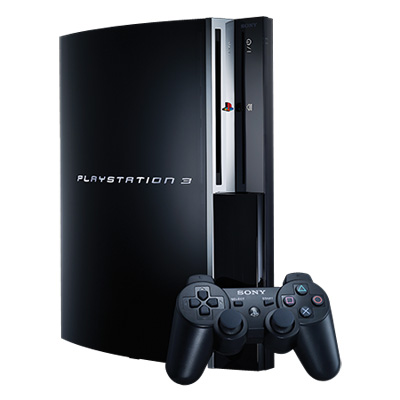
 As promised, this blog post will talk a little about my experience with buying the PS3, setting it all up, and the experience of my first week of using it. Regular readers will know that I already own a Wii and a 360, so gaming wise, I’m pretty covered already. Therefore, my main purpose for the PS3 remain video playback, in particular, Blu-ray playback. Before this, I was format neutral in spirit, but HD DVD only in practice. Getting a Blu-ray player, and the PS3 being one of the cheaper ones (despite being one of the best players, certainly the most upgradable and future proof), was therefore the next logical step.
I live in Australia. Melbourne to be exact. And even though the Australian dollar is at an all time high (or thereabouts), our PS3s are still overpriced – we pay dearly to subsidized people in the US, it seems. Before I buy anything, I always do a quick search online to see if there are any bargains to pick up. I stumbled upon DTV Forum Australia, a forum I have visited on and off in the past. There was a thread in there about PS3 bargains, and from the thread I found an offer for a standard PS3 40 GB with wireless controller, plus the Sony Blu-ray remote and a redemption offer for 3 Blu-ray movies (Casino Royale, Ghost Rider and Spider-Man 3), all for $11 less then the recommended retail price (RRP is $699, or $USD 620 – I told you our PS3 was overpriced). This was the best deal I could find, and so I decided to go shopping.
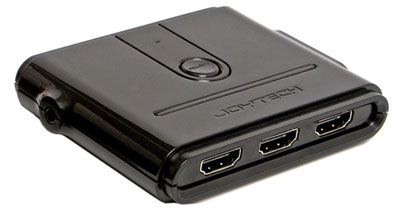
 But before I went, I decided to make a list of the things I will need to get the PS3 Blu-ray up and running (I don’t like pen and paper, so a mental list it was). The first is an HDMI cable, which the PS3 package does not include unfortunately – even the component cable is sold separately, which is a bit cheap on Sony’s part I might say, especially when we’re paying $220 more than our US counterparts). But since the single HDMI connector on my TV was already being used, and my AV receiver does not support HDMI, the only solution is to get a HDMI switch. I decided on the Joytech HDMI TriLink. And this of course meant getting a second HDMI cable. And unlike the US package, our PS3 package does not include a movie in the box, so I will have to get a Blu-ray movie to test the damn thing, since I did not want to wait 6 to 8 weeks for my free movies to arrive. And I almost forgot that I also needed an Ethernet cable, since the PS3 doesn’t include one of these either (but to be fair, it does include wireless network support). And I really did forget that I also needed an optical audio cable, but luckily I added it to my mental list before I set off to do the shopping. The PS3 might be a cheap-ish Blu-ray player (by our standards), but the needed accessories makes it not so cheap after all.
Buying the PS3 went somewhat smoothly. The hardest part was getting the huge box to the car, which was parked some distance away. The Xbox 360 box was large, but manageable. This PS3 box was much bigger than I had expected, and much heavier too. While the salesman was himself struggling to get the box from the back of the store to me, I had a look at the “Buy 2 get 1 free” offer they had for Blu-ray movies. In Australia, our Blu-ray and HD DVD movie prices are outrageous as well – usually $USD 35 per movie ($30 if you’re lucky). The movies in the B2G1F stand was even more outrageously priced, at $USD 45 per movie. No thanks. I will have to go to another store to get my Blu-ray movie, which I had to go to anyway for the other accessories.
So to the other store I went, and my credit card was taking a pounding by this point. And remembering a mental list when you’re carrying 5 KG boxes the size of a small car is not recommended – at one point, I had to go back to the same store twice because I had forgotten to get a few things, the second time I almost forgot another item (the optical cable again). For the record, I purchased Rocky Balboa on Blu-ray because I was interested in its AVC H.264 encoding, and also because I haven’t seen the movie before. Here’s the list of damages at the end of the day (in Australian dollars):
 PS3 – $688
Rocky Balboa Blu-ray: $40
Joytech TriLink: $60
2 x HDMI cables: $60
1 x Ethernet cable: $10
1 x Toslink cable: $20
So all together, that’s $878, which translates to nearly $USD 780. If I was in the US, the whole package probably won’t cost me more than $500, $550 at most. Oh well.
The wallet bashing was over, time to get home and set it up. It wasn’t too hard, to be honest, other than the fact that I have far too many cables already going everywhere, and having more cables did not help. The PS3 setup was pretty easy, setup the HDMI output, set up the optical audio and that’s it. What took a long time was inputting the usernames, sign up details and downloading the updates, but all the consoles are like that these days.
For the past week, I’ve been testing the PS3’s video playback functions, mainly to help me write the PS3 H.264 Conversion Guide (which I’ve updated today to add instructions on how to get AC3 5.1 audio tracks, with some trickery involving MKV to VOB conversion). I’m very impressed with both Blu-ray and the upscaled DVD playback, and if not for the fact that the PS3 is not region free for either of these formats (DVD in particular), I would make it my primary disc player. But as such, my existing region-free upscaling DVD player will still have to occupy a space on the home theatre rack. In between video tests, I’ve been running the Folding@Home software to help contribute some work units to our team.
My TV (Pioneer PDP-504) has what Pioneer calls PureCinema Advanced, which is just 3:3 pulldown (24 FPS -> 72 Hz) for smooth film playback. For whatever reason, I can’t get it to work over component without glitches, but over HDMI, it works a treat. Watching a Blu-ray movie with this option turned on is really fantastic – smooth pans that you don’t see with 3:2 pulldown. I know some people hate PAL speedup, but I find it much more acceptable than 3:2 judder. Now I’ll have to go about upgrading my Xbox 360 to a HDMI capable (and quieter) model, to make HD DVD viewing just as nice.
 The next thing I want to try is to make my own AVCHD disc to play on the PS3. AVCHD is basically a mini-Blu-ray, supporting H.264 video and AC3 audio. Nero Vision supports making these types of discs, but there’s still a couple of things I need to figure out. If/When I do, I’ll write a guide for it.
So that’s my first week with the PS3. I’ve done some work, enjoyed some movies and helped out a good cause by donating the free processing power, so all in all, it’s been a good week. PS3 for upscaled DVD and Blu-ray playback is highly recommended.


 Home
Home