|
|
Main Categories: AVI (DivX, XviD ...), DVD Conversion, DVD/SVCD/VCD (MPEG-1/2), MPEG-4 (ASF/WMV, QuickTime, Real, VC-1, H.264 ...)
Sub Categories:
- AVI To Other Format Conversion -> AVI to MPEG-4 (AVC, H.264) Conversion
- DVD Conversion -> DVD To MPEG-4 (AVC/H.264) Conversion
- Portable/Handheld (iPod, PSP, Zune, iPhone ...)
- Video Encoders -> MPEG-4 (DivX, XviD, WMV, QuickTime, AVC, VC-1, H.264 ...) Encoders
Input Files: AVI, DVD, MPG
Output Files: AVI, MP4
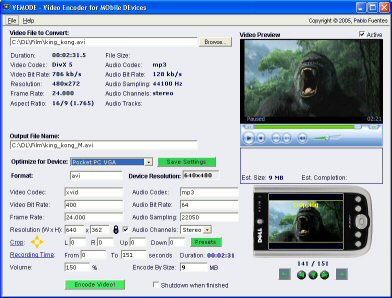
VEMoDe is a free program that gives you a quick and easy way to turn your videos and movies into portable videos. It will convert from many formats and includes settings for several mobile devices.
Features:
- Easy to use interface. Just pick your file and go!
- Very fast, high quality encoder (using FFmpeg)
- Existing settings for several popular devices (PSP, iPod, Palm, Pocket PC, Zodiac, Treo, GP2X), plus you can create settings for other devices.
- Support for optional subtitles
- "Encode by Size" to get the most quality for your memory cards.
- "Split by Size" to maximize quality and portability
- Easy to configure encoding options.
- Cropping options to get the best screen usage.
- Select the start and end positions to remove those long credits.
- Batch Processing and Auto-shutdown for overnight encoding.

- It's free!
Version 1.2b
- Release Date: Jan 23, 2008
- Added iPhone and iPod Touch support
- Added Audio Sync adjustments
- Added Progress display of Recording Speed and Elapsed Time
- Added AVC / H.264 video codec support
- Improved support for multiple audio streams in DVD and videos
- Improved support for a few input codecs
- Fixed iPod Video skipping issues
- Fixed issue with some Input File Names
- Fixed detection of some input video codecs
- Fixed some UI bugs
- Fixed issues on Windows 95/98
View complete revision history
 |
Title: Official Download Page
Link: Download
Description: Download VEMoDe from the official site
|
|
|
| |
Average Rating: |
Your Rating: |
| Registered Users: |
         (2 votes) |
|
| Non-Registered Users: |
         (7 votes) |
Sorry, but you must be logged in to use this feature. Please note that the forum has a separate login/registration system. You will need to sign up and login to the forum separately.
|
|
|
 |
|