|
Easily convert your DVD's, DVB captures and many more formats into MPEG-4 like DivX, XviD and x264
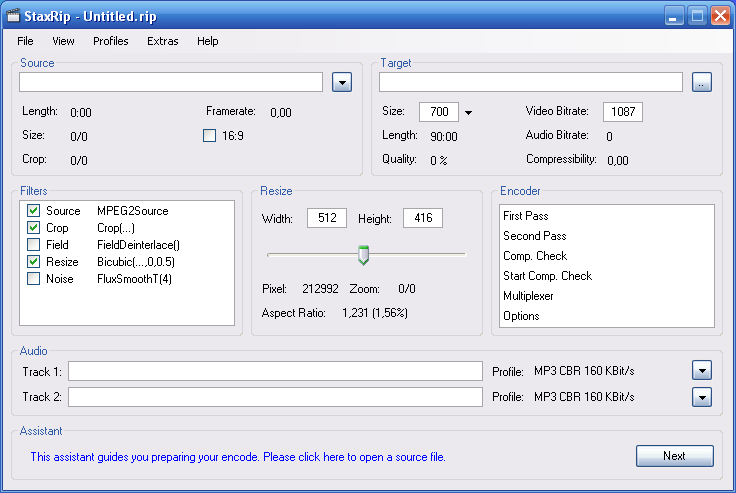
Main Screen |
With StaxRip you can easily convert your DVD's, DVB captures and many more formats into MPEG-4 like DivX, XviD and x264. As a open source application StaxRip is completely free.
Features:
- No spyware, adware or any other form of malware.
- Open Source, Freeware.
- No registry bloat, settings are saved in files within the application's directory or within the user directory. No lost settings after a fresh windows installation.
- No awkward setup/installer, no system changes, system bloat and trash.
- Easy to use and highly versatile and customizable.
- Reasonable default values for filters, codecs etc.
- Rich help system including, online help (assistant), context sensitive help and forum support.
- Rich and convenient cutting facilities e.g. to remove ads.
- Batch processing (jobs).
- Rich feature set to manage, integrate and download required third party application transparently instead of awkward or dangerous codec packs or application packs.
- AviSynth powered to achieve excelent video quality and support of almost any source format.
- Rapid development using the latest and greatest technology .NET Framework 2.0
- Reportet bugs get fixed quickly, often a new version is available on the same day!
- Many feature requests get incorporated very quickly.
Main Categories: AVI (DivX, Xvid ...), DVB (Digital TV, HDTV, Satellite), DVD Conversion, DVD/SVCD/VCD (MPEG-1/2), MPEG-4 (ASF/WMV, QuickTime, Real, VC-1, H.264 ...)
Sub Categories:
- DVB (DTV, HDTV, Satellite) To Other Format Conversion -> DVB To AVI (DivX, XviD ...) Conversion
- DVB (DTV, HDTV, Satellite) To Other Format Conversion -> DVB To MPEG-4 (AVC/H.264) Conversion
- DVD Conversion -> DVD To AVI (DivX, XviD ...) Conversion
- DVD Conversion -> DVD To MPEG-4 (AVC/H.264) Conversion
- MKV Files
- Video Encoders -> MPEG-4 (DivX, XviD, WMV, QuickTime, AVC, VC-1, H.264 ...) Encoders
Input Files: DVB, DVD, MPG
Output Files: AAC, AC3, AVI, DivX, H.264, MKV, MP3, MP4, OGG/OGM, Xvid
Windows 2000/Windows XP
 H.264 Encoding using StaxRip H.264 Encoding using StaxRip 
Description: A guide on how to use StaxRip to encode video, with an emphasis on the H.264 format using a DVD to H.264 conversion as an example
|
|
|
x264 Options Explained 
Description: This article explains the encoding options found in x264 (as seen through the eyes of StaxRip), with hints and tips about which settings to use
|
|
|
Version 2.2.0
- Release Date: Mar 27, 2021
- Download(s):
-
- Might break settings from previous version, so starting with new settings is recommended
- Might break templates and jobs from previous version
- Changed menus from previous versions that need a menu reset, manual setting or global settings reset in order to see them
- Start of new versioning (no beta versions anymore, but stripped DEV versions)
- Check for updates updated to support new versioning (Dendraspis)
- Fix re-calculation of video bitrate on multi-pass encode and audio encodes (Dendraspis, #580
- New projects use Copy/Mux as audio profile (Dendraspis)
- Fix misleading audio stream delay detection (Dendraspis)
- Demuxing of video and chapters is set via Options window instead of Preprocessing (Dendraspis)
- Add option to demux subtitles without including them (Dendraspis, #622
- Make Checkboxes grow and shrink with UIScaleFactor (Dendraspis)
- Fix menu button graphics issue (Dendraspis, #623)
- New Check for updates dialog (Dendraspis)
- Extended Settings Directory Location Selection at first run from new folder (Dendraspis)
- Fix crash on app version editing (Dendraspis, #628)
- MTN Thumbnailer description adjusted (JJKylee)
- Fixed 'Reset Setting' feature in the Advanced menu (stax76)
- New task dialog with color theme support (stax76)
- Clicking an option in the video encoder command line preview navigates directly to the UI control (stax76, #617)
- New font picking task dialog to choose the console font (stax76)
- DetailSharpen VapourSynth filter profile added (JJKylee, #624)
- JPSDR 3.2.5 (Clang W7 AVX version)
- SangNom2 v0.6.0
- x265 3.5+9+14-6c69ed37d [Mod by Patman]
View complete revision history
|

|
Rate this software:
Your Rating:
You have not voted yet!
Average: 3.85/5
Total Ratings: 36
|

 Home
Home


 StaxRip-v2.2.0-x64.7z