Digital Digest -> Software ->

GOM Video Converter

GOM Video Converter is a video conversion software that enables you to convert and watch your videos on your iPods, PSPs, MP3 Players, Cell phones, Game Consoles and in other various devices
Author/Publisher:
Language: English
Ease of use: Not Rated
Latest Version: 1.1.0.54 (details)
OS Support: Windows XP Windows Vista
License: Commercial, $USD34.95
Last Updated:
Page Viewed: 9141 times

Links:

Download: Download Trial Version   Download Trial Version

Description:Download a trial version of GOM Encoder from the official site


Screenshots & Images:

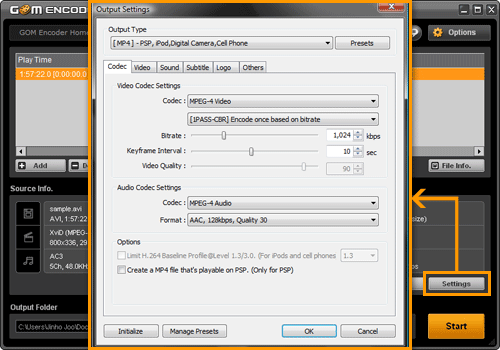
Screenshot

Description:

GOM Video Converter is a video conversion software that enables you to convert and watch your videos on your iPods, PSPs, MP3 Players, Cell phones, Game Consoles and in other various devices.

You can convert all the video files that are playable with GOM Player to MKV, AVI, MP4, FLV, WMV/ASF, OGM, 3GP, MP3 files and more.

You can enjoy your converted videos anywhere and anytime with your Cell Phones, MP3 Players, iPods, PSP/PS3s, PMPs, GPS and other various multimedia devices.

Features:

  • All the videos that can be played with GOM Player can be converted (Except SWF)
  • Embed subtitles on videos (Able to view subtitles on devices that do not support subtitle files)
  • MP4/3GP/SKM video conversions for Cell Phones, PSPS/PS3, and iPod
  • AVI video conversions for PMP, DivX Players
  • WMV video conversions for WebPages and Blog Posts
  • OGM/AVI video conversions for PDAs
  • Conversions into FLV (Flash) files
  • Extract and convert an audio file from a video to an MP3 file
  • Stable encoding (When converting WMV files like online lecture videos)
  • Very rapid conversion speed (Even faster with dual or quad-core/hyper threading CPU)
  • Extract and convert only the segments of a video
  • Use the video play speed change function, and watch video lectures and etc faster (faster encoding)

  • Create high quality videos with 2PASS encoding


Categories:

Supported File Formats:

Input Files: 3GP, AVI, FLV, MKV, MOV, MP4, MPG, OGG/OGM, RM/RMVB, WMV
Output Files: AVI, FLV, MP4, OGG/OGM, SWF, WMV

OS Compatibility:

Windows XP/Windows Vista

Revision History:

Version 1.1.0.54
  • Release Date: Apr 24, 2012
  • Greatly improved the Preview / Set Segment window and it's functionality
    • Can now control preview playback volume and toggle mute on/off
    • Added the screencap feature to the preview window
    • Can now set / preview up to 5 segments simultaneously
    • Can now make adjustment in 0.01 second intervals
    • Can now jump forward and backward in the video preview by using the left and right arrow keys
    • Can adjust the preview time jump interval with the up and down arrow keys
  • Altered the way video size adjustment are made, and added additional ratio adjustment options when altering the video size.
  • Added the LAV Audio Decoder, LAV Video Decoder, and LAV Splitter to the default disabled filter list due to compatibility issues.
  • Added a Gretech Video Filter Single Thread option to correct an audio/video sync issue that occurred with certain conversions.
  • Added Internet Explorer 10 and HTML5 WebM format support to GOM Picker
  • Improved the Gretech MP4 Source Filter
  • Added a conversion preset for the new 2012 iPad
  • Added general upload presets for converting files to upload to the web.
  • Added a registration screen the the software installation, allowing users to input their registration information during installation.
  • Added a registration tab to the Configuration window, allowing users to input their registration information without restarting the software.
  • Corrected an error where rotation settings were not saved when creating a custom preset.
  • Corrected an issue where GOM Reader was not properly recognizing certain file information.
  • Corrected an issue where users displays would not automatically go to sleep if the software was mid-conversion.
  • Updated the GOM Video Converter and GOM Picker EULA
View complete revision history

Rate this software:

Your Rating:
You have not voted yet!

Average: 2.88/5
Total Ratings: 4


Features

Gaming Zone: Gaming related video news, articles and downloads


Software Submissions