Digital Digest -> Software ->

DVBViewer

DVBViewer allows you to experience Digital TV on your PC. With a proper DVB card you can enter the world of digital entertainment and experience high quality, incredibly sharp TV pictures and near CD quality radio!
Author/Publisher:
Language: English
Ease of use: Not Rated
Latest Version: 4.9 (details)
OS Support: Windows 98 Windows Me Windows 2000 Windows XP Windows Vista
License: Commercial, €15.00
Last Updated:
Page Viewed: 67026 times

Links:

Download: Official Products Page   Official Products Page
Description:Visit the official products page for DVBViewer


Screenshots & Images:

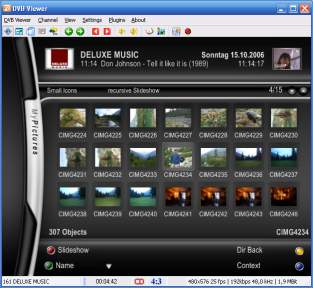
OSD
OSD
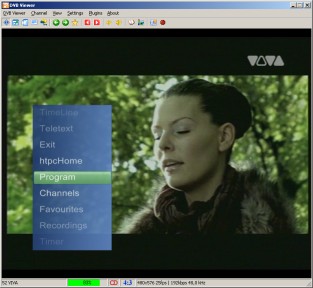
OSD Menu
OSD Menu
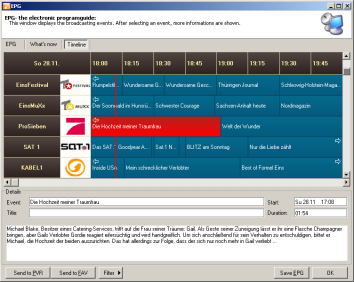
EPG
EPG

Description:

What is it?
DVBViewer allows you to experience Digital TV on your PC. With a proper DVB card you can enter the world of digital entertainment and experience high quality, incredibly sharp TV pictures and near CD quality radio!

What features does DVBViewer provide?
It provides all basic functions you need to enjoy digital television and radio programs. In addition, DVBViewer offers you a wide range of advanced features such as Teletext, Electronic Programming Guide, Remote Control support and enhanced recording capabilities which enable you to record your favourite shows on hard-disc, edit them or share them with your friends.

Which features make it unique?
DVBViewer contains functions which are groundbreaking : It was the first program with a so called DesktopTV mode and in its category the only product which offers AC-3 and Timeshifting features. It is even possible to handle more than one DVB device at the same time. Further on the multimedia skills of the DVBViewer do not need to hide behind other mediacenters. From playing multimedia contents up to receiving RSS newsfeeds, weather data, everything is possible.

What are the differences between the Technisat Edition and the proversion?
There are various features, which are only available in the proversion. A few examples, could be found here.


Categories:

Supported File Formats:

Input Files: DVB

OS Compatibility:

Windows 98/Windows Me/Windows 2000/Windows XP/Windows Vista

Revision History:

Version 4.9
  • Release Date: Sep 16, 2011
  • Only available to customers who have purchased the Pro version
  • MHEG-5
    • Add: TOT data generated by the system time
    • Add: Audio play states are now handled by the MHEG engine
    • Add: Video play states are now handled by the MHEG engine
    • Add: partially support for online content like BBC iPlayer
    • Fix: Volume control of the MHEG engine should work correctly
    • Fix: Interactive language is now send to the MHEG application correctly
    • Add: PVR Bookings are send/read to/from the VCR
  • Video On Demand Filter
    • Add: Youtube support (youtube://[youtubeid])
    • Add: Vimeo support (vimeo://[vimeoid])
    • Fix: Improved Playback and buffering of all kind of audio and video streams
    • Add: Better Icecast/Shoutcast detection
    • Removed: LastFM support
  • General
    • Add: Playback Presets by Griga. Presets are used to offer a more flexible way to select codecs and splitters for specific file formats. Note: selecting a Videorenderer inside these preset files is NOT supported.
    • Some example presets are in the [app-folder]\GraphPresets_Samples. You need to copy them into the [configuration folder]\GraphPresets\ folder and adjust the filter IDs and/or make sure you have the fitting filters/splitters installed.
    • Add: Playback: Added CD and WAV playback via the DVBSource Filter.
    • Change: Program: Saving of the windows positions is now handled a little better.
    • Fix: Program: The position of dialog windows was sometimes incorrect.
    • Add: Playback: Playback of ts/mp3/wav streams from a http source (Recording Service) via the DVBSource filter added. Use the "Open URL" dialog. Needs the current version of the Recording Service.
    • Fix: Installation: A clean installation with no channel list as a Recording Service client could deactivate all timers in the Recording Service.
    • Fix: Program Start: under certain circumstances a renderer error message could delay the program start up to 20 seconds.
    • Fix: Recordings: If adjust PAT/PMT was activated and the SID of a channel was wrong, no Audio/Videodata was written. Now adjust PAT/PMT is deactivated if the SID doesn't match. careful this might cause problems with other hard/Software. Make sure the SID of a channel is always correct.
    • Change: Rewritten and optimized the code for (debug)Logfile writing.
    • Fix: Settings: Changes to Auto detect Audio/Video weren't saved anymore.
    • Updated to current sqlite3 version.
    • Updated the DVBViewer Filter.
    • Several corrections and optimizations.
    • Language files updated.
  • Hardware
    • Add: Skystar USB HD with WDM driver: Enabled Diseqc 1.2 for this device.
    • Add: BDA: DiSEqC support for DVBSky devices added.
    • Add: BDA: Detection of Digital Devices Cine CT V6 devices added.
    • Add: BDA: Reworked the detection of Turbosight devices. You might have to do a manual hardware search in the options.
    • Add: BDA: Cinergy HTC Stick detection added.
    • Change: BDA: New option for EMPIA compatible devices in DVB-C mode in the hardware Options: "Force Auto Modulation". Changing this value might help if channel changes are very slow.
    • Add: Support for Hauppauge PVR devices
View complete revision history

Rate this software:

Your Rating:
You have not voted yet!

Average: 3.12/5
Total Ratings: 60


Software Submissions