Please note: This software has been discontinued by Womble Multimedia, and the development has been merged with Womble MPEG Video Wizard DVD.
Womble MPEG Video Wizard is a multi-dimensional MPEG editor. MPEG Video Wizard contains all of the key features of its predecessor MPEG-VCR: frame accurate editing, fastest scrubbing of any MPEG editor, fastest frame stepping, and smart rendering with no re-encoding when editing DVD-compliant MPEG captures from the latest hardware boxes. Whether you are a video professional or a new video enthusiast, we are confident that MPEG Video Wizard will meet your MPEG editing needs.
Some of the main features of MPEG Video Wizar are:
* Smart Rendering with minimum video re-encoding which leads to fast export speed and maximum quality preservation.
* Frame accurate editing: step forward and backward through your video, frame-by-frame, to find exactly the scene you wan
t, or to cut out the ones you don't.
* Fastest scrubbing of any MPEG-2 editor: scroll through your entire movie as fast as your mouse can drag the slider. Quickly find the scenes you want to keep, or the ones you want to cut.
* Fastest frame stepping of any MPEG-2 Editor: move through you
r video frame-by-frame at the click of your mouse, or the press of a key. Makes it super easy to zero-in on exactly the desired frame to be edited.
* Very intuitive and easy-to-use User Interface, with a flexible yet powerful multi-track timeline based editing.
* Comprehensive edit project
and content management, batch job processing, and project package tool.
* Flexible title editor for both text and graphics generation. You can create attractive titles directly with MVW.
* An extensive transition library with simple controls. Most common transitions can be added using onl
y the mouse.
* Multiple editing windows, with flexible window configuration and layout.
Input Files: AAC, AC3, AVI, DivX, DV, DVB, DVD, GIF, H.264, HD DVD, IFO/BUP, IMG, JPG, MOV, MP2, MP3, MP4, MPG, PNG, RAM, SVCD, TS, VCD, VOB, WAV, Xvid
Output Files: AAC, AC3, AVI, DVD, H.264, IMG, ISO, JPG, MOV, MP2, MP3, MP4, MPG, SVCD, TS, VCD, VOB, WAV, Xvid
Windows 98/Windows Me/Windows 2000/Windows XP/Windows 2003/Other/Windows Vista


 Home
Home


 Womble MPEG Video Wizard DVD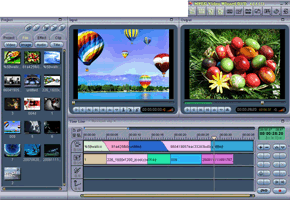
 Womble MPEG Video Wizard - Basic Video Editing Guide


