Software - > Womble MPEG Video Wizard DVD

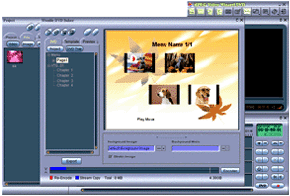
Main Window
Enlarge Image Enlarge Image: Main Window

Downloads


Join Our Newsletter
Title: Womble MPEG Video Wizard DVD
Author/Publisher: Womble Multimedia,Inc. (details)
Ease of use: Not Rated
Latest Version: June 2009 Update (details)
OS Support: Windows 98 Windows Me Windows 2000 Windows XP Windows 2003 Other Windows Vista
License: Shareware, $USD49.00
Date Added: Mar 5, 2006
Last Updated: Jun 27, 2009
Page Viewed: 32633 times

  Email Updates
email me whenever this software gets updated

Send to Friend   Send to Friend

User Rating:
(4 votes)
Details / Vote Now / Post Your Comments

Summary Links Images Ratings History Tools

Related Forum Threads:

Loading

Downloads:

Download: Download_dvd_trial_20090429.exe Title: Download_dvd_trial_20090429.exe
Link: Download
Size: 10.68 MB

Description: Download a trial version of Womble MPEG Video Wizard DVD from the official site


Related Articles:

Read Article: Womble MPEG Video Wizard - Basic Video Editing Guide Title: Womble MPEG Video Wizard - Basic Video Editing Guide
Link: Read Article   Editor's Pick  

Description: This guide shows you how to use Womble MPEG Video Wizard (or MVW DVD) to perform basic video editing tasks, including joining, cutting and commercial removing


Description:

The Womble MPEG Video Wizard DVD is the latest MPEG editor with DVD authoring and full AC-3 encoder support, and it includes all the features and functionality of its predecessor --- the MPEG Video Wizard.


Whether you are a video professional or a new video enthusiast, we are confident that MVW-DVD will meet all of your needs of MPEG editing and DVD authoring.

Some of the main features of Womble DVD are:

* Smart Rendering with minimum video re-encoding which leads to fast export speed and max

imum quality preservation.

* Full AC-3 audio encoder support

* Nonstandard video content export which supports HDTV and other non standard DVD video content without video re-encoding or conversion.

* Advanced menu authoring with easy to use menu templates; addition of background music

to menus; creation of user defined menu templates; selection of menu display for both widescreen and 4:3 formats; and DVD video previewing before writing to a disc.

Categories:

Supported File Formats:

Input Files: AAC, AC3, AVI, DivX, DV, DVB, DVD, GIF, H.264, HD DVD, IFO/BUP, IMG, JPG, MOV, MP2, MP3, MP4, MPG, PNG, RAM, SVCD, TS, VCD, VOB, WAV, XviD
Output Files: AAC, AC3, AVI, DivX, DVD, H.264, IMG, ISO, JPG, MOV, MP2, MP3, MP4, MPG, SVCD, TS, VCD, VOB, WAV, XviD

Revision History:

Version June 2009 Update
  • Release Date: Jun 27, 2009
  • Download(s):
  • (BUG) DVD menu high light display problem, especial for 16:9 ratio.
  • (BUG) wrong length for MPEG-2 program files with bad GOP headers.
  • (BUG) open VOB file with a big chunk of junk data at its beginning (> 10MB).
  • (BUG) loss of user data in picture headers for re-encoded frames.
  • (BUG) open MP3 file with a big chunk of junk data at its beginning (> 128kB).
  • (NEW) loading of 192-byte packeted MPEG-2 TS file with MPEG-2 video (Humax).
  • (NEW) discard of leading B-frames that cannot be fully decoded.
View complete revision history

User Rating:

  Average Rating: Your Rating:
Registered Users: (4 votes)
Non-Registered Users: (41 votes)

User Comments:

It's very good. Very great. I like it. It's useful.
Posted by: sakurangi_ha, 13:34:25, Apr 13, 2007


Very good, perfect for non professional users and for my Sony DCR-SR100 camcorder.
Posted by: lbernh, 07:23:35, Jul 1, 2007


great tool, highly recommend!
Posted by: jslaven, 18:53:14, Jun 24, 2009


Sorry, but you must be logged in to use this feature.

Please note that the forum has a separate login/registration system. You will need to sign up and login to the forum separately.

Username:
Password:
Remember Login?
 

Don't have an account? Sign up here
Lost your login/password?
Top Deals

Software Submissions