

 Home
Home

Page 1 of 3: AVI and Other Video Files to iPod Video
Jodix's Free iPod Video Converter will convert all popular video formats to iPod video. You can enjoy DVD/VCD and AVI, MPEG, WMV, RM, RMVB, DivX, ASF, VOB video files in your iPod with few clicks. The program is a freeware and does not contain any form of malware, including but not limited to: spyware, viruses, Trojans.
Key Features
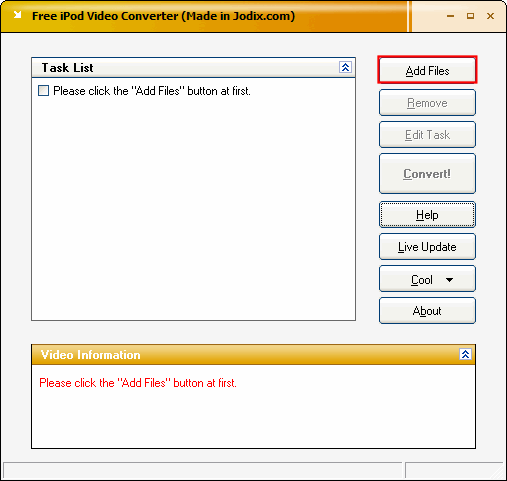
Go ahead and start up the iPod Video Converter. Click the "Add Files" button. [Screen Shot Below]
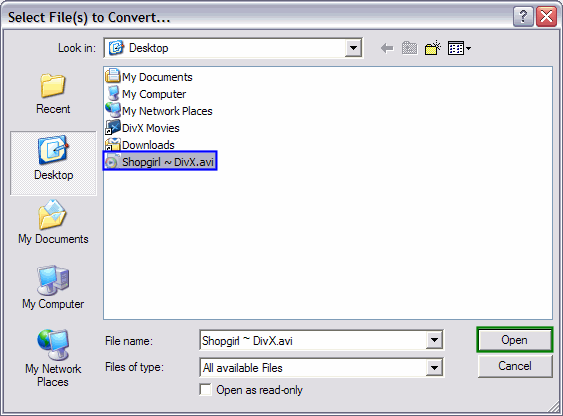
Click the video file that you want converted one time to highlight it (blue). Then click the "Open Button" (green). [Screen Shot Below]
Key Features
- It's clean and free, without any adware or spyware.
- It supports all popular video formats including AVI, MPEG, WMV (ASF), RM, RMVB, DivX, ASF, VOB etc.
- It's stable and fast.
- Easy-to-use wizard-like user interface helps you setup conversion process easily.
- The output video has excellent image and sound quality.
- ID3 Tag can be derived from the input files automatically.
- Batch Processing is supported, it can process an unlimited number of files at one time.
- Detailed HTML help file is included.
- The installing and uninstalling process is very easy.
Go ahead and start up the iPod Video Converter. Click the "Add Files" button. [Screen Shot Below]
Click the video file that you want converted one time to highlight it (blue). Then click the "Open Button" (green). [Screen Shot Below]

