

 Home
HomePage 7 of 7: How to check your DMA status & reset it if necessary
Upon rebooting, if you watch near your PC's clock area, some notifications will pop up telling you it has discovered some new hardware. That is normal, as it is just re-detecting your Primary IDE Channel.
It may (mine did) tell you that you have to reboot again for it to be installed properly. Reboot again, and your all set!
Your DMA should look like this below:
Primary IDE Channel (red)
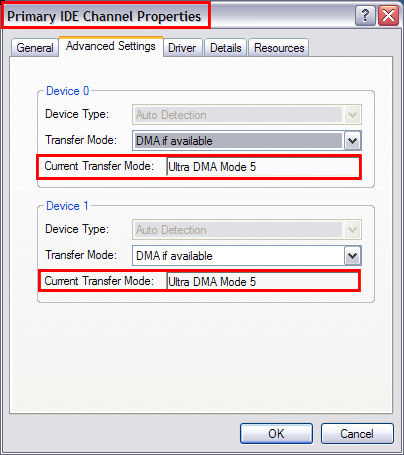
If the "Secondary IDE Channel" is in PIO mode in either box, do the same steps that you did for the "Primary IDE Channel".
Secondary IDE Channel (blue) - (Most disc drives have a limitation of UDMA 2 Mode, so thats as high as they will go, so don't freak out.)
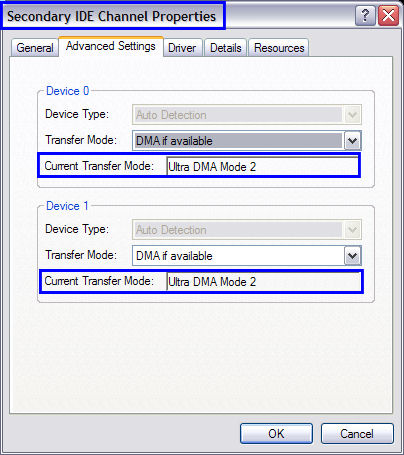
It may (mine did) tell you that you have to reboot again for it to be installed properly. Reboot again, and your all set!
Your DMA should look like this below:
Primary IDE Channel (red)
If the "Secondary IDE Channel" is in PIO mode in either box, do the same steps that you did for the "Primary IDE Channel".
Secondary IDE Channel (blue) - (Most disc drives have a limitation of UDMA 2 Mode, so thats as high as they will go, so don't freak out.)

