
News Articles
Movies Software
DivX, XviD, DVD Subtitles Forum
DigiWiki Codecs

Username:
Password:  
Remember Login?
Sign Up
 

Articles - > How to check your DMA status & reset it if necessary

Printer Friendly Version Printer Friendly Version

User Rating:
No ratings recorded - Vote Now

User Comments:
tycobb: help! when i expand the IDE...
More / Post Your Comments

Page Select:

  1   2   3   4   5   6   7   Next Page

Page 2 of 7: How to check your DMA status & reset it if necessary

Related Articles:
  1. Basic Guide How to Convert AVI Files to DVD with Avi2DVD
  2. Xbox 360 H.264 Conversion Guide
  3. The Complete Region-Free Guide
  4. PS3 H.264 Conversion Guide
  5. Basic AVI to DVD conversion using TMPGEnc+ (including Audio Sync Correction)
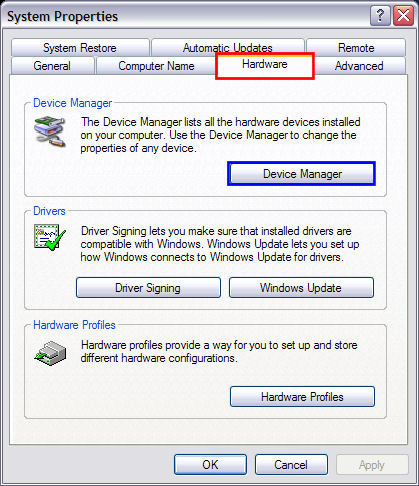
After clicking the "Hardware" tab (red), your screen should look like this. Now go ahead and "Device Manager" (blue). (Screen Shot Below)


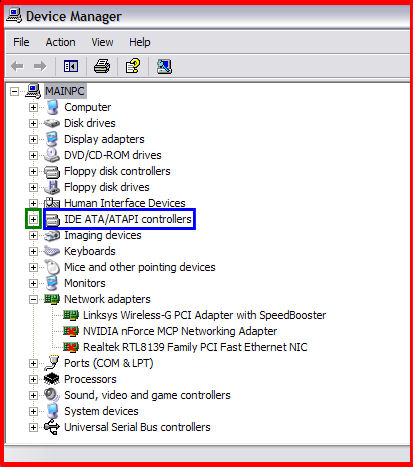
After clicking "Device Manger", it should have opened up this screen (red). Now find "IDE ATA/ATAPI controllers" (blue) in the list. Click the plus sign out to the left of it (+) (green). (Screen Shot Below)


  1   2   3   4   5   6   7   Next Page

Article Navigation:

Page 1:
Page 2: <--
Page 3:
Page 4:
Page 5:
Page 6:
Page 7:

User Rating:

  Average Rating: Your Rating:
Registered Users: No ratings recorded
Non-Registered Users: (19 votes)

User Comments:

help! when i expand the IDE ATA/ATAPI Controllers, only my NVIDIA controller shows up, there is no Primary or Secondary IDE, how to get get it up?
Posted by: tycobb, 02:57:46, Mar 24, 2007


Comments: