
Archive for the ‘Electronics’ Category

Dream Machine

Wednesday, September 19th, 2007

Lately, I’ve been dreaming about the perfect hardware video player. Currently, I have a Momitsu V880N upscaling DVD/networked video player. I like this machine because it allows networked DivX/XviD playback, as well as DVD upscaling up to 1080i. I know that eventually, I will have to replace it with probably a dual-format (Blu-ray/HD DVD) HD player, but looking at the current selection, none of them really gives me exactly what I want.
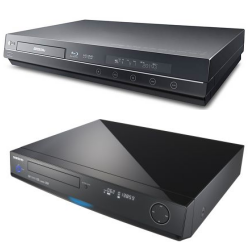
LG and Samsung’s dual-format HD playersThe early dual-format offerings by Samsung and LG looks pretty good, but neither offers networked DivX/XviD playback (although I could probably do without it since I’ve connected my PC to the TV and I’ve been using it more and more). I’m also concerned about their region-free status when it comes to playing DVDs – region-free DVD is perfectly legal here in Australia.

So anyway, here’s a wishlist of what I want in terms of my next video player (some obvious ones, such as HDMI, has been left out since these features are not optional). It’s unlikely a player will ever have all of these features, but one can dream …

  • DVD/video upscaling using Silicon Optix’s Reon VX chip
  • Region-free DVD playback
  • Blu-ray (profile 2.0) and HD DVD playback
  • DivX/XviD playback
  • H.264 and VC-1 (WMV) playback
  • Networked video playback through wired ethernet or wireless
  • 1080p/24 output
  • 50, 60, 72/96/120 Hz output for video playback

If such a machine does eventually exist, it will come pretty close to being a media center PC, so perhaps going down the PC route might be the most realistic.

New blog, some TV buying tips

Wednesday, September 12th, 2007

Some of you may already know about my original blog, The Perfect Pitch, which covered anything from Arsenal Football Club to plasma TVs. It was a bit confusing to be honest, and so I’ve decided to separate the football stuff from the non football stuff … and all the non football stuff are now here, in this new blog. All the non football blog entries from TPP are now here too.

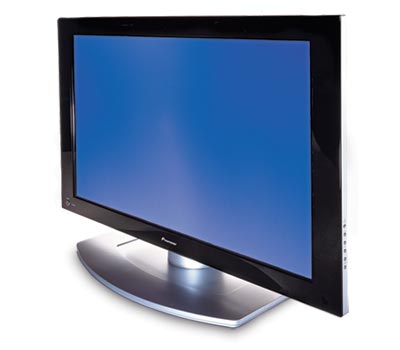
Choosing a new TV is hard workTo start off, I want to talk about some TV buying tips. The questions of buying a new LCD or plasma has come up quite a few times on the forum recently, so I thought I would collect all my thoughts in this blog post.

I’m not going to go into another LCD vs Plasma debate simply because it’s getting quite boring, and that I’ve already covered it in a previous blog entry. Instead, I’ll list some of the features that you should be looking at:

  1. HDMI Inputs – regardless of what you feel about this massively copy protected connection system, it is here to stay and it’s going to get more popular. The Xbox 360, PS3, Blu-ray/HD DVD players, DVD recorders, DVD upscalers, HDTV boxes and pretty much every digital video device will be using them. You need to make sure the TV has as many of these as possible, otherwise you may need to invest in a HDMI receiver or switcher (both are quite expensive, although this HDMI switcher from Joytech is quite affordable). HDMI also have version numbers, the latest (at the time of this post) is version 1.3a. You should aim to get the latest version, but in all honest truths, it probably won’t matter much to you unless you need pass-thru support for the latest Dolby/DTS audio formats (if your player can decode them, then you won’t even need the pass-thru support).
  2. Resolution – I would say the time is now right to start thinking about buying 1080p displays. Not just displays that can accept 1080p input, but displays with native resolution of 1920×1080. It might not matter much to smaller screens (say less than 42/46″), but people do notice a difference even on 32″ displays. Of course, if you plan on doing PC work on the display, then having a higher resolution is essential. Also look for displays that can do 1080p/24. These displays can refresh at 72/120Hz to avoid the need for 3:2 pulldown on film content – in other words, it will display Blu-ray/HD DVD without the judder effect, to give you full flowing motion just like in the cinemas.
  3. PC Input – There is a very good chance that you will want to connect your PC to your new TV, especially if you are running a HTPC setup. So it’s essential that your TV has PC input. While HDMI can be used (with a DVI -> HDMI cable), but it’s not really great for PC input because unless the TV accepts PC resolutions/refresh through the HDMI input, you’ll be limited to 720p/1080i/p, which is not ideal for things like games (that usually only support PC resolutions such as 1024×768). If the TV has a dedicated VGA or DVI input, then that’s good (for the DVI input, check to make sure it supports HDCP copy protection), as it usually means PC resolutions are supported (but check the manual to make sure). The common resolutions that it will hopefully support should be 1024×768, 1280×768, 1280×720, 1600×1200, 1920×1080. The refresh rate is also important, and it should support 50/60/72/75/100/120 Hz if possible.
  4. Other issues – If you own an Xbox 360, and you are in a PAL territory, then you will also need the TV do support PAL-60 mode, basically PAL at 60 Hz. This is because Xbox 360 games are sometimes 60 Hz only games (actually I think the majority are PAL-60), and if your TV does not support PAL-60, you won’t be able to play these games. It’s one of those things people often don’t think about, but you may be surprised at how many TVs do not support PAL-60 (but mostly older ones though). You should also check to see (in the store) if the TV displays non HD content well or not … some HD displays only display HD content well, but SD content looks quite bad and blurry. It’s to do with the internal scaler, and some TVs have better scalers than others.

So there you have it, some tips to help you find the perfect TV. Of course, one that matches all the above criteria might cost quite a bit more than the cheapest one available, but I think it’s worth it. If the thing is going to cost $1,500 or something, you might as well spend an extra $500 to get the best.

Happy Shopping!

The age old question: LCD or Plasma?

Wednesday, May 23rd, 2007

I visit a lot of forums, and I have yet to visit one where the question “LCD or Plasma” hasn’t bee posted yet. When buying a new TV, this question will inevitably come up, so here are some tips to help you choose.

Why you should buy an LCD?
Plasma only comes in 42″ or above sizes, so if you want something smaller, LCD is your only choice. LCDs will usually have a brighter picture (higher contrast), and more vibrant colors (although not to everyone’s taste, some say the colors are unrealistic). The better brightness helps if your screen is placed in a bright room.

Why you shouldn’t buy an LCD?
Older LCD panels suffer from motion blurring, due to the high response time of the panel. Newer models have response times less than 8ms, and so suffer less (but still do suffer) from the problem. Viewing angles (both vertical and horizontal) can be a big problem, especially with a large size screen – even when sitting straight in front, the edges might be less visible/brighter than the center, but again, newer models will suffer less from this problem, if at all.

Why you should buy a Plasma?
In 50″ or above sizes, plasma panels still represent the better value for money. Plasma technology has been around for a while now, most models are in their 7th or 8th generation, and so the technology has matured quite a bit. Some prefer plasma’s more natural contrast/brightness, although you will need a more dedicated home theatre environment (ie. darker room) to enjoy it as its best. Viewing angle is amazing on a plasma, as good as a CRT in practical terms.

Why you shouldn’t buy a Plasma?
Plasma screens can sometimes offer blacks that are more gray due to the inherent nature of the technology (although newer models have ways to reduce this problem). Motion judder can also be a problem with plasma screens. Then there is the issue of plasma burn in, which is not as serious as most people think. Early panels suffered from this, but this is a non issue with most newer panels. Some screens suffer from temporary burn-in, but it usually goes away after you switch of the panel for a while or watch something else. What most people fail to realise is that old CRT TVs suffers from burn-in much more so than plasmas ever will, and LCDs do suffer from burn-in as well.

The best way to find out which is suited to you is to go to your local electronics store and see which screen grabs your attention the most. Of course, this relies on the store having set up these screens properly, but you should get a good idea. Stores usually have very harsh lighting, and this will favor LCDs more, so keep this in mind. And if possible, ask them if you can bring along your own equipment to test these TVs, for example bring your Xbox 360 and see how games play on it.