Archive for the ‘Computing’ Category

My new PC + Fallout 3 Troubleshooting

Friday, November 28th, 2008

It’s been a week or two since I started using my new computer full time and so I think the time is right to write a little review and share with you the reasons why I bought what I bought these parts in the first place. Here are the complete specs for my new work computer, including parts (monitor, Blu-ray drive) that I had purchased previously:
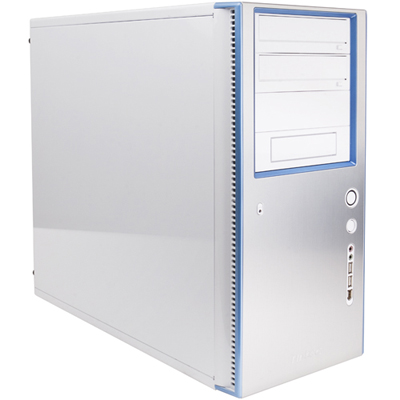
Antec Sonata Designer 500

Antec Sonata Designer 500

Intel E8500
Gigabyte GA-EP45T-DS3R
OCZ 4GB 1333 C9
2 x Western Digital 640GB WD6400AAKS
LG GGC-H20L Blu-ray/HD DVD reader, DVD writer
Asus 512 MB 4850 
Dell S2409W 24″ 1080p LCD monitor 
Antec Sonata Designer 500 case (includes 500W Antec EarthWatts power supply)
Microsoft Laser Desktop 4000
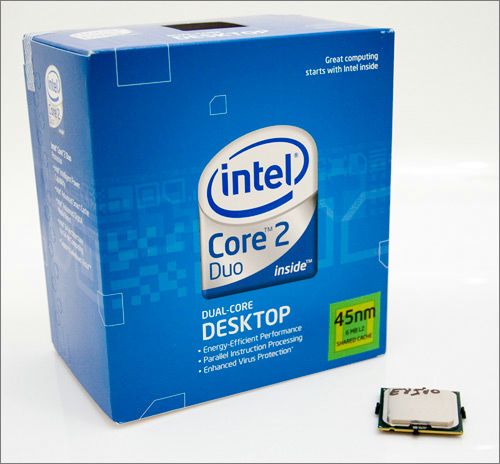


Intel E8500

Intel E8500

The E8400 has been the sweet spot, in terms of pricing and performance, for the upper end of the Intel Core 2 Duo line-up for some time now. Quad-core is nice, but it’s also expensive and unless you use apps optimized to use all 4 cores, the Core 2 Duos still represent better value for money and raw performance when it comes to these unoptimized programs (most games, for example). I went with the E8500 instead of the E8400 due to recent price rises (thanks to the low Australian dollar), certain parts, especially the popular ones, went up in price by greater amounts than the less popular ones. The E8400, being more popular, was only now about $30 cheaper than the E8500, whereas previously, the difference had been as high as $130. At $130 difference, the E8400 is clearly the better choice. At $30 difference, especially with the current socket coming to the end of life, it’s worth it to get a faster processor that will last a bit longer.
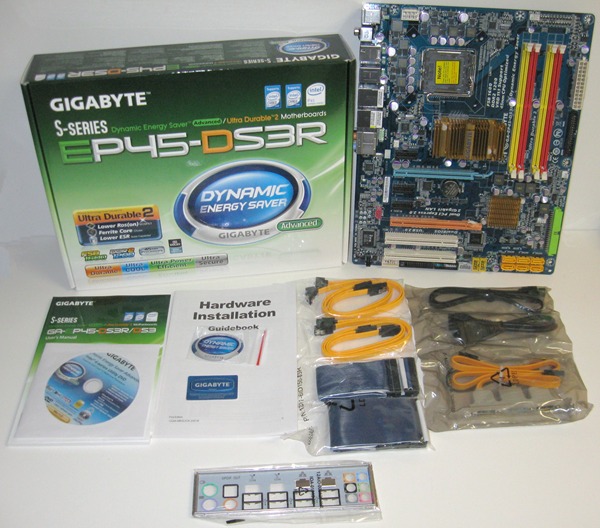
Gigabyte GA-EP45T-DS3R

Gigabyte GA-EP45T-DS3R

The motherboard sort of picks itself, as I like Gigabyte’s stuff and their EP45 series are well priced and very fully featured (eSata, on-board audio, 2 Ethernet ports, dual BIOS …). The only choice you have to make really is whether you want to use DDR3 or DDR2 memory (the ‘T’ in EP45T denotes a DDR3 only board). I went with DDR3 because it will probably be easier and cheaper to replace in the future, as DDR2 will be phased out soon by both Intel and AMD. I went with 4 GB (2 x 2GB) to give Windows and newer apps a bit of breathing room, and although it’s not the fastest RAM, it does run at 1333 MHz and I have the option to run it at slower speeds, with lower latency, if needed. It’s probably not worth spending more on RAM, as you get little out of it. I originally ran into problems with the OCZ RAM, as the ones supplied were faulty on arrival. This brings up the issue of testing, and it was obvious that the computer store (Computer Parts Land) I purchased from did not test this build at all. I can tell because the default RAM timings were used, and it is a well known thing that these OCZ RAM had wrong SPD settings for 1333 MHz operation (it shows 1.5v, but the RAM is actually 1.7v as stated on the OCZ website). If they had done testing at this original setting, the RAM would not have passed the required tests (Memtest86+). And this is a good time to recommend you test your system with Memtest86+ and other stress test tools before you install software on it – otherwise, you could end up wasting a lot of time like I did before I figured out that the random crashes were RAM related.
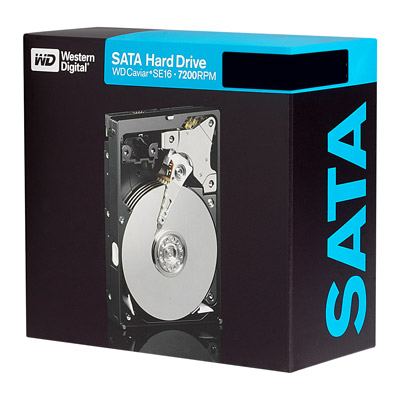
Western Digital 640GB 6400AAKS

Western Digital 640GB 6400AAKS

The HDD I had to decide between the Samsung or the WD AAKS series that I eventually picked. The Samsung is a bit more expensive, and I’ve heard of problems with faulty drives. Plus the AAKS 640 GB series is supposed to be one of the fastest mainstream drives around, and 640 GB sits nicely between 500 GB and 750 GB and offers a good compromise between these two sizes. I got two drives and run them in RAID 1 for improved data integrity, as this is my work computer and the data is more important than performance of a RAID 0 array (the “Russian Roulette of RAID”, that’s what I call it, because if one drive dies in a RAID 0 array …). The Blu-ray/HD DVD reader (and DVD writer) drive from LG I actually purchased several month ago due to a sale, and it’s great little drive that writes every kind of DVDs (including Lightscribe), and reads both HD formats which is necessary for me because I still have lots of HD DVDs (that’s now 3 HD DVD players that I have, the Xbox 360 add-on, the Toshiba standalone, and now the PC – this should ensure that my HD DVD collection remains playable for some time, especially considering that HD DVD reader drives are still being made). 
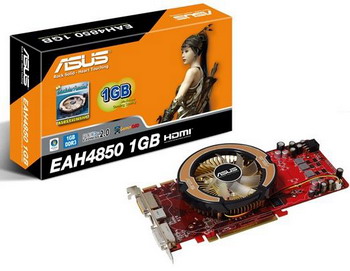
Asus Radeon HD 4850

Asus Radeon HD 4850

I chose the ATi Radeon 4850 because it is the best “budget” 3D card that can play almost all the latest games at the highest quality and resolution. Maybe it will struggle with some games at 1600×1200 with high quality (and won’t play others in “ultra” quality mode), but you’ll have to pay double or triple the price for a GPU that does and it will be obsolete in no time. I do regret a bit not spending more money on a GTX 260, as it has CUDA support which means you can use it as a second CPU for applications such as video encoding. But at double the price, they’re not worth it at the moment and I can always grab a cheap one (possibly a GTX 280) when they do come down in price. There’s also the issue of these GTX cards being noisy compared to the 4850, plus the 4850’s more numerous stream processors actually give it GTX 260 like performances in certain games. To sum up, the 4850 represents the price/performance sweet spot for GPUs at the moment, especially if getting more FPS out of your system is not your top priority. The Radeon HD range is particularly good for Blu-ray playback, as it features full acceleration for all the video formats used by Blu-ray, not just the usual H.264 with partial acceleration for VC-1 like on Nvidia cards. I chose the Asus version because it comes with a custom heatsink-fan that reduces the heat/noise even further, and all at the standard price.
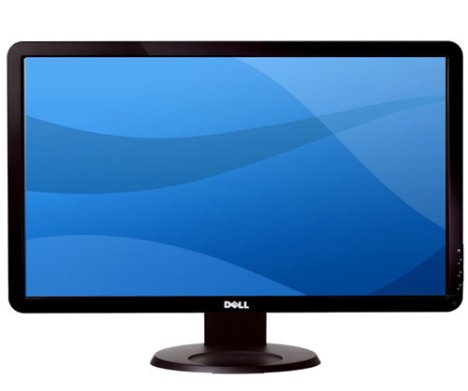
Dell 24" S2409W

Dell 24" S2409W

For the monitor, I’m using the Dell 24″ I got for cheap a couple of months ago due to a Dell pricing error. It’s great for playing HD movies due to the 1080p (1920×1080) native resolution, and for games as well, as more and more are now using console based HD resolutions (720p, 1080p), rather than the more traditional PC resolutions such as 1920×1200 (you may get letterboxing effect if you do uses these PC resolutions in multi-platform games such as Fallout 3). On the negative side, your choice of PC resolutions are greatly reduced if you want the full undistorted picture, and some cards do not even support certain resolution combinations such as 1600×900, which sits between the too low 1360×768 and the too high 1920×1080.
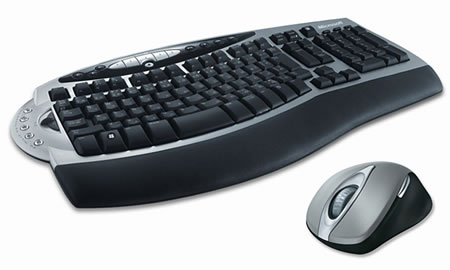
Microsoft Laser Desktop 4000

Microsoft Laser Desktop 4000

For the case, I chose the Antec Sonata Designer 500. The Antec Sonata range is all about quiet operation, at the expense of support for high performance systems (hence the small 500W power supply). The Designer range is new to Sonata, and I prefer it over the original black Sonata range (my other computer’s case). Just a note that despite the picture on the website and on the box, the case is actually white, not silver – only the front facade is silver. It’s still an excellent looking case, and the noise level is very low, and the case stays very cool to the touch (actually feels cold when touching the outside). For the keyboard mouse, I got the Microsoft Laser Desktop 4000 due to Microsoft having a cash back offer for it (so it only cost me $45 after cash back, when the normal pricing is $130). It’s a very nice combination, and much much better than my previously wired Microsoft pair or my Logitech wireless set on my other computer. Money well spent, I think.

So that’s my system. It’s not a budget system nor is it expensive, not the fastest gaming PC nor does it fail to play the latest games, and it’s not a quad core either, but it does a bit of everything and do them quite well. It does H.264 encoding in no time, plays Blu-ray movies with only 10% CPU utilization, can play Fallout 3 at full quality in 1920×1080 (I play it at 1360×768 with 4x AA in high quality mode), and can run Crysis at high quality if you don’t mind the framerates being a bit inconsistent at times.

As for Fallout 3, I’ve been playing it a lot recently. But the PC version is well known for being quite unstable, and crashes are quite common unless you do a few things. I managed to get the game to run for hours without crashing, and here are some tips on how to do this, as well as solve some bugs the games has:

  • You have to ensure ffdshow is disabled for the video and audio decoding the game uses. This is especially needed if the game crashes on start up. 
  • The game seems to crash the more heavily pushed the GPU is, so even if Fallout 3 tells you you can run the game in “Ultra” mode, go back down one mode to “High” and the game will be a lot more stable.
  • While some say that you cannot run Fallout 3 on an ATi card with both AA and HDR. That’s not true, because I’ve managed to do so without crashing or any side effects, but the previous point stands – if you’re pushing your system to the limit, the game will crash more often.
  • If NPC disappear, especially in Megaton, then you can resurrect them on the PC version. This is a well known bug and characters such as Walter (the water plant, scrap metal guy) will disappear from time to time. This happens because they may fall off a platform into some null space somewhere. I’ve also had Billy Creel disappear on me, both him and Walter were at exactly the same null space place when I used the ‘player moveto’ command to find them. 
  • Save and save often. And don’t overwrite your saves. RPG are always save heavy, meaning that you almost need 100 saves before you complete the game. This is because certain actions and decisions you make can affect a lot of things, and you may miss out on certain optional quests if you don’t pay attention. With saves, you can sacrifice a few hours of game play to complete a quest that otherwise would have been unavailable. Plus, with the game crashing all the time, saves become even more important. 
  • If you plan on using Games for Windows to get the achievements and gamer points, log into “Live” before you start the game, as otherwise the achievements won’t be given.

That’s all for today, I think I’ve yapped on long enough.

If I were to buy a new computer today (October 2008)

Thursday, October 30th, 2008

It’s been a couple of month, but I thought now would be a good time to do the fifth edition of ““If I were to buy a new computer today”. The personal reason why it was a good time to update this feature was that I’m in the process of buying a new computer myself. Yes, the trusty old AMD 2600+ is being put out to pasture.

Back in September 2007, I first wrote about what I would be looking for in a computer if I were buying one today. To get a better idea of the kind of system I’m looking for, please refer to the original blog entry, but to sum up, it would be a system for playing the latest 3D games as well as a system ready for Blu-ray and HD DVD playback, but one that is reasonable in price and without the need for overclocking. This is still the system that I will “imagine” to build today, which is slightly different to the requirements of the computer that I will buy this month. My computer will be more work related, will still require Blu-ray/HD DVD playback, but less emphasis on gaming.

So let’s not waste any time. Here are the specs of the computer, including comparisons with the last specs from May (as compared to May: upgraded parts in blue, lower prices in green, higher prices in red). Note that some parts have risen in price due to currency fluctuations (the $Aus has been hammered lately).

Type: May Part: October Part: May 
Price 
($AUD):
October
Price
($AUD):
CPU: Intel Core2Duo 8400 Intel Quad Q8200 $253 $309
Motherboard: Gigabyte GA-EP35C-DS3R (Rev 2.1) Gigabyte GA-EP45T-DS3R $146 $185
RAM: Corsair 2 GB PC-DDR3 PC-10600 Corsair 2 GB DDR3 PC-10600 $160 $159
HDD: 2 x Seagate 500GB 7200RPM 32MB SATA2 (AS) 2 x Samsung 750GB 7200RPM 32MB SATA2 $256 $238
Video Card: NVIDIA GeForce 8800 GTS 512 MB (Gigabyte) NVIDIA GeForce GTX260 896 MB (Gigabyte) $325 $415
Sound Card: In-Built In-Built N/A N/A
Optical Drive: Pioneer BCD-S02 Pioneer BCD-S02 $215 $169
Monitor: Samsung 22″ 2243BW Samsung 24″ 2433BW $309 $389
Case: Antenc Sonata III Antenc Sonata Designer $176 $189
Total Price ($AUD): $1,840 $2,053
Total Price ($USD): $1,760 $1,403

Ok, as mentioned above, the currency fluctuations here in Australia has been crazy over the last month or so, partly to do with the world economic crisis. So we have a situation where a PC that’s much more expensive in Australian dollars, but much cheaper in US dollars. The AUD was probably overvalued back in May, and now it may be undervalued, so that explains the price differential. For those earning US dollars, now is a great time to buy a computer here in Australia though thanks to the generous exchange rate and computer retailers not having caught up yet. And I have taken this opportunity to upgrade a few parts to make the system fresh enough for the second half of 2008.

Let’s go over each specification. As usual, I will provide alternatives, including rival AMD/ATi offers.

CPU: We’ve gone quad! The Q8200 represents a good value quad core processor that uses the 45nm process shared by the more expensive quad-core chips, but at a price that’s closer to the original Q6600 (65nm). Performance wise, it’s similar to the E8200 in dual-core only apps, but faster than the Q6600 and E8400 in quad-core enabled applications, which are more and more common these days. For future proofing, we’re going with quad core.
Alternatives: For a few dollars less, you can get the Intel E8500 dual-core processor or the AMD Phenom 9950 quad-core. Of these two, the 9950 is better value, and it is much faster than the Q8200. The Q8200 is less power hungry, but if you take into account the performance of the 9950, it is probably more worth it for the extra power it uses (get the 125w version).

Motherboard: (Update) We’re going with the Gigabyte EP45T-DS3R, which is basically the same board as last time except it supports DDR3 only. Didn’t see the point of keeping DDR2 support when we’re not using it, and this way, you can have up to 4 DDR3 slots rather than being limited to 2. The price remains the same. It’s a very fully featured board (HD audio, RAID, 0/1/5/10), with all the options you would expect and outputs galore.
Alternatives: For your AMD processor system, you might consider the Gigabyte MA790X-DS4 for $175. This is a very similar featured motherboard to the EP45T-DS3R and it uses AMD’s latest 790X chipset.

RAM: Still sticking with the same DDR3 memory as in May. Prices have dropped again during this time. As mentioned before, there really is no benefit to getting DDR3 memory unless you are overclocking to the max (and even then, DDR2 is probably enough), or if you prefer the power saving nature of DDR3 memory. The only other advantage is that they may be easier to sell off in the future once DDR3’s superior bandwidth is actually useful. 
Alternatives: If you plan on overclocking your system, faster DDR3 memory can be had. At this stage, there isn’t much benefit to get DDR3 anyway until faster FSB speeds are available, so you might save a bit of money and get 4GB of PC-6400 (800 MHz) rated low latency (C4) DDR2 instead (you will need to make sure the motherboard you get supports DDR2). You can also opt for the C9DHX range of DDR3 memory from Corsair, with has enhanced cooling, but it’s mostly unnecessary if you don’t overclock your memory. With the AMD system, you can only use DDR2, which is great as it’s much cheaper and you can actually get 4 GB for the same price as 2GB of DDR3.

HDD: After reading good review of the Samsung 750 GB drive, I’m including it in the specs. The extra 250 GB is obviously an improvement, but probably not as important as the price drop that comes with it.
Alternatives: If money is more important than space, then getting the 500 GB drive for $24 per drive ($95) may be worth it.

Video Card: A new quarter, so a new GPU to go along with it. The Nvidia GTX260 is their latest card that will give you a performance boost over the 9800 range. It’s not the best value card, I must admit, as you can get a card that’s nearly half the price but much better than just half the performance.
Alternatives: As mentioned, you can get a cheaper card that is not as powerful as the GTX260, but much cheaper. The Nvidia 9800 GTX+ at $299 is tempting as it gives similar performances to the GTX260 in games that don’t benefit too much from having more stream processors, but the cheaper ATi Radeon 4850 is the best value at $249 and it will give you similar performances to a 9800 GTX+.

Sound Card: Still going with a on-board solution. Until HDMI audio output gets sorted out, it’s probably not worth getting a new sound-card for your PC. HDMI audio output would allow the pass-thru or decoding or several of the new HD audio formats, which is not possible through SPDIF/optical due to insufficient bandwidth.

Optical Drive: Still sticking with the Pioneer Blu-ray reader drive. Not much point in buying a Blu-ray writer at the moment as media prices are still high, and prices are sure to drop any day now.
Alternative: The LG GGC-H20L is also at the same price, but reads HD DVD. It’s also a lightscribe DVD writer.

Monitor: An upgrade with 2 more diagonal inches, and full HD resolution (1080p) to fully take advantage of Blu-ray playback. Prices have come down a lot, although the price I’m quoting here includes a local cashback offer.
Alternative: If money isn’t an issue, then you can get the Samsung 2493HM for $100 more. It is an improved model on the 2433BW. If you want HDMI, DisplayPort and equally excellent quality, then the Dell Ultrasharp 2408WFP is worth considering, although it costs an arm and a leg at $669.

Case: A change here, but mainly for those that want something in silver, not black. It’s a quiet case too, also part of the Antec Sonata family like the Sonata III featured here previously.
Alternatives: There are lots of alternatives to cases, and it depends largely on taste. The one that I’ve seen lots of good reviews for is the Antec P182 case, but the style is not really to my taste and it costs more than the Sonata III despite not including a power supply unit.

You might now be wondering what are the specs of the work computer that I plan to buy, so I’ll tell you. For the optical drive, I already own a LG GGC-H20L that will go into the computer. The monitor is also taken care of after I purchased a Dell 24″ on discount (and I mean discount – $499 down to $258, or only $US 176). The rest of the system, shown below, consists of a few parts that are the same as the selection above, plus the rest from the “alternatives” selections:

AMD Phenom 9950
Gigabyte MA790X-DS4
Corsair 2 x 2GB 8500 C5D Twinx
2 x Samsung 750 GB SATA
Asus Radeon 4850 512 MB
Antec Sonata Designer

(Update)

I eventually went with a different system altogether, and one that’s much closer to the system recommended by this post. Here are the specs:

Intel E8500
Gigabyte GA-EP45T-DS3R
OCZ 4GB 1333 C9
2 x Western Digital 640GB WD6400AAKS
Asus 512 MB 4850 

In a normal situation, you would be better off going with cheaper DDR2 memory, with the extra $100 savings going towards a better GPU or CPU (or rent), but I got a special deal with this package so even though getting DDR3 memory is a bit of an overkill, I’m sticking with it.

Whether you go with the selected system, or my work computer, the value for money has never been greater. For $US 1,400 (or just $US 950 for my work system, although the monitor and optical drive is not included in the price), you can get a system that plays all the latest games at high detail and resolution, plus Blu-ray on a monitor that displays all 1080 lines of resolution. And it can do some work too!

With Intel’s new line-up just around the corner, all of this will be come outdated rather quickly, but if you don’t mind buying a system with little upgrade potential, then now or waiting another month or two is a good time to buy (I haven’t upgraded a PC in years, they last longer than before and by the time you need more power, it’s cheaper to just buy a new one than to upgrade almost every single component). I suspect the next edition of this feature will have a vastly different PC from the one above.

See you in a few month’s time …

Weekly News Roundup (10 August 2008)

Sunday, August 10th, 2008

The Olympics have started. I hope you’re watching it in HD, as this is the first Olympics to be presented with the superior resolution of High Definition. Events such as the Olympics are catalysts for huge surge in sales of TVs, and this one seems to have come just at the right time (when HD uptake is reaching a critical point).

CopyrightLet’s not waste any time and get right into the copyright news. There is pressure in Australia on ISPs to become copyright cops and to spy on user downloads to check for pirated material. Not only is this a serious breach of privacy, and many ISP’s terms of usage, it has much larger implications as well. Plus, it adds additional monetary burden on an industry whose profit margins are dropping all the time due to increased usage (and yes, some of this extra usage is related to piracy, but most are due to legal uses, such as viewing YouTube or free online streaming that most major media outlets offer these days). The good news is that Australian ISPs, unlike those in the UK, are still rejecting this idea that they should become copyright cops. How long can they hold out though, is another question.

Will movie studios end up here?

Will movie studios end up here?

With exaggerated claims of piracy, and absurd statements such as “Piracy could put film industry out of business”, there’s definitely a global push to protect the income streams of big media. Even though profits are going through the roof at the moment, with movies like The Dark Knight breaking all records left and right. Greed, as always, is a very dangerous thing. The whole situation is actually quite depressing, and I’m glad I’m not the only one. William Patry, a copyright expert who has hosted a blog on copyright issues, has shut down his blog citing the current depressing copy control climate as a reason.

High DefinitionOnto HD news now, nothing much this week other than the usual “nobody wants Blu-ray, new study finds” stories, which are just recycled stories from a couple of weeks ago. I don’t buy the stories that say Blu-ray will die as a format, but I also don’t buy the stories that say Blu-ray will take over DVDs in a matter of months. Expect DVDs and Blu-rays to exist side by side well into the 2010’s, and then for both to be further supplemented by Internet based video services of one kind or another. I’m still buying DVDs, just bought 13 movies yesterday. And I will buy Blu-ray for movies that I think deserve to be shown in their full HD glory (The Dark Knight, The Godfather Trilogy, for example). And I think this is the way to go for many people, until Blu-ray prices tumble down to DVD levels, that is.


Panasonic wins one of these for their work on MPEG-4 AVC

Panasonic wins one of these for their work on MPEG-4 AVC

Panasonic is set to win a technical Emmy award for its work on the MPEG-4 AVC (H.264) codec, which as I predicted last year, has really established itself as the codec of choice across a wide range of applications. YouTube, Blu-ray, HDTV, mobile streaming … they all use one of the MPEG-4 AVC profiles. Which is why if you’re buying a new computer, you really do need to make sure it can decode H.264 @ 1080p. A fast CPU should do it, but these days, GPUs do a lot of decoding work too and you no longer need to spend hundreds on a dedicated video card … even integrated GPUs, such as Intel’s new GMA X4500HD chip, can do most of the decoding without having to rely on the CPU. It’s worth noting that VC-1 and H.264 are two different formats entirely and you should make sure your GPU supports acceleration for both (ATi is better in this regard than Nvidia). VC-1 is the other major codec used by Blu-ray, by studios such as Warner Bros, Disney, Paramount and Universal.

GamingAnd in gaming, PC gaming is not dead, but its doctor is recommending a strict diet, exercise regiment and monthly check-ups, just to be sure. GTA IV is coming to the PC after all. There was also this rumour that Sony’s long awaited PS3 exclusive, Little Big Planet, will be coming to the PC as well. Most likely just a photoshopped image of the game box. But what was funny, at least to me, was the reaction of certain PS3 sites, who greeted the news with anger and sadness. I never understand the need for games to be exclusive to a certain platform … does it make the game better? No, of course not. Does it improve the game by making it gain more fans across the platforms. I think it does. Does it hurt fanboy pride that a game they thought was going to win some kind of imaginary war for them? Yes it does.

PS Home is finally coming ... erm ... home

PS Home is finally coming ... erm ... home

Another favourite line from PS3 fans is that the full PS3 power is not being utilized yet. PS3 publisher Naughty Dog says only 30% of the PS3’s power is being used at the moment. That may be true on paper, but as with any multi-core/cell technology, it all depends on the software and more importantly, the type of software that can benefit from a multi-threaded environment. For calculations and statistical analysis, multi-threading can’t be beat, but for interactive content like games, the positives are less so and requires a lot more work to get just a little bit more. Basically what John Carmack of ID said last week about PS3 versus Xbox 360. Speaking of software on the PS3, want to run Windows Vista on it? Someone has tried it, and the results, as expected, were pretty nasty. Another software that will run a bit better is PlayStation Home, currently in closed beta, but you might be able to sign up and preview it for yourself.

Over in Xbox 360 land, there was a software update but it didn’t seem to add anything. Just another step towards to the new dashboard update, probably. The new 60 GB Xbox 360 seems to be the same as the old 40 GB version, but there has been some changes under the hood which should improve heat dissipation. It’s August now, so the rumoured Jasper 65nm GPU update should have arrived or be arriving soon, but who knows. I think I’ll wait for that one before exchanging my original HDMI-less 360.

It’s been somewhat quiet in Wii news, which probably means something big is on the horizon. Capcom talks about the new Wii MotionPlus controller add-on and how it plans to use it, but that’s about it.

And that does it for this week I think. I’ll be back next week with more news. If there’s more news. There should be more news, unless the world has ended by next Sunday afternoon (Australian time). I plan on watching all 6 Star Wars movies this week. I don’t know why I’m telling you this, or how it relates to the next WNR. I do get paid by the number of words I write, so that’s probably why. Except it’s not true, as I don’t get paid to write anything. So why am I still writing. I don’t know. Maybe it’s because …

Weekly News Roundup (27 July 2008)

Sunday, July 27th, 2008

Welcome to another WNR. My memory of the week was that it was pretty quiet, not many news stories at all, but when I went to check (the latest news forum), I actually found quite a few news items for the week. It’s funny how your memory can play tricks on you … like the other day when super-glued my mouse to my desk. Oh memory, when will you ever grow up!

CopyrightLet’s start with copyright news as per usual. One of the best ways that anti-piracy groups get people to notice them (and politicians to do what they say, apart from the large plain envelopes full of money that they give them) is to take statistics and then spin it their way. The BSA is just one such group that releases misleading stats to justify their actions, but you can read a detailed explanation of why these stats are misleading. Another way they do things is by holding back new technology and services and then blaming piracy for this, saying piracy adds too much risk to introducing these new services. And then they use this to sneak in new DRMs. The MPAA’s DVR-blocking initiative is one such example, and it is now backed by AT&T and DirecTV. The public pressure against this, I hope, will be enough to prevent it from happening.

MPAA's real definition

What MPAA really stands for?

And if sneaking in DRMs doesn’t work, then another way is to blame someone else for the problem and threaten to take action. That’s what the British Phonographic Industry did by blaming ISPs, and the UK ISPs relented and will now act as copyright cops for the BPI. And hypocrisy is another tool of the anti-piracy lobby, and it was revealed this week that the MPAA hired a hacker to spy on The Pirate Bay. Hacking is very illegal pretty much in every country in the world, and to hire someone to hack and spy on a foreign company is very naughty indeed, certainly much more naughtier than downloading an episode of Dexter that you happen to miss on TV.

And it’s not just the so called pirates that get the rough treatment. Often, the legitimate users are the worst affected, which then forces them to seek “illegal” alternatives. Take Yahoo’s DRM music service, which will be shut down and make all those legally purchased songs unplayable. Yahoo says they will compensate, but even if they give back all the money paid for these songs, people will still need to go out and find them again … how much time and effort will that be worth? The only fair compensation is to turn those music files DRM free, but they won’t do that of course. And if you think you’re rich and powerful, then you won’t become a victim of the copyright cops, think again. Senator McCain, US Republican Presidential nominee, might have just been caught by the copyright cops for copyright infringement in a campaign video lambasting Senator Obama. Of course, he’ll probably get away with it just like when Dubya was caught with an iPod full of pirated Beatles songs. 

High DefinitionIn HD news, not much news in the HD arena this week. But there was this very interesting article on how Sony beat Toshiba in the HD format war, and how close Sony came to oblivion just after Paramount ditched Blu-ray for HD DVD. I’ve always said that Sony won because they had it all to lose, and Toshiba didn’t have that kind of pressure to force them to go all the way.

DisplayPort - To replace HDMI soon?

DisplayPort - To replace HDMI soon?

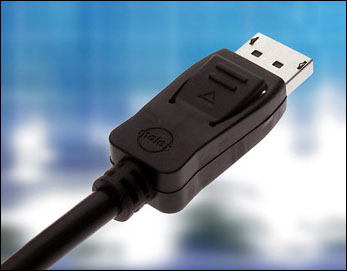
Meanwhile, I get tired of reading the stories about “300% increase in Blu-ray sales”, because what exactly are they comparing the sales figures to? Last year this time when nobody was making and selling Blu-ray players? I’ve recently sold some Blu-ray movies on eBay as well, and I didn’t sell any last year, so my Blu-ray sales are up one billion percent! Take that, Wal-Mart! For the PC, if you want a HDMI equipped video card, now’s a good time because ATI is offering one for only $19 (after rebate). It still surprises me that HDMI hasn’t become standard on all video cards, although I suppose with DisplayPort on the way, one isn’t strictly necessary (and the added licensing cost of the DRM used can be avoided).

GamingAnd last but not least, in gaming, there is a brief peak at the new Xbox 360 Dashboard. Looks rather nice, I have to say. Microsoft is also encouraging users to build and sell their own games. Then came a series of what appears to be verbal tennis between Sony and Microsoft. I don’t know who started, but I’m sure they’re both grounded now.  Sony president Kaz Hirai first questioned the Xbox 360’s longevity, as compared to the PS3’s ten year plan. Microsoft responded by saying PS3 software sales will trail Xbox 360’s for this entire generation. Then Kaz Hirai said (might have been in the same interview as the above one) that he would rather die than have Xbox 360 exclusives on the PS3, not sure what this means to be honest. Although real people might die playing some PS3 exclusives, as it was revealed that Wipeout HD had to be re-designed because it failed an epilepsy test.

He started out playing Wii Sports you know

He started out playing Wii Sports you know

Meanwhile, laughing on the sidelines, Nintendo face some trouble of their own as they lost an appeal to a ruling that said the Wii controller infringed on patents, and they could be banned from selling controllers until this matter is resolved. Someone will give someone else a bag of money and the problem will go away ($21m, reportedly, which is what Nintendo makes every hour these days). While the matter might cause some of the lawyers involved high blood pressure, Nintendo wants to find out about your blood pressure. Pretty soon, there will be a Wii device that hook up to every part of your body. We’ll be like the Borg, except more stylish and family friendly. “Wii are the Borg. Resistance is fun for the whole family!”, that’s what we’ll say. And Americans are apparently better than Brits at Wii Sport. The fact that some scientists actually spent money on researching this is very funny to me.

Okay, that’s all the news we have for this week. Actually, that’s a lie because I left out a bunch of stuff I found boring or mundane, so it’s basically “that’s all the news that I found interesting/had time to post/wasn’t too drunk to pay atttention to this week”. Until next week, same Bat channel, same Bat time … (P.S surely The Dark Knight CANNOT be a better movie than The Godfather, Schindler’s List, Star Wars, Lord of the Rings, Citizen Kane … despite what you read on the IMDb)

More about CPUs

Saturday, July 26th, 2008

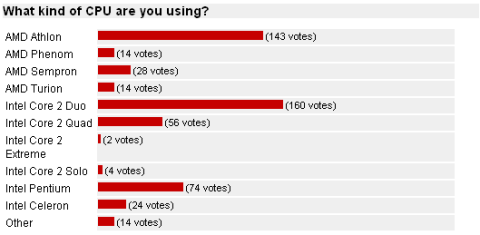
A couple of weeks ago I wrote something about CPUs and H.264 here, and this is just a post to follow it up. Since then, I’ve ran a poll on the type of CPU people uses, and the results are in. It’s not all that surprising, but it does give a good indication of the present AMD vs Intel war which Intel seems to be winning quite handsomely.

Let have a look at the results graph:

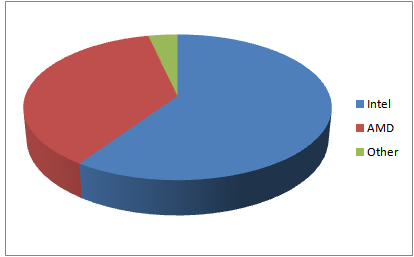
Breaking down the results into Intel vs AMD (vs Other), here’s what we have:

As you can see, Intel currently holds a good lead over AMD, where 60% of people polled had one of Intel’s CPUs, compared to only 37% that have AMDs. This is not really surprising, as AMD have only recently been able to properly respond to Intel’s Core 2 Duo/Quad range with the Phenom X3/X4s, largely thanks to AMD’s mistake of releasing the original Phenom with a memory addressing bug that caused huge performance problems.

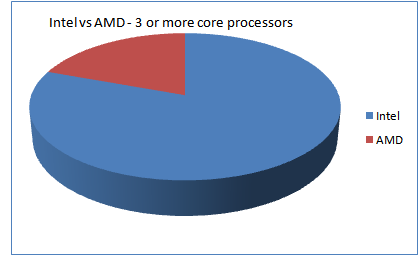
What is also clear though is that while Intel has a well established brand name for it’s range of quad-core processors, AMD’s Phenom range hasn’t really taken off, and they are still reliant upon their Athlon range to fight against Intel’s Core 2 series. With the Phenom X3/X4s being priced very competitively against the Core 2 Quad, AMD’s Phenom series looks to have a bright future.

And AMD still does not have any processors that can compete with the Core 2 Extreme series … while it’s not a popular series, having the fastest CPU on the market definitely helps sell the other CPUs in the range.

Looking at the other end of the scale, at the budget processors, Intel again has many more options available than AMD, with Pentiums (both desktop and mobile), Celerons, Solos and the lower spec’d Core 2’s all competing against the Sempron and Turion.

So if AMD is to compete against Intel, then they need to focus more on the Phenom range, to pit it directly against the Core 2 Quad and some of the high end Core 2 Duos. They will also need to bring out a wider range of processors, to serve the budget through to the enthusiasts market, as it feels their current range is heavily focused around a very narrow price/performance range, with more emphasis on the lower performance/budget market, than the high end enthusiasts market. In other words, there is an Intel CPU for every type of PCs, while there doesn’t seem to be the same range from AMD.

All will change again when Intel’s Nehalem processor range is released later in the year, so there’s not much time left for AMD to act, and act they must if they want to stay competitive.