Archive for the ‘Computing’ Category

Weekly News Roundup (14 June 2009)

Sunday, June 14th, 2009

Time for another Weekly News Roundup, because, funnily enough, it’s been another week since the last one. Since then, the NPD US video games sales figures for May 2009 came out, and as usual, I have posted my analysis. More bad news for the video gaming industry basically, but a slight improvement since April. And there’s yet another hyped up PS3 exclusive (inFAMOUS) that has failed to really grab a huge chunk of sales, adding to the list including LittleBigPlanet and Killzone 2, to name a few. Sure, they do sell in good numbers eventually, but so do a lot of other quite mediocre titles, including ones that aren’t even exclusive and so by common sense should be selling less on one particular console than exclusives. I do wonder how many people are like me and don’t use their PS3 for games, only for Blu-ray or media playback. I’m sure the percentage of this type of users is much higher than on the Xbox 360, while a competent media hub, is no patch on the PS3 (no Blu-ray, noisy …). Anyway, onto the news.

Copyright

In copyright news, a couple of developments this week, mostly in Europe. That’s understandable, due to the attention the Pirate Bay trial has attracted, and what appears to be several European government’s obsession in pleasing their American overlords to pass strong anti-piracy legislation.

The Swedish Pirate Party now has a seat in the EU parliament

The Swedish Pirate Party now has a seat in the EU parliament

First up is good news, which is rare for this section of the WNR. The Pirate Bay may have lost a trial, but it has gained status as a political party by winning a seat in the European parliament. They won 7.1% of the vote in Sweden, which may not sound quite as impressive to people living in countries with two major parties, but considering that the largest  party in Sweden got 24.6%, and that their Prime Minister’s own party only got 18.8%, the Pirate Party’s 7.1% suddenly looks a lot more significant. The traditional third party in many countries is the Green party, and they only got 3.6% more. The Pirate Party is a single issue protest party, and it’s really unheard of for such a party to receive so many votes. But that’s not to say that the one issue they represent is not an important one, or one worth fighting. Far from it. One can only hope The Pirate Party extends their reach to around the world and they can become a political force that will force some positive change for the lobbyist controlled copyright issue.

Meanwhile, the New York Times posted what appeared to be very bad news for The Pirate Bay in terms of their trial, which the headline that states that their appeal has been denied. This was sourced from an article by the Hollywood Reporter. However, both are wrong in this case, according to our forum’s resident Swedish expert, Cynthia (and a couple of other news sources). The Pirate Bay defence had claimed that the judge ruling the case was biased. The court which will see to the appeal has asked for opinions from the original court that ruled the case in regards to this claim, and the original court has denied any evidence of bias and has submitted this. This is where the confusion comes from, perhaps, because no judgement on the appeal has been made yet, and I doubt this is the only avenue of appeal anyway. Thanks again Cynthia for the update, and no thanks to the NY Times for their lack of research on the issue (even if they don’t consider it “important”).

A couple of weeks ago I posted a news item about France passing a new controversial law, dubbed the “three-strikes” law, which aims to cut off Internet usage for people found to be “guilty” of downloading pirated material three times. Of course, there is no court, no appeal of decisions, and the copyright groups can basically silence anyone it wants to without any hint of a fair process. It is no surprise then the country’s constitutional council has declared this law to be, well, un-constitutional because a system where one is assumed to be guilty and the charged needs to prove their innocence is not one that should belong in a Democratic society. The council basically says that the court has to be involved somehow, so people can prove their innocence. The French government are undeterred and plan to go ahead with the now modified law, which will now require “special judges” to rule on each and every case. But the whole point of the three strikes system is so that it doesn’t go through the criminal justice system to save time and money, but the newly modified law won’t achieve this point and one can see the court system being overwhelmed instantly. Maybe then, it will convince the French government to drop it completely.

All this emphasis on downloads seem to suggest that downloading pirated material has led to a collapse in revenue for industries such as the music industry. While the music industry has suffered from lost of revenue, there is no doubt of this (well, maybe a little), perhaps the reason is not piracy at all. The Guardian, spending a little more time doing research than the NY Times, has came up with a very interesting graph in regards to people’s spending habits. And yes, it does show music spending way down compared to just a few years ago. But the overall spending seems to have increased, to almost double of what it was in 1999. And looking at the graph in more details, it’s easy to see why this is the case. DVD sales went up quickly, but has stayed pretty flat since 2003. Music down as mentioned previously, and so is DVD rental. But people’s spendings on gaming quadrupled in the same period. So instead of piracy getting people’s money, it’s actually gaming, taking money away from music and rentals, and to be lesser degree, gaming. In the intro of this week’s WNR I talked about the NPD analysis, and one of the reasons that I have been doing the analysis posts for over a year now is because gaming is huge business and it needs to be made known that, yes, it is taking money away from the other home entertainment industries. But the point is overall spending increased, and this is despite piracy on the rise, so perhaps piracy isn’t a problem at all – it’s how the music and DVD industry, the passive entertainment industry if you will, can compete with the high level of interactivity that’s offered by video games. And while games are more expensive, say 3 times the cost of a DVD movie, but they also offer at least 3 times the entertainment, sometimes hundreds of hours of interactive entertainment, compared to only 2 or 3 hours for a typical movie (and 72 minutes for a CD). Research shows that piracy actually help to promote content, and thus promote purchases, while people who pirate are not the types to have spent money on it even if there was no pirated alternative. But let’s blame it on the pirates anyway, because that’s easy than confronting the harsher reality that music and movies aren’t as fun for the whole family as video games anymore, especially now with family oriented game consoles like the Wii.

High Definition

While this is probably still Copyright news, but I’ll talk about it in the HD section since the Copyright section above was getting a bit long. The big news this week is that the AACS licensing authority, the people behind copy protection on Blu-ray, has revealed the final specifications for the AACS system. There are a couple of controversial items in the announcement, which is not surprising given the whole attitude of the DRM industry.
Say goodbye to the analog video outputs on your Blu-ray player

Say goodbye to the analog video outputs on your Blu-ray player

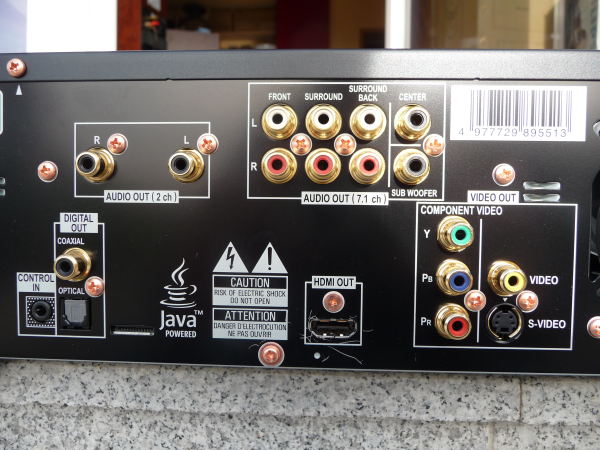
The big first controversial item is that analog video output is set to be banned from Blu-ray players. That’s right,  after 2014, no Blu-ray player will be allowed to have component, S-Video, SCART or composite video output or they face not getting the AACS license and therefore, will be unable to play all commercial Blu-ray movies. Starting in 2011, analog output will be limited to SD resolutions only, to set the analog sunset in motion. The argument that analog is useless in the world of HDMI and DisplayPort is a perfectly valid one, and that’s reason enough for manufacturers to stop including them in their players. But to place a ban on it due to copyright reasons is just stupid. If people aren’t smart enough to just download pirated movies online, then I don’t think they’re smart enough to hook up their Blu-ray players to their DVD recorders through analog output, and then somehow find a way to by-pass the Macrovision copy protection present on all analog outputs (for DVD and Blu-ray). It’s certainly not easier than downloading. And if this measure is to stop pirates from making copies, then since existing players support analog output, don’t you think that the pirates, if they needed to pirate through analog (which they don’t), would just keep a few old players lying around to bypass this measure completely. And real pirates work at the Blu-ray disc pressing plants, and have access to the masters, which is why they can bring out a pirated version even before the official release, and this doesn’t stop them. The only thing it stops is Macrovision from getting royalties from Blu-ray (which is not a bad thing, really), and it stops people using Blu-ray on older equipment. I don’t think this will really affect that many people, since I don’t think most people will even remember what analog is in 2014, but it’s the principle of the thing, and it just shows how paranoid the content owners are (possibly thanks to scary propaganda from the DRM industry).

The other big news is that Blu-ray Mandatory Copy will begin to rollout next year. What it is, and it’s already present but not in a standardised form, is that it will allow you to make limited copies of your Blu-ray movies through the Blu-ray player itself. The copies can be on Blu-ray, DVD or even for your portable players (although no Apple based players have signed up for this yet). Blu-ray movies with MC will have an extra menu option to make copies. Each Blu-ray disc with this feature will also have an unique serial number, which is used in an online authentication system to record and place limits on your copying activities (as well as to track if the copied content eventually ends up online or not). That’s pretty much what you would expect from such a system. The problem is that current Blu-ray players do not support MC, and so if you want it, you’ll have to buy yet another Blu-ray player (Blu-ray Profile 4.0?). The PS3 may be able to accommodate this through software updates, and your PC may be updated through software as well to conform to MC standards. And despite the phrase “mandatory” in Mandatory Copy, it isn’t mandatory and is purely optional for both movie studios and hardware manufacturers. And Blu-ray movies with MC enabled will cost more. So MC may be dead before it even starts, but it does add value to be able to make portable versions of movies straight from your Blu-ray player, and it might still end up cheaper than the studio’s preferred method of you purchasing the same content many times over in each different format. I’m going to call this positive progress, because at the very least, it acknowledges the need for people to make legal copies of their movies.

Wal-Mart will be offering cheap Blu-ray players for Father’s Day, at $128 each. But take the advice from our forum members and avoid the ultra cheapo players, because they lack many of the features that the slightly more expensive players have, such as Internet connectivity.

Apple’s upcoming Snow Leopard Mac OS X revision will feature GPU assisted acceleration, including H.264 acceleration, but you will need a Mac with at least the Nvidia 9400M GPU, or you’ll miss out. The $99 iPhone should also entice more people to buy it, and it’s a nice little media player even if you don’t need all the other fancier features. And for $99, you can’t really go wrong, especially if you limit Internet usage to your home WiFi network, as opposed to spending too much on data (more of an issue here in Australia and other countries with rip-off data charges). And no, still no Blu-ray on Apple systems. And speaking of data charges, Microsoft’s HD streaming services will require a 8 to 10 Mbps connection for full quality streaming (quality will drop if connection is slower). That’s out of reach of most Australians at the very least, but maybe you lucky folks in the UK, Asia or US may get to enjoy full quality HD streaming. From a technical point of view, 8 Mbps should give you excellent 720p quality video, while 10 Mbps is probably still too low to offer Blu-ray quality 1080p video (you need at least 15 Mbps to even come close). HD video streaming is still very much bottlenecked at the bandwidth level, I’m afraid.

Gaming

And in gaming, Microsoft’s Natal motion gaming system continues the media promotional blitz by appearing on Late Night with Jimmy Fallon (video in link), in a live demo that was played by Fallon. It’s certainly easier to see the potential of Natal, but until I buy it and test it out in my own home, I’m going to remain skeptical.

Can Natal really work, or will it be too inaccurate to be of any use?

Can Natal really work, or will it be too inaccurate to be of any use?

But Engadget and IGN has both had plays with Natal, and they’ve said some pretty impressive things about it, including the fact that it’s surprisingly accurate. The accuracy thing is the one I’m most worried about. And the live demos showed a modified version of Burnout Paradise that works with Natal, which might mean that lots of existing games can be updated to work with it. I’m really looking forward to playing Crackdown by jumping up and down in my living room like a crazy person.

For those that want to make the comparisons between the Wii, PS3 motion controller (PMC) and Natal, I think Natal is something a bit different to what the Wii and PMC offers. The PMC is a basically a super accurate Wii-mote, and add in the PS3’s HD graphics, it could offer the Wii some real competition. Natal, on the other hand, doesn’t even require a controller, which won’t please the hardcore gamers, but might entice even more of those who don’t consider themselves gamers, much like what the Wii has done. Some people just don’t like having to learn how to use a controller, or are unable to, but being able to use your body to do something is natural to all humans and much easier to learn. Plus Natal offers voice and facial recognition as well. But don’t forget that the PS3 has the PS3 has the EyeToy camera thing, which can be adapted to function in a similar way to Natal, so don’t be surprised if Sony offers body motion controls as well.

My WordPress word counter meter tells me I’ve type 2327 words already, so I’m ready to take a break now. More words coming at you next week.


Weekly News Roundup (7 June 2009)

Sunday, June 7th, 2009

Another pretty quiet week. Well, not so quiet with the E3 going on, but the major stories out of that were gaming which I will cover later on in this WNR. I did manage to write a mid-week blog this week, so no Fallout 3 jokes this time. The blog was about solid state drives and about how awesome I think they are. It’s well worth a read because you will be using one sooner rather than later. If they do manage to replace HDDs, then that’s the second last major mechanical device out of your average PC. What’s the last mechanical device? That’s your optical drive, of course. No wonder Sony says that Blu-ray may be the last optical format around, not so much because it’s so good that you won’t need another one, but rather because once HDDs are gone, the optical drive is going to seem quite quaint as the last mechanical device sitting in your PC (fans and switches excepted, although with cooler components and alternative cooling methods, fans are on their way out as well).

Copyright

Starting with the copyright news, there isn’t much going on actually. I don’t know if this is good news or not.  The MPAA is pretty busy these days with their (and their affiliates’) lawsuits all around the world, so I guess it’s understandable that they don’t have as much time to come out with the usual propaganda.

In the RealDVD case, the MPAA has made a claim that will not surprise anyone, but does give insight into what they perceive to be fair use. They have made the case to the judge that even making one backup copy of a legally purchase DVD for personal use is illegal, as it circumvents the DMCA. There are fair use provisions in the DMCA in relation to archiving, but the MPAA lawyers claim that’s for actual archives (like the National Archive) and does not apply to mere mortals. They even got the Copyright Alliance to claim that if they wanted to give people their rights back, they would have charged more per DVD, and not the current amount, which is too low to allow them to be able to make backups and stuff. Basically they’ve admitted that DRM is used to provide price control on digital content that’s normally (in its DRM-free form) hard to control. So it’s not about piracy at all, and never has been.

Windows 7's codec support may bring more anti-trust lawsuits

Windows 7's codec support may bring more anti-trust lawsuits

While it’s not a copyright issue, but it is still a legal one and that’s the slightly controversial approach that Microsoft has taken with audio/video codec support in the new Windows 7 operating system, which will be released in October. What they have done is locked Windows Media Player so that it won’t work with third party codecs. And the Microsoft codecs will override your third party ones unless unlocked or using a player that will ignore the way Microsoft has done things like Media Player Classic. It’s good news for end users I suppose, in that Microsoft is providing a bunch of codecs with the default OS installation so that you don’t need to go codec hunting just to play a XviD file. What’s not so good is for codec publishers that will lose customers, despite offering a superior product to the one that comes with Windows. Sound familiar? Didn’t Microsoft try to do this when they integrated Internet Explorer into Windows, and had to pay out huge amounts in anti-trust cases brought against them. Microsoft argued then that it was good for their customers, but offering something that come as standard is one thing, but preventing competitors from offering alternatives is another. We’ll have to wait until the release version to see if installing and using third party codecs has been made intentionally hard, or it’s just something that can be bypassed easily.

High Definition

In HD news, it’s all pretty quiet on the Blu-ray front. Most HD news these days is about yet another HD streaming service, or another hardware platform that now streams an existing service.

One of Microsoft’s big E3 announcements (you’ll read more about them in the gaming section), is that 1080p HD video streaming is coming to the Xbox 360. Bandwidth issues mean that none of the 1080p streaming services will come close to matching Blu-ray’s quality, and you can’t argue with the convenience of not having to step outside you home to watch a movie from a catalogue of thousands, more than what your typical store will hold. The best news is that, unlike previous offerings, this one is worldwide. And not only that, the services that Xboxers in the lucky countries have been enjoying will now come to 10 more countries, including Australia. Last week it was the news about UK and Irish Xboxers getting Sky TV channels through the Xbox 360. So one of Microsoft’s major themes for this E3 has been trying to turn the Xbox 360 into a fully fledged media streamer. And unlike Sony, they don’t have to worry about streaming taking customers away from their disc format, because they don’t have a disc format to support (anymore).  

Gaming

And so onto gaming, and most of the news this week has been the various announcements from the gaming companies. Nintendo was relatively quiet this E3, and it’s all been about Sony and Microsoft catching up.

And the best way to do that of course would be to copy Nintendo’s lead and offer motion controlled gaming. But both have decided to go in a slightly different direction to what Nintendo is offering.

Full body motion controls comes to the Xbox 360 through Project Natal

Full body motion controls comes to the Xbox 360 through Project Natal

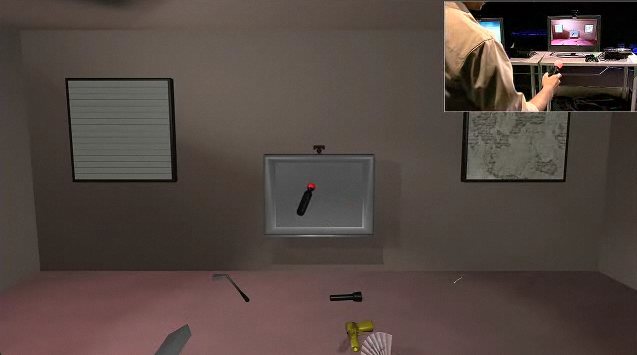
Microsoft was up first, and they demonstrated their Project Natal, a full body motion gaming system without the need for a controller (click on link to see video of Project Natal, as well as Milo). Well, you can’t accuse them for coming out with a Wii clone, that’s for sure. If the thing works, then it will open up a whole new level of gaming, because gamers don’t want an abstract representation of real world activities, as the gamepad provides. Even the Wii-mote is limited in providing a representation of real world activities, as it only works for one arm (and even with the Wii Fit board, it’s still limited – to go that one step further, then we’ll have to end up looking like the Borg just play Mario).  So a motion and depth sensing camera seems to be the way to go, and Microsoft has also added facial and voice recognition. The criticism of Natal is that without an actual controller with buttons, then the whole system may not work with proper games that require the gamer to do super-human things that only controllers and buttons can simulate. But what’s to say that Natal won’t have controller add-ons in the future? Another problem is accuracy, and I don’t know if the camera can pick up and interpret all the nuances that would be required to have a full gaming experience. But certainly this seems to be the next logical development in gaming, and it was what I thought the Wii-2 would be like. Microsoft also showed a demo featuring a virtual boy called Milo (see video from link above), which combined showed the future potential of Natal by allowing you to interact with your game console/virtual friend in unbelievable ways. 

PlayStation Motion Controller - like the Wii-mote, but in 3D and more accurate

PlayStation Motion Controller - like the Wii-mote, but in 3D and more accurate

Sony went with the more traditional approach, but added some innovation as well (click on link to see video). A controller wand very much like the Wii is present, but there is a big glowing light that, when combined with the PlayStation Eye, will allow depth to be tracked (based on how “big” the glowing balls are, as seen from the PS Eye) and will also improve accuracy. It’s basically motion capture technology used in 3D effects. And compared to the Wii, it basically means 3D motion controller that’s ultra accurate – and as many have said, basically what the Wii would look like if it was perfect. So it’s not as revolutionary as Natal, but it will be available for public consumption earlier by all estimates, and it is more “gaming”, compared to Microsoft’s more “virtual” approach. And there’s no reason why Sony can’t add some of Natal’s features through the use of the PlayStation Eye (some of which are already present). And yes, it looks like a dildo, but so what? And of course,  no price cut for the PS3.

So two companies and two different approaches. Which one will come out on top? Hard to say at the moment. If Natal works, then that’s the type of gaming I see myself playing in 5 years time. If the PlayStation Motion Controller works, then that’s the one I see myself playing next year instead of the Wii. And in the end, it’s all about the games that will support either system, and that will determine who wins. And don’t forget Nintendo, the masters of this type of thing, has yet to come out with the full response to these two interesting challenges.

On that positive note, here ends this week’s WNR. See you next week.

SSDs: The Next Big Thing?

Friday, June 5th, 2009
Good old magnetic HDDs may be on the way out ...

Good old magnetic HDDs may be on the way out ...

The good old hard disk drive has been around forever now. And you can tell they’ve been around a long time because in essence, they’re still largely mechanical devices. They run hot, they are noisy and they can break through prolonged usage. And they’re fragile too. Recent improvements in hard disk technology has meant quieter, more shock resistant drives, but you still can’t go past having platters, read heads, long seek times and the many limitations of a mechanical device.

So that’s the alternative? The good news is that the alternative is already here and available: SSDs. SSDs stand for Solid State Drives, and in modern usage, they basically refer to hard-drives that use flash memory chips as opposed to magnetic surfaces to store data. There are lots of technical stuff related to SSDs, such as the two main type of SSds (SLC and MLC – SLC stores bits in the familiar one bit per cell fashion, whereas MLC stores two bits per cell to double storage as the expense of write speed), but we won’t go into these technical details. Instead, this blog will examine whether SSDs can compete with the current range of cheap and TB sized HDDs (for the purpose of this blog, HDDs will refer to standard magnetic mechanical drives), listing the advantages and disadvantages of either format.

Form Factor:
SSDs now come in 2.5″ and 3.5″ varieties just like hard-drives, and they employ the familiar SATA interface. So fitting one into your PC won’t be a problem.

Read Speed:
SSDs employ parallel architecture to improve read speeds. Typical read speed (such as for the Intel X25-M drive) is around 200 MB/s, often going up to 250 MB/s. A typical hard-drive would be around 100 MB/s for sequential reads. HDDs will actually transfer files at slower speeds depending on where the files are located (for example, inner and outer edges of platters) and how they are fragmented. SSDs do not suffer from this problem, when it claims to have xxx MB/s, then that’s not dependent on file location and fragmentation.
Update: Having read a few more reviews, including some more recent ones with real world tests as opposed to numbers published in specifications, I have revised the read speed ratings below to better reflect real world stats. HDDs tend to have more stable read speeds between models as it is a more mature technology, whereas with SSDs, the range tend to differ more. But read speed is still heavily in favour of SSDs, even if you take the lower end MLC SSD read results. Note that the high end HDD results are for high performance drives such as the WD VelociRaptor range.
HDDs: 60 – 100 MB/s
SSDs: 90 – 180 MB/s (up to 250 MB/s for SLC drives)

Seek Times:
The lack of mechanical servos and reading arms means that seek times are much improved. A typical SSD has a random seek time of around 80 microseconds. A typical HDD will has a seek time of around 14 milliseconds. 1 millisecond equals 1000 microseconds, so seek times for SSDs are actually around 175 times faster. And again, because there are no physical and mechanical limitations, the seek time is not dependent on file location and fragmentation.
HDDs:
14 ms (14,000 microseconds)
SSDs: 80 microseconds

Write Speed:
As mentioned before, there are two types of SSDs: SLC and MLC. MLC has slower write speed, but by “slower” it is still about the same as your typical hard-drive. SLCs will write faster, at more than 160 MB/s, around double that of your typical hard-drive. Again with seek time and read speed, location and fragmentation aren’t issues.
Update: Similar to the read speed update above, write speeds for SSDs differ much more between models, and there are some very low results when compared to even the cheapest HDDs, as there are really high results compared to even the most expensive HDDs. Typically, SLC drives still easily destroys the performance of any HDDs, but they will also destroy your savings as well.
HDDs: 50 – 90 MB/s
SSDs: 45 – 120 MB/s (up to 160 MB/s for SLC drives)

Power Requirements:
Another advantage of non mechanical drives is the reduction in power requirements and heat. A typical hard-drive draws around 8W of power even when idle, whereas your typical SSD only uses less than a single watt even under heavy use. This makes SSDs perfect for portable computing needs, where both power and heat can be problems. Noise is all but eliminated as well.
HDDs:
8W when idle
SSDs: 1W under heavy use

Durability:
By taking the possibility of mechanical failure and losing magnetic cohesion from the equation, SSDs can be even more durable than standard HDDs. A typical HDD has a MTBF (mean time between failure) of about 136 years (plenty for mere mortals). A MLC type SSD has about the same MTBF, and the SLC type is even better at almost double this (around 228 years, for the Intel X25-M). SSDs are also better able to handle being physically abused as there are no delicate mechanical parts that are a drop away from being damaged permanently. And when SSDs do fail, it will be the write that fails first (read will still work)), so you can still retrieve your data while you seek a new drive, unlike HDDs that can fail and take away all your data almost instantly.

Capacity and Cost:
So far, SSDs are taking HDDs for a ride in every aspect. So why aren’t we using SSDs? The reason is the two C’s: capacity and cost. Do an online search for SSDs, and the sizes you are likely to see are still in the GBs, as opposed to TBs. 256 GB is considered large for commercial SSD drives, while HDDs are now considered small even at 4 times this. As for cost, you will be paying through the nose for SSDs, even at small sizes. A quick search over at Newegg.com reveals that a 256 GB SSD costs $619. That works out to be around $2.40 per GB. A Seagate 1.5 TB HDD, in comparison, costs only $129, or $0.09 per GB. This means that SSDs are currently28 times more expensive than HDDs, while offering much less space per drive. Even if you take even lower capacity SSDs (which are cheaper per GB), that cost is still around $2.00 per GB, or 20 times more expensive.
HDDs: 1 TB at under 10 cents per GB
SSDs: 128 GB at around $2.00 per GB

... while SSDs will almost certainly take over

... while SSDs will almost certainly take over

So there you have it. SSDs pretty much beat HDDs at everything, except capacity and cost. But the good news is that these two C’s are the areas that SSDs will improve at an exponential rate. Competition in this sector will be fierce due to a large number of companies being able to produce SSDs – RAM and flash drive producers will join existing HDD manufacturers in producing SSD drives. This should help ensure prices drop at an even faster rate. Note that you have to look carefully to buy the right SSD as not all SSDs are equal (see updated notes for read/write speed entries). This is another weak point of SSDs, in that the technology is still maturing. The Intel X-25E, being a SLC drive, is the top performer at the moment. But for better value, something like the OCZ 120 GB MLC SSD drive will offer superior read and write speeds to all HDDs, and costs much less than SLC drives. But it is still way too expensive compared to even the most expensive HDDs, even if you don’t take into account the capacity shortage.

So while it is a bit unrealistic to think people are able to replace HDDs with SSDs at this moment, there is no reason to think that SSDs won’t replace HDDs in the short the mid term. My prediction is that by this time next year, many mid and top end PCs will come with SSD storage, perhaps complimented by larger HDDs for media storage. Portable computers will quickly employ SSDs over the rest of this year, with perhaps cheaper netbooks coming with them as standard due to the benefits of battery times outweighing the extra cost. And in two year’s time, the humble magnetic HDD that has served us so well may very well be a memory of the past as SSDs take over the market completely. I, for one, can’t wait.

Weekly News Roundup (17 May 2009)

Sunday, May 17th, 2009

It was a long time coming, but I finally managed to write the latest edition in the “If I were to buy a new computer today” series. With Windows 7 around the corner, Intel’s Core i7 and AMD’s Phenom II processors being released, it was a good time to update the series. The poor economic conditions have been factored in as well, so I’ve managed to “assemble” a system that’s cheaper than the last one, while still offering excellent all around performance and features. In my opinion, anyway. People say PC’s are dead, especially when it comes to PC gaming, but I hold the view that there are certain games that are best played on PCs, and until consoles actually become PCs by allowing gamers to use keyboard/mouse controls, there will always be a place for PC gaming.

Copyright

Lots to go through this week so let’s start with the copyright news. In Australia, the copyright case against the ISP iiNet continues. There is sort of good news for iiNet, in that part of the lawsuit against them have been dropped. They are no longer being accused of being the main copyright infringer, rather, they are now only being accused of providing copyrighted material. This was most likely because the Judge in the case asked for evidence of this, and the AFACT (Australia’s very own MPAA , the group suing iiNet) could not provide it.

Meanwhile, the more well known case against The Pirate Bay gets closer to a retrial. There was also evidence that the Judge in that case was not only guilty of a conflict of interest, because he was part of a pro-copyright panel, that he is also biased because he was involved in a scandal relating to the police search of an ISP that wasn’t entirely based on solid evidence. Looks like the other side got a very very friendly Judge in this case. The other big case at the moment is of course the MPAA vs RealNetworks trial. RealNetworks has hit back by filing anti-trust charges against the MPAA, calling it a “price-fixing cartel”. Whatever you feel about RealNetworks’ products (and I’m a huge anti-fan of them), and even what you feel about the software on trial (RealDVD creates more DRM than it removes), you do want the MPAA to lose this one, because it will then open up DVD and even Blu-ray to so many other uses, such as being able to store copies of the movies on NAS to stream to your media device without having to insert the disc all the time.

Good news and bad news in Europe/UK this week. UK ISPs have refused to become copyright cops to police their users’ usage. This is all good, except if the government passes laws to force them to do it, then they have no other choice. Which is what is happening across the Channel in France. The French has passed their “Net Piracy” bill which will people having their Internet connections disconnected if they are “caught” download illegal content three times. It’s a shame to see such a draconian measure being passed in what has traditionally been a very liberal country. I don’t know the details, but I can’t see there being a fair way for people to appeal this decision, since I doubt the court system has the capacity to absorb the hundreds of thousands of cases that will spring up each year. And if the court system is not involved, then are users simply guilty because two corporations (the ISP and content owners) say they are? And having an Internet connection these days is just as important as any other utility such as water or gas for many people, and do you really want your supply to be controlled by multi-national corporations with no chance of appeals?

Better movie, more hype, but less ticket sales because it wasn't pirated

Better movie, more hype, but less ticket sales because it wasn't pirated?

The industry will talk about the threat of piracy, how in the current economic climate it is even more important to crack down (it’s funny how they take advantage of serious issues to cram in their own agendas, such as using an anti child pornography bill to get their anti-piracy stuff through). But does Internet piracy really affect sales, or can the extra (and free) promotion actually help? Last week I mentioned the movie Wolverine, how it was leaked online months before the premier, but still managed to do very well at the box office. This week, we have that other summer sci-fi blockbuster that’s received way more (traditional) hype, Star Trek, and appears to be the better movie. And it was also not leaked online. This makes for an interesting comparison between the two movies – a better and more hyped up one that’s not leaked, and another that was leaked. And guess which movie sold more tickets? Yep, you guessed right, Wolvering beat Star Trek at the box office based on opening weekend numbers, despite (or is that because of) the online leak. So does piracy actually help to promote a movie? The Internet certainly helps to promote movies, and the more piracy, the more Internet hype, and who knows.

Nintendo has also recently released their updated DS handheld, the DSi. Part of the new set of “features” is a firmware update service that has been specifically designed to root out piracy. Unfortunately, it won’t work. The companies that make flashcarts that allows copied games to be played are one step ahead (or technically just one small step behind) by releasing their own “fixed” firmware – one for each new firmware released by Nintendo. This way, users can have the latest Nintendo firmware, but still (within a short period of time) play their copied games. So that’s another DRM problem solved. Which is no wonder that game developers are finally rallying against DRM, because they simply do not work. If they work, then perhaps you can argue for their necessity. But they don’t work, so they cost money, make things more difficult for legitimate users, and maybe even encourage anti DMCA behaviour for those sick and tired of having to insert their game disc or carts every time they want to play something, even just for a few minutes.

High Definition

That was a long copyright section. Next up is high definition news. One needs to be careful when digesting the stories about Blu-ray sales skyrocketing. As Betanews says, Blu-ray sales *are* skyrocketing, but only if you lower the sky. This article talks about hardware, and the stats make interesting reading because the 72% increase in the number of players sold has only resulted in a 14% increase in dollar sales. This suggest that the average Blu-ray player sold today is 34% cheaper than what it was a year ago. This makes perfect sense because hardware prices have dropped as expected, and cheaper products equals more sales. But is a 72% increase enough? Especially considering the low starting point in the first place.

Now, I’ve been keeping track of Blu-ray movie sales figures through Nielsen VideoScan stats, and have been posting analysis of them for over a year now in this forum thread. This means, for the first time, we can actually compare this year and last year’s stats for the same week. This isn’t actually a good way to compare figures, since movie sales are largely related to the titles being released, rather than what week it was. However, if you do an average, then you will be able to get a fair picture of what’s going on with movies as well. It is pretty clear that Blu-ray movies sales have nearly doubled (possibly close to a 72% increase as well), although again the low starting point makes this sound better than it is (if I sold one Blu-ray movie last year, and I sold 5 of them this year, then the 400% increase isn’t as impressive as it sounds). It’s not good enough to replace the lost sales of DVDs, that’s for sure, but again the question is whether it is good enough for the Blu-ray format? I really don’t know the answer. I think if we fast forward another year and we see the same level of increase, then you will probably be able to say that Blu-ray has made it. Right now, it’s too soon I think to declare a winner.

Zulu on Blu-ray: Amazing restoration effort

Zulu on Blu-ray: Amazing restoration effort

But assuming you are one of the additional 72% that purchased a Blu-ray player this year, what movies do you get to show off your system? Engadget HD asks this question of its readers. Personally, I think sections of Planet Earth are absolutely amazing and exactly the type of stuff I picture when I dreamt about going HD some years ago. Other people will have their own list, some concentrating on sound rather than picture, or on interactivity. But I also prefer older movies that have been properly restored on Blu-ray, and you get to see them at the best they’ve ever been shown. Zulu is one such example, where the transfer is simply amazing for a movie of this age. These can often surprise and amaze people more so than say Iron Man, because people expect Iron Man to look great on HD, not so much an older movie that they’ve gotten used to on TV or even DVD with their poor transfers. Certainly, Blu-ray has given studios an excuse to spend a lot of money restoring old movies. Whether the money was worth it commercially or not, remains to be seen.

Gaming

And finally in gaming, the April NDP figures are out and I will analyse them early next week. The numbers look bad across the borad, except for the Nintendo DSi. All the other consoles have dropped in sales, both compared to the last month and also compared to a year ago, with only the cheapest console, the Xbox 360, dropping the least. The PS3 was outsold by the PS2, which has recently received a price drop (hint to Sony?).

There are rumours of a new PS3 build being released, and could Sony be perhaps lowering prices through this new SKU by cutting some corners here and there in the new build? The current models apparently costs 10% more than what the retail price. This is not that surprising, although I thought it would have been much higher than 10% to explain Sony’s stubbornness on price cutting. Another way for them to cut prices without cutting prices would be to put more Sony produced games in game bundles with the console, if you include 5 free games by redemption or something but with the pack remaining at the same price point, then it works out to be good value, especially if there’s a list of games you can choose to redeem. Blu-ray did this at the beginning, and it helped to make the expensive players more attractive, but only at a small cost to the manufacturer.

That’s the news that was for the week. Have a nice weekend, or whatever is left of it depending on your time zone. See you next week.

If I were to buy a new computer today (May 2009)

Tuesday, May 12th, 2009

It’s been a while since my last “If I were to buy a new computer today …” blog, and a lot has changed since then, most notably the introduction of new processor lines from both Intel and AMD.

First, a little bit of history. Back in September 2007, I first wrote about what I would be looking for in a computer if I were buying one today. To get a better idea of the kind of system I’m looking for, please refer to the original blog entry, but to sum up, it would be a system for playing the latest 3D games as well as a system ready for Blu-ray playback, but one that is reasonable in price and without the need for overclocking. But overall, it’s all about the price performance ratio and finding the best system that offers the best ratio (so not necessarily a “budget” system, nor a “high-end” one). 

I will format this post a little different than previously, as I will be explaining the various parts up front, and then listing the specs table. I will also be looking at US parts and prices, despite being located in Australia, since this avoids issues with the exchange rate. Got a lot to go through, so let’s get started …

AMD Phenom II X3 720

AMD Phenom II X3 720

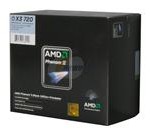
CPU: Since the last post, Intel has released its Nehalem series, now called the Core i7. AMD has been busy as well, releasing a less radical processor in the Phenom II. I don’t want to get into it too much, but suffice to say that the i7 is way overpriced at the moment, especially if you add in the cost of expensive motherboards. The Phenom II series make more sense from the financial point of view, although it’s far behind the i7 in terms of performance. I’ve chosen the Phenom II X3 720, as it costs less than the ageing Phenom X4 9950, and offers slightly better performance. Yes, you miss out on one core, but then it offers an extra core compared to Intel’s Core 2 Duo range (which costs a lot more).
Pick: AMD Phenom II X3 720
Alternative: AMD Phenom II X4 810 – an extra core if you really need all four

Motherboard: The choice would be between a AM2+ or AM3 motherboard due to our CPU pick. The basic difference is that AM3 supports DDR3, whereas AM2+ supports only DDR2 – both will support the Phenom II processor. So while AM3 is more future proof, AM2+ is better value at the moment if you add in the cost of RAM. With the economy the way it is, I’m going with AM2+. I’m going with the 790X chipset, since the FX’s quad GPU support is not a must have feature. I’m sticking with a brand I know, Gigabyte. 
Pick: Gigabyte GA-MA790X-UD4P
Alternative: Gigabyte GA-MA790GP-UD4H – if you don’t need gaming, then the onboard Radeon HD 3300 will provide excellent Blu-ray decoding acceleration for $20 more than the MA790X-UD4P 

RAM: DDR2 is cheap and plentiful. 4GB is enough for today’s applications, especially if you’re still going to use a 32-bit OS. You’ll probably have your own preferences in terms of brand, but I’ve chosen Corsair 2 x 2G DDR2 1066 RAM at CAS 5.
Pick:  Corsair XMS2 PC2 8500 CAS 5 (2 x 2G)
Alternative: Corsair XMS2 PC2 6400 CAS 4 (2 x 2G) – if you want an extra bit of performance, go with these CAS 4 rated DDR2 800 RAM

HDD: TB drives are all the rage, so we’re going with two of the Samsung F1’s which are quiet and fast. We’re going with two for a simple RAID 1 setup, but you can grab more or less depending on which RAID you want or don’t want.
Pick: 2 x SAMSUNG Spinpoint F1 HD102UJ 1TB
Alternative: Go with just a single drive for a non RAID setup, or a RAID 5 setup with 3 drives

HIS Radeon HD 4850

HIS Radeon HD 4850

Video Card: ATI’s 4800 series has been extremely popular, in terms of both price and performance. This is one area where it really depends on your needs, whether you want the best gaming performance, some gaming performance, or none at all (if so, then going with the motherboard with integrated graphics is the best choice – see above). The NVIDIA range seems expensive for the power they provide, and you should really only consider the top range cards for top performance. In the mid range, I still prefer the Radeon HD 4850 series for those who wants to dabble in gaming, but don’t mind turning down a few details here and there. The brand of the card is up to individuals, and you’ll have to look at the included HSF, software bundle and such (I’ve picked the HIS with free copy of S.T.A.L.K.E.R: Clear Sky until the end of May).
Pick:  HIS Hightech H485FN512P Radeon HD 4850 512MB
Alternative:  HIS Hightech H487FN1GP Radeon HD 4870 1GB – the 4870 comes with more performance, 1GB of faster GDDR5 RAM as well, for those that want the few extra FPS

Sound Card: Still going with a on-board solution, which works well for most people that don’t require audiophile level quality. With ATI’s Radeon HD range, you can output audio via the graphics card’s HDMI as well.

Optical Drive: Still sticking with a Blu-ray reader drive. My thinking is that when Blu-ray media becomes cheap enough for everyday use, then drives will be dirty cheap and much faster than current offerings, so it’s not worth buying a Blu-ray burner drive at the moment. Of course, if you really must have 50GB of storage per disc, regardless of the price, then these drives are not too expensive.
Pick: LG GGC-H20L Blu-ray/HD DVD reader, CD/DVD burner
Alternative:  LG GGW-H20L Blu-ray/CD/DVD burner, HD DVD reader – add Blu-ray burning for $70 more

Samsung T240HD

Samsung T240HD

Monitor: 22″ seems to be the sweet spot in terms of price, but I prefer 24″. You can spend a little, or a lot here, and it really depends on your needs. But I like to spend a bit more on your monitor, because a good one can last several computers, and it’s the only part of your PC that you have to interact with everyday. Most people would probably want a 16:10 ratio monitor, this will give you 1920×1200 resolution. However, there are more monitors carrying the 16:9 ratio (1920×1080, 1080p), which is the same ratio used by widescreen TVs and is most suited for connecting to game consoles or Blu-ray players. The problem with these 1080p displays is that it lacks the vertical resolution of 16:10 monitors (1200 lines versus 1080 lines), and so you won’t be able to display resolutions like 1600×1200 for example, despite having a horizontal resolution that’s greater than 1600.  I went with the Samsung T240HD because it had HDMI input (the more popular 2443BWT does not). If you are serious, then look for S-IPS or VA type displays, including the Dell UltraSharp range.
Pick: Samsung T240HD 24″
Alternative: ASUS VW246H – A cheaper 24″ with 16:9 as opposed to 16:10 (lower vertical resolution), good for Blu-ray

Case: I’m keeping with the Antec Sonata Designer, which comes with a quality 500W power supply that is more than enough to power the above system. 
Pick: Antec Sonata Designer 500
Alternative: RAIDMAX SMILODON ATX-612WBP – a more fancier, yet cheaper option, also with a 500W power supply

So that’s the system picked out. All you need is to add an OS (get XP, and then wait for Windows 7), and a keyboard/mouse combo. Here’s the full system spec and prices (note that comparison with October 2008 prices removed since that was for Australian prices, and this time, we’re using latest Newegg.com prices) – changed parts in blue, unchanged in black:

Type: October 2008 Part: May 2009 Part: October
Price
($USD):
May
Price
($USD):
CPU: Intel Core2Duo Q8200 AMD Phenom II X3 720 $139
Motherboard: Gigabyte GA-EP45T-DS3R Gigabyte GA-MA790X-UD4P $110
RAM: Corsair 2 GB DDR3 PC-10600 Corsair XMS2 PC2 8500 CAS 5 (2 x 2G) $69
HDD: 2 x Samsung 750GB 7200RPM 32MB SATA2 2 x Samsung 1TB 7200RPM 32MB SATA2 $150
Video Card: NVIDIA GeForce GTX260 896 MB (Gigabyte) ATI Radeon HD 4850 512MB (HIS) $100
Sound Card: In-Built In-Built N/A N/A
Optical Drive: Pioneer BCD-S02 LG GGC-H20L $100
Monitor: Samsung 24″ 2433BW Samsung T240HD 24″ $330
Case: Antenc Sonata Designer Antec Sonata Designer $140
Total Price ($USD): $1,403 $1,158

So that’s a system that will play all the latest games, albeit not always at the highest quality, and will play Blu-ray movies without breaking a sweat. It’s not the cheapest system available, but it’s full of quality parts and it will last you many years.

For the next issue, it will all be about waiting for the Core i7 prices to drop, perhaps Intel could release a few lower spec’d models at lower prices to compete with the AMD chips. Otherwise, the Core 2 Duo line-up doesn’t fare too well compared to the new Phenom II’s. 

See you in a few month’s time …