Archive for the ‘Computing’ Category

Weekly News Roundup (4 October 2009)

Sunday, October 4th, 2009

Welcome to another, slightly later than usual, WNR. Time to do a PSA, or public service announcement. With Microsoft revealing its new free anti-virus software, there’s now now reason, none at all, why you should not have security software on your PC (that’s firewall, anti-virus and anti-malware). Just with free anti-virus software, there are now at least 6 well known free software to choose from. With malware, at least passive protection, then you can’t really do worse than scanning your computer monthly using the full scan function of Malwarebytes’ Anti-Malware, another free software. And as for firewall, then ZoneAlarm Basic will offer you basic protection that’s better than the built in Windows Firewall. And with a little bit of discipline in terms of updating your operating system/browser with the latest patches, and not clicking on every link you find in emails and on website, then there’s a decent chance that your computer will remain malware free. Decent, but not guaranteed of course, which is why if you have the money, then investing in a security suite like Norton or Kaspersky Internet Security is a good idea, especially considering licenses often now come in 3’s and so you can protect all the computers in your home for a low yearly subscription fee.

Next week’s PSA: backups – do you have a system and if not, why not? Let’s move onto the news.

Copyright

In copyright news, The Pirate Bay appeal is about to begin, but there has been some shuffling of the judges in the case. Judges, or just clerks, I’m not quite sure – the Swedish legal system is a bit different to that of the US or Australia. But a judge, or a clerk, has been removed due to bias, but the request for removal came from the people suing TPB, not from TPB.

This leads me to believe that this might not be done to ensure the result cannot be challenged, as the RIAA/MPAA claims, but rather that the person’s removal may in fact hurt the TPB. The bias in question was related to this person owning shares in Spotify, which has content distribution deals with the RIAA. Does this mean the person would benefit from TPB not existing? Possibly, as Spotify aims to offer what TPB offers illegally. However, it also might mean this person has the required technical knowledge to understand the major issues behind the case, and that in turn might hurt the copyright holder’s case more. I was once told that this type of case is often won or lost on the ability of the judge(s) to understand the technical implications of their decisions, and that judges that do not come from a technical background (that is, most of them) will usually rule in favour of the industry group. It’s understandable, as if the first thing you think of when someone says “torrent” is rain, then you would also be more likely side with major Hollywood studios as opposed to a bunch of kids who set up this website about pirate ships.

Pirate Party Australia: Ready to fight in the next election in Australia

Pirate Party Australia: Ready to fight in the next election in Australia

Which is precisely why there should be more education and more public lobbying of the issues, which has generally been one sided in favour of the copyright holders. The Swedish Pirate Party’s fantastic results in the European Parliament elections shows that this is an issue that people care about and politicians and judges should realise that there are two sides to this issue, and is not a case good versus evil as portrayed by the copyright lobby. Which is good news then that Pirate Party Australia has managed to sign up enough members to contest the next Federal election, and I suspect they will do rather well in the polls, since there has been a lot of Internet related issues that have become major issues, such as the government’s ridiculous pursuit of a national censorship system, or the much needed national broadband network. And the piracy issue, particular with the current high profile copyright court cases, and the government’s hints at moving towards a three-strikes system, should ensure a lot of protest votes go the way of the PPA.

iiNet will defend itself in court next week over claims that it allows and promotes piracy

iiNet will defend itself in court next week over claims that it allows and promotes piracy

Speaking of high profile Australian copyright court cases, it will start next week but the Australian Federation Against Copyright Theft (AFACT) has dropped another key part of their case against iiNet. Previously, they had dropped the “conversion” charge, as they could not prove that iiNet was the main copyright infringer. Now, they’ve dropped the part of the case which say that iiNet engaged in primary acts of infringement, based on the fact that iiNet caches content for its subscribers. Of course, all ISPs cache content, that’s how ISPs work, and if an ISP can be found guilty this way, then all of them need to be shutdown immediately as they’ve all helped to plan terrorist attacks, share child pornography, commit acts of fraud and every other bad thing that has gone through their cache. The fact that charges are being dropped this late into the preparation phase, suggest that the original charges were far too ambitious, and lacked understanding of even some basic facts like how ISPs work. Were they perhaps too ambitious deliberately to scare iiNet into submission, into a settlement, not expecting iiNet to be so determined to fight the charges out in court? Who know.

Free All Music: Free MP3s, if you watch an ad ... too good to be true?

Free All Music: Free MP3s, if you watch an ad ... too good to be true?

Now, whenever there’s a clever new way to fight piracy, no matter whether it will work or not, I’ll report it here. The latest is interesting, and it’s actually good for consumers, as if the plan works, you’ll be able to download legal MP3s for free, and all it will take is a moment of your time. The new idea, well not exactly new, is ad-supported MP3s. The plans is that after the user views  a short video ad, they will then be able to download the DRM-free MP3s to keep. Sounds pretty good to me, although it’s a US only thing apparently so I can’t take advantage of it. But if it sounds too good to be true, then it might just be that. The major problem I can see immediately is, well, how will the video ads actually manage to pay for the MP3s, each of them costing at least $0.50 each – a single view of a video ad, unless the user clicks on it, is going to generate a lot less than 50 cents, probably a lot less than 5 cents. But if the ads do manage to pay for the music, then it becomes a good business model and will go a long way towards killing piracy, much more than a new DRM scheme or more lawsuits. Let’s hope my math is wrong and that the system does work, because I don’t people will mind sitting through an ad or two if it means free stuff.

High Definition

Let’s move onto high definition news, the latest rumour is that Apple will finally add Blu-ray support to its iMac range, despite Steve Jobs calling Blu-ray ‘a bag of hurt’, referring to the messy and expensive licensing process and the lack of user penetration. Both problems have been greatly reduced thanks to lower and simpler licensing schemes, and with current  market share double that of when Mr Jobs spoke.

But as it is, it’s just a rumour for now, and I haven’t really heard enough from the right sources to think that this is a certainty, not like with the PS3 Slim and Xbox 360 price cut rumours. Will Apple’s support help Blu-ray? Of course it will. Will it be a major help, probably not. Why? Well, Blu-ray has been available on Windows systems from day one, and despite there being a lot more Windows systems than Macs, it has been of almost no help to the format, and penetration of Blu-ray on PCs remain quite low. Still, with Apple’s well known and respected ability for working with HD video, having Blu-ray support is almost a necessity these days, rather than a luxury, although it remains to be seen whether hardware acceleration will be enabled in software (the Nvidia GPUs that iMacs use should support at least H.264 acceleration for Blu-ray playback).

One rumour about Apple’s reluctance towards Blu-ray is that its current Apple TV devices would be hurt by Blu-ray’s success, since Apple would prefer everyone to be buying movies through iTunes, as opposed to on disc. I don’t know if I believe this, as I think Apple’s reluctance is more to do with how people use Macs, and whether Apple thinks people will use it as a Blu-ray player, when they take into account the number of people who currently use it as a DVD player.

Foxtel Download: Free downloads for subscribers

Foxtel Download: Free downloads for subscribers

But it is true that technologies like iTunes are in some ways competing with Blu-ray for the home video market share. But even within downloads, there’s great competition from the way it is being offered. The latest thing here in Australia is that our major cable/satellite subscription TV provider, Foxtel, has just announced that they will offer 400 hours of downloadable content for free per month for all subscribers. It’s technically just allowing subscribers to download for free the content they’ve already paid for and with subscribers using the IQ set-top-box, content that they already have the ability to record and keep. But with a billing system already in place, and an user base that is already willing to fork out cash for TV shows and movies, it will be interesting to see if Foxtel extends this download service to premium content like the latest episodes available straight after their showing in the US – with the payment being handled through the monthly bill. Foxtel already does this with on-demand HD movies through their set-top-box, so it’s not a huge step to extend this to TV and movie downloads on the PC.

Gaming

Everyone knows about the infamous Xbox 360 RRoD problem, but I wonder if the PS3’s “no disc reading” problem might also get some unwanted spotlight in the near future. The problem I describe is one that I have personally experienced and posted about on this blog, and it seems to be still happening with the latest firmware updates.

I have no doubt that this problem is far less widespread than the RRoD problem, but there are still a large group of people who have suffered from it, and it seems to occur after every firmware update. I would guess that less than 1% of PS3s are affected, possibly much less than this, so it’s no surprise that some people feel the problem doesn’t exist because it has never happened to them. But it has happened, I can confirm from personal experience, with the people who posted comments on the blog, from users posting about their problem on the official PS3 forum and elsewhere, and so the problem is not imaginary. The worst part is that Sony charges $150 per repair of this problem out of warranty (mine was in warranty at the time), and if it is the firmware update process that somehow causes this to occur (and the PS3 firmwares themselves are not really known for their bug free nature), then I wonder if charging users this large amount is the right thing to do. And this problem pretty much only started showing up after the 2.40 firmware update, so something must have changed then that causes this problem to appear, but it’s all just speculation as Sony has refused to release any information in regards to this issue. And with the wholesale hardware changes in the PS3 Slim, I don’t think this will be an issue for the Slim, so that’s one reason to upgrade your old PS3s to the new one, even if the styling isn’t to my taste (I still like the old one better, hmmm, glossy).

Okie dokie, that’s itie for this weekie. More next week, so until then …
Weekly News Roundup (27 September 2009)

Sunday, September 27th, 2009

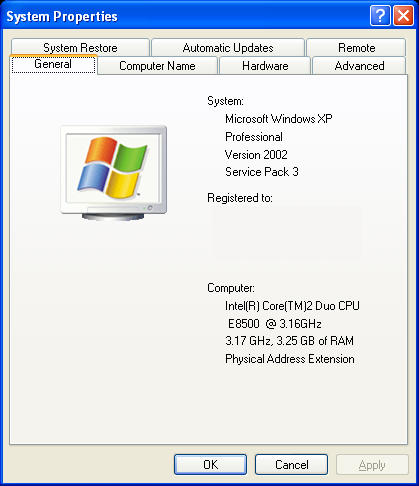
With Windows 7 coming in less than a month’s time, it certainly seems like it’s the operating system that Vista should have been, and I think Microsoft are on their way to a very successful launch, despite their horrible marketing campaign. And for those upgrading – and I hope you’re opting for a clean install because that’s the only way to get the best out of Windows 7, performance wise – then this is the perfect opportunity to go to a 64-bit OS if you’re not already using one. The reason is that to go from 32-bit to 64-bit, even within the same OS version, you’ll need a clean install, so you might as well bite the bullet when doing the XP/Vista to 7 upgrade. If you’re already using a 64-bit OS, then please ignore the blog I’ve just written, otherwise it’s well worth a read to find out if 64-bit is for you, or if 32-bit is good enough for now.

Otherwise, it was a fairly quiet week, with a few stories occupying the headlines to still make it a very interesting week, although most of it was yet again about the issue of copyright.

Copyright

Let’s start with the copyright news. There was only really one news item that really caught the attention of people this week. And not even Sir Elton John could push the news out of the headlines, much of it thanks to the reactions to the story on the Internet.

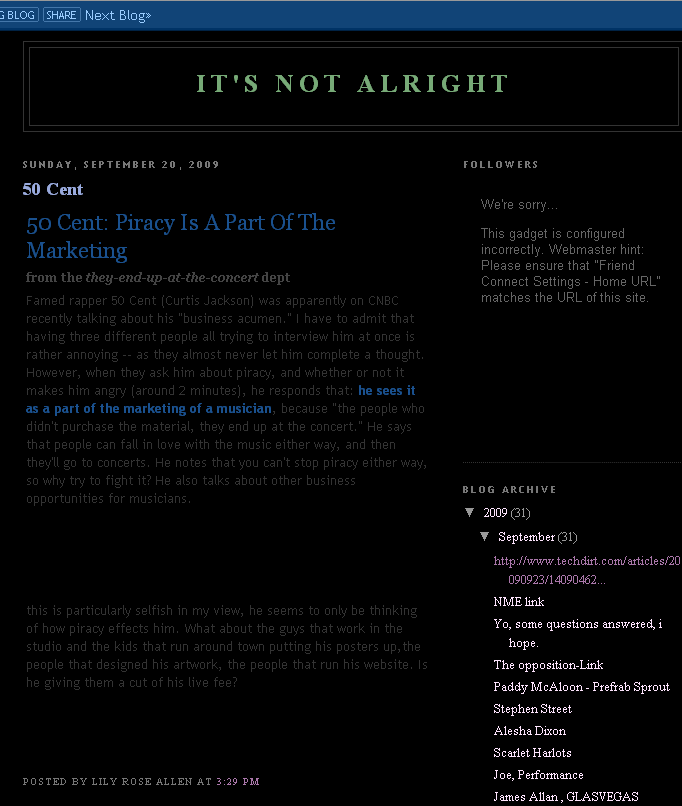
A screencap of the Google cache of Lily Allen's anti-piracy blog, which has now been closed

A screencap of the Google cache of Lily Allen's anti-piracy blog, which has now been closed

Earlier in the week, musician Lily Allen decided to take a stand on the issue of online music piracy. But unlike many others who have come out against the proposed three-strike Internet banning policy, Ms Allen has come out for it, even launching a blog called “It’s Not Alright” to voice her views on piracy. Now there is nothing wrong with someone expressing their views, in fact, that’s what the Internet is for. However, if you do come out with some opinion, especially a controversial one, then make sure you are untouchable when it comes to arguing the facts. Unfortunately, Ms Allen made the mistake of not doing enough vetting into her personal history in regards to piracy, and in netspeak, she has been truly and thoroughly pwned. It turns out that, in publishing her anti-piracy views, that she might have pirated the article of high tech news and discussion website, Techdirt. And not only that, a few days later, it was revealed that Ms Allen was a distributor of pirated music herself, with some self-made mixtape MP3s that was available for download from her website, that featured songs that she (and her record company) did not have the distribution rights to. Oops.

Some dude said nearly 2000 years ago that “let he who is without sin, cast the first stone”. And if one is to take the moral stance that anyone who has downloaded or shared an illegal MP3 (and that’s a lot of people) is a thief and should be punished harshly, than he, or she, should at the very least ensure that they have not committed the same “crime”. Because the truth is that it’s very easy to commit this crime, it may be because you think you’re not doing anything wrong by not paying for something you never had the intention to pay for in the first place, or perhaps you think sharing songs is a great way to promote the song and the artist and it may lead to you, or the people you shared the song with, to become a fan and start buying. There are legitimate arguments for and against a heavy crackdown on piracy, but as the Lily Allen incident showed us, it’s far too easy to be labeled a pirate just because, earlier in your music career, your appreciation of other artists led you to make a mixtape that somehow ended up online. And as Ms Allen posted on her blog about the mixtapes, “I made those mixtapes 5 years ago, I didn’t have a knowledge of the workings of the music industry back then”. But Ms Allen, under the very legislation that you support, you would be punished for what you claim you did out of ignorance 5 years ago, and guess how many other people might get punished for similar acts if what you support becomes law? And the article you stole from Techdirt, well, that’s copyright protected as well, even if it were just some text on some website you’ve never seen before. So I’m glad Ms Allen spoke out, because she has successfully demonstrated the worst aspect of the three-strikes system, something nobody else could do until it was actually made into law. Ms Allen has since then decided to quit the music business, which could be to her genuine loss of hope in the future of the music business due to continuing losses to piracy, a publicity stunt, a bit of sulky sulk sulk over the whole affair,  or a bit of everything.

Oh, and Sir Elton John made similar statements but nobody really cared, not when the Lily Allen Show was so interesting.

UK ISP BT says that policing Internet usage could cost more than simply ignoring the problem

UK ISP BT says that policing Internet usage could cost more than simply ignoring the problem

In all of this, it’s sometimes easy to forget that the whole point of the anti-piracy drive, and the three-strikes system, is all just about increasing profits for the music industry (and other industries). Not that there’s anything wrong with this of course, they have the right to take actions to increase their profits. But will the three-strikes actually stop piracy, and what about the cost to implement and maintain such a system. One of UK’s leading ISPs, BT, has came up with some estimates as to the cost of spying on Internet users, and they put the cost at £24 per person, or roughly £365 million per year in the UK. The UK music industry actually only claims £200 million in lost profits due to piracy per year, and as with their estimates, the actual loss is probably less than a quarter of this amount, if that much. The extra cost, the full amount of which will no doubt be passed onto the consumer, will hurt the Internet as access plans become less affordable and some are priced out of being able to connect altogether. This will in turn hurt legal online music sales and promotional efforts. I would be surprised if the music industry actually comes out ahead at all, but for them it’s of little risk since they scream so loudly about the seriousness of online piracy, yet are unwilling to fork out a single cent for a solution that they came up with. Probably the most effective way to actually kill off the three-strikes system is to actually force the music, movie (and other) industries to come up with the cash to implement such a system.

But the movie studios (or at least movie theaters) are spending on implementing systems that try and stop camcorder pirates. The latest such system uses infrared pulsing lights situated behind the screen that the human eye cannot see, but will be recorded onto camcorder images. This is supposed to deter pirates and purchasers of said pirated content, but they’ve obviously never bothered to download and examine a cam recording of a movie, what with part of the picture being blocked by somebody’s head, and the sound of popcorn chewing louder than the explosions in the movie. I don’t think quality is what people care about when it comes to cam recordings, and so feel free to spend millions upgrading cinemas with this technology, and in the end, some guy who works at the cinema for $10 an hour will still manage to get their hands on the original reel and hand it over to the right people to make a perfect rip.

So what would drive the copyright holders to spend so much fighting against online piracy, when by reasonable estimations, the loss to online piracy isn’t anywhere near as bad as the copyright holders make out, and that the benefits of the Internet will probably eventually outweigh any effect that piracy has. Many people can see that Internet and digital distribution provides a lot of new opportunities, but why does the industry treat it as a disease that must be eradicated? Well, William Patry, the senior copyright counsel at Google might have found the reason in his new book, Moral Panics and the Copyright Wars. He explains that this isn’t, nor will it be the last, time that copyright holders show mass panic in the face of a new distribution medium, to identify it as the enemy and do all in their powers to stop it, and then only to find out later on that it actually benefits them the most in the long run. It happened with the introduction of radio, television, VCRs, and now, it’s the Internet that’s public enemy number one where copyright is concerned. I guess it is understandable to a degree. To have something so valuable, you will want to protect it, against new things that you don’t fully understand and sometimes that means going too far. I keep on thinking back to the Susan Boyle episode, and wonder if her performance, and the show she performed on, would have been as popular if somebody hadn’t illegally uploaded the clip of the show onto YouTube. Had the copyright holders got to the video before the general public, how much of an adverse effect would that have had on the finances of said copyright holders, I wonder. Not to mention the financial fortunes of one Susan Boyle (although the publicity has had an adverse effect on her personal life, but that’s a whole other problem).

High Definition

Onto high def news now. Still not much happening, and that’s true on the release front as well, as the last few weeks (after the Watchmen bump had subsided) has been fairly quiet ones. However, one thing is for certain, and that’s the price drops for Blu-ray happening all over the place, for both hardware and software.

Blu-ray prices have come down, for example, Crash on Blu-ray is now under $10 on Amazon

Blu-ray prices have come down, for example, Crash on Blu-ray is now under $10 on Amazon

I’ve noticed this trend from analyzing the NPD stats, and NPD themselves have also been monitoring the situation and found that average prices have indeed dropped and are getting closer to the pricing of the DVD versions, even compared to just a few months ago. And from looking at the price history info on our own Amazon Blu-ray Price Index section, you can see the trend quite clearly. New releases, which used to be priced at just below $28 on Amazon, are now almost always under $24, with older releases previously hardly ever discounted, sometimes now falling to under $10. And whenever there has been a discount for older titles, it will usually shoot to the top of the charts. It’s good new for consumers and good news for the Blu-ray format, but probably not great news for the backers of the format, who have envisaged a premium format to combat ever lowering DVD prices. It hasn’t totally failed in this respect, as DVD prices are falling faster and so Blu-ray has at least slow downed the bleeding, but I think it’s time studios start to think about ways to sell more copies of the movies, rather than to make more money per copy.

Gaming

Not much happening in gaming as it’s still a couple of weeks away from official sales figures for September, which should tell us how well the PS3 Slim is doing, and whether the discount to the Xbox 360 Elite has worked or not. The Wii price drop has been confirmed as well, but it comes too late in September to really have an effect on the month’s sales figures. But the fact that Nintendo is doing it may suggest they’ve had a look at the September sales figures and weren’t really happy with what they saw. And there is also news of a further $50 rebate offer for the Xbox 360 Elite, which suggests that Microsoft weren’t that happy with what they saw as well.

That’s it for now, have a great week, and see you in about 168 hours time.

The Windows 7 64-Bit Question: Should I Switch?

Friday, September 25th, 2009

Windows 7 is almost upon us, and by all accounts, it’s one of the rare instances where Microsoft actually get things right (XP being the other one). The question I’ve been seeing a lot of, and it’s also one that I myself have asked when I got my new computer last year, is should I keep on using a 32-bit OS or a 64-bit one?

First of all, a little background on the issue. 32-bit computing has been with us for quite a while now, ever since Windows 3.11 and 95. But what does it all mean? Well, a 32-bit OS is one that can work with 32-bit chunks of data in a single operation. Accuracy of data, particularly decimal values, also increase as the number of bits increase – a 64-bit system can represent a decimal value up to 14 significant numbers, whereas a 32-bit system, can only go up to 7.

32-bit Windows Memory Limitation

32-bit Windows Memory Limitation ...

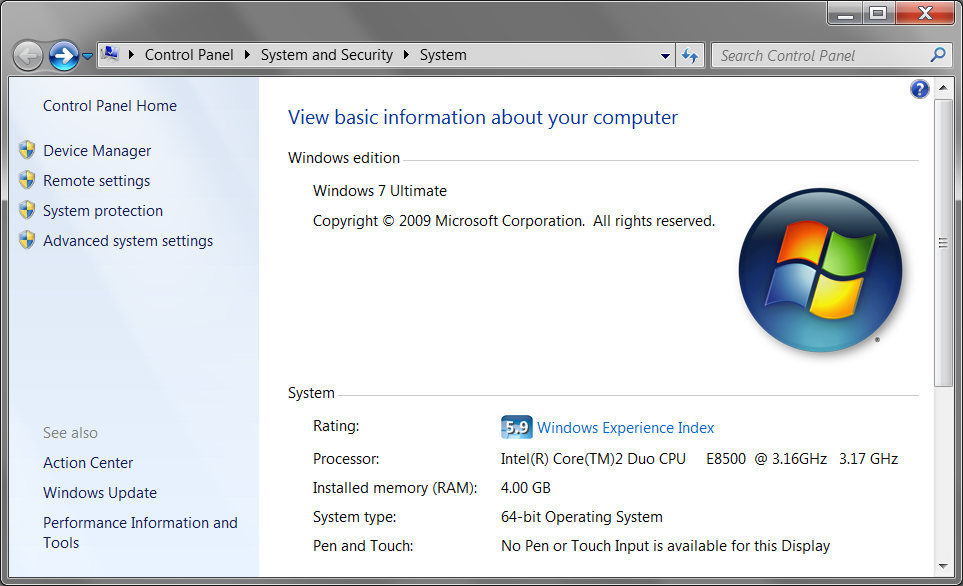
The bit rating also determines how much memory the system can support, as each byte of memory will require their own address location. With 32-bit computing, up to 2 ^ 32, or 4,294,967,296 different locations can be addressed. 4,294,967,296 bytes work out to be 4 GB. But if you need to add more memory to your system, then you have reached the limit of 32-bit systems the extra memory will simply be ignored. You will actually get less than 4 GB of memory being available in Windows if you are using the 32-bit version, as other devices with memory, such as your graphics card (which can come with 1 GB+ of memory these days) will also use up the available addressing space. This is why it’s common to see only 3.2 GB or less on 32-bit Windows with 4 GB of memory. But with a 64-bit OS, you now have 2 ^ 64 address locations to work with, and this means support for up to 16 Exabytes of memory (1 Exabyte equals 1,073,741,824 GBs)! We’ll probably colonize Mars before we’ll need a computer with that much memory.

In order to use a 64-bit OS, there are a couple of requirements. First of all, your CPU must be 64-bit compatible. Luckily, most CPUs these days are. AMD’s Athlon 64 makes this clear in its naming, and practically any Intel CPU released since 2005 (including some Prescott P4’s, and everything after the Pentium D). And obviously, you need a 64-bit OS. And then in terms of software, you’ll need 64-bit drivers for your various devices. All 32-bit applications will still run perfectly fine in a 64-bit OS (that’s because even though most of you are running a 32-bit OS, you’re actually already using a 64-bit CPU, and so you’ll already taking advantage the 32-bit compatibility that 64-bit processors offer). 16-bit software won’t be supported at all though, but it’s unlikely they will run in Windows, even the 32-bit version – but you can still  use DOSBox to run these programs in 64-bit Windows.

... But 4 GB Is Fully Usable In 64-Bit Windows

... But 4 GB Is Fully Usable In 64-Bit Windows

Upgrading to Windows 7, particularly doing a clean install as many will be doing, is an excellent opportunity to upgrade from 32-bit to 64-bit. And you do almost always need to do a clean install in order to make such an upgrade. The rest of this article will examine the benefits, and some of the drawbacks, of upgrading from 32-bit to 64-bit so that when you do make the decision to go with Windows 7, you can make the right decision. Note that the retail DVD disc of Windows 7 will come with both 32-bit and 64-bit editions, and if you need to go from one to another, you’ll have to to a clean install. If you are buying the OEM version or if you system comes with one, then the product key is usually limited to either the 32-bit or the 64-bit version, and you normally cannot go from one to the other without buying another set of keys (although your system manufacturer might be nice enough to exchange product keys for you).

Performance:

While in theory, the CPU’s ability to process 64-bit chunks of data, as opposed to only 32-bits, should provide a performance boost. In reality, thanks to processor extensions such as SSE4, the CPU is already capable of processing data in ever larger chunks, some 128-bit wide. The ability to take advantage of 64-bit processing also depends on the type of software. Software that performs lots of calculations, especially of larger numbers, and software that deals digital video, encryption, large databases will all benefit. Of course, these software will have to have 64-bit support, but that’s becoming much more common these days (K-Lite Codec Pack, ffdshow, x264, VirtualDub and Media Player Classic are just a small selection of software on Digital Digest that already have 64-bit editions). And of course, because 64-bit systems can support more memory, any application for which 4 GB is simply not enough will definitely benefit from 64-bit systems. But for general home use, there is very little noticeable difference between 32-bit and 64-bit computing, at least for now.
32 or 64: 64-bit has performance gains, albeit mostly theoretical or fairly insignificant. You certainly won’t be worse off with a 64-bit OS, so there’s no harm in being future proof.

Compatibility:

As mentioned above, compatibility is much less of an issue than a couple of years ago, since new CPUs are 64-bit these days. Driver support is also much better, particularly with the large vendors, and a quick browse of their driver section reveals 64-bit drivers ready for Windows 7 even right now. The only problem is with smaller vendors and legacy hardware, for example, a no brand scanner from 2004. Unless the manufacturer of this device was considerable enough to continue to provide driver updates (unlikely), or that Windows has native support, then you may be out of luck. Note that 64-bit Windows requires all drivers to have electronic signatures, and it won’t allow drivers without them to be installed – this brings improved security, but it also means custom drivers are out of the question and that you have to rely further on the manufacturer to provide signed drivers.
32 or 64: 32-bit will definitely be more compatible, but unless you can’t live without a particular legacy device, it shouldn’t be an issue for most people.

Extra Memory Support:

On the surface, being able to use more than 4 GB of memory sounds like it will be quite handy, as 2 GB is quickly become even standard on budget systems. And even if you use exactly 4 GB of memory, being able to use all of it, instead of just 3.2 GB of it, is also a good idea. But in reality, at least with today’s applications, the extra memory will not bring you a huge performance increase, and in fact, the performance benefits of even going from 2 GB to 4 GB is debatable. With Core i7’s triple channel memory support, getting 3 GB of memory so that you don’t waste the extra GB in a 32-bit OS is also a possibility.
32 or 64: A 64-bit OS will allow you to use the full amount of your 4 GB of memory, and allow you to upgrade to more when needed. But whether you will actually need more than 4 GB of memory is debatable. But as with performance, you have nothing to lose by going 64-bit now, even if you don’t need it right away.

Conclusion:

So the conclusion may be that while 64-bit is the future, going to a 64-bit OS won’t give you a huge amount of benefits right now. But unlike the early days of 64-bit computing, with missing drivers and patchy software support, these are all relatively non issues and you really have nothing to lose from going 64-bit. The increased performance from a small set of specialized tasks, the improved memory support and even some security enhancements means that the benefits just about outweigh the risks. And the benefits will keep on increasing, while the risk keep on decreasing over time as well. Of course, if you get the retail version of Windows 7, you can always stick with 32-bit for now and do a clean install sometime in the future when you need 64-bit.

But one thing is for sure, 32-bit computing is nearing an end. With CPUs already having moved on, driver support mostly in place, and the memory limit becoming an issue, Windows 7 will most likely be the last ever 32-bit Windows and it’s only a matter of time before we’ll all using 64-bit operating systems.

Weekly News Roundup (30 August 2009)

Sunday, August 30th, 2009

Damn, can’t believe August is nearly over already. Can’t believe it’s nearly 2010, you know the year we make contact, and only three years away from the end of the world in December 2012. And there’s still aren’t any flying cars. Meh. Oh, I did as promised and updated the blog post I wrote two weeks ago about the value of digital entertainment, but this time instead of basing it on pricing/length of the entertainment, I did it on the price per “bit” of digital data. Blu-ray, it seems, is the best value if you want to minimize the cost per byte of data you buy. Once again, digital music is the least value, costing 500 times more than Blu-ray on a bit-by-bit basis.

Copyright

Let’s start with copyright news for this relatively news lite week. The Pirate Bay continues to be attacked by the MPAA, via the Swedish courts. This time, the MPAA has forced the Pirate Bay’s web host’s web host to shut off traffic to TPB, which managed to shut down the torrent listing site for an entire three hours. Millions of dollars spent in legal proceedings don’t give you much, do they?

And as a preview of what could happen if the TPB would go down forever, the temporary downtime of the TPB led to server spikes for the other torrent sites. So unless the MPAA/RIAA go and take down every single torrent website, then people will just move on to the next one. Eventually, someone will open a website in a country that won’t bow down to the MPAA, maybe Antigua or somewhere, and then the MPAA would have finally forced piracy to become fully resilient. Evidence shows this to be the trend, that the more the industry fights against piracy, the harder it becomes to prevent it. Evidence also shows that through more competitive pricing and less DRM, piracy can be reduced.

IsoHunt - the MPAA needs to prove direct infringement, Judge says

IsoHunt - the MPAA needs to prove direct infringement, Judge says

Going to another big trial going on at the moment, the judge in IsoHunt’s trial actually wants the MPAA to prove direct infringement, of which they have presented zero evidence of it so far. The MPAA are of course outraged, that they would actually have to prove direct piracy, because it might be a bit hard to prove that a text file, which is basically what a .torrent file is, can do any damage at all when it comes to piracy. The text file has to be fed to a software program, which interprets the data, connects to the right trackers, and then through the tracker, connect to users to initiate downloads and uploads. Not exactly direct, and nothing other than the original text file is hosted by torrent sites like IsoHunt – everything else is hosted or produced by someone else, and even at the end of this, you still cannot prove piracy unless a complete copy of a file has been uploaded or downloaded, not just chunks of it. A chunk of a file is just digital garbage, and is neither unique nor will it contain any artistic or commercial value, and hence, no copyright abuse. It would be almost as ridiculous as someone copying a couple of word from an AP news article, and then AP going after them for copyright abuse. Oh.

Going to yet another big trial, a Dutch court has ruled that Mininova must remove all infringing torrents within three month, as the Dutch MPAA, BREIN, has won a court case. It’s funny because Mininova was only set up after Suprnova was shutdown, and Mininova, despite the name, is not much larger and much easier to use than Suprnova. I’m looking forward to see what advances Micronova will have when Mininova goes down, if it goes down. And if you can’t stop torrent sites, then you can go after the people who download them. The UK government is planning to have their own three strikes system that will ban anyone suspected of downloading pirated material. All this will do is to put further pressure on the courts, which might need to handle a couple of thousand claims every week. Happening in the UK, this reminds me of what happened over there in the 19th century, where moral outrage ensure every other poor person were sentenced for trivial crimes, and sent to penal colonies all around the world. Just don’t send them to Australia this time please, because we’ve got enough of our own pirates already.

None of this will actually stop people pirating though. As mentioned above, people will just open new torrent sites that will become super popular instantly. And the people who download pirated material will simply switch to encryption technology, which won’t really slow down downloads that much, but will mean it would be next to impossible to monitor what files you are downloading. So the industry can spend millions on lawsuits, the government can spend millions on new legislation and put further pressure on the judicial system, ISPs can be forced to spend millions on monitoring (which will kill off the smaller ISPs), and further millions can be spent on DRM, but what will all this get you? Piracy that can’t be stopped. Well worth the money spent, if you ask me. For people pirating stuff, and people downloading pirated stuff, that is. Eventually, all of this will force piracy to be even more convenient and private, and then at that time, everyone will do it because they know they can’t get caught anymore. Good one, MPAA.

High Definition

Let’s get to HD news. Blu-ray may be gaining popularity in the home theater, but hardly anybody is using it on computers, and the situation is likely to continue well into the 2010’s, according to analysts.

There are a lot of reasons why Blu-ray hasn’t taken off on PCs, the main reason may be because other than movies, there’s nothing else that uses Blu-ray. Games could come on Blu-ray instead of 2 or 3 DVDs, but that will only work if most people have Blu-ray drives, and because games can be installed to people’s huge HDDs, the convenience only comes in at installation time. So instead of swapping out the disc once or twice during the install, Blu-ray can save you the trouble, but after this, you will still only ever need to insert one disc into the drive to play the game, whether it is the first DVD, or the single Blu-ray. It’s not like the transition from CD to DVD, because at that time, some CD games came on as many as 5 discs, and because people’s HDDs were smaller, you had to swap discs during play which was really annoying. And even then, the gaming industry successfully resisted using DVD-ROM for gaming for many years.

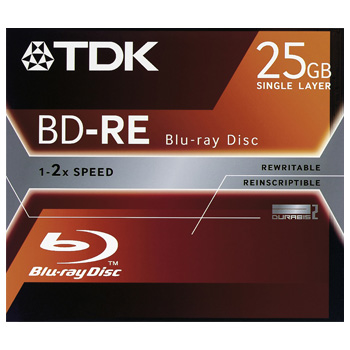
BD-RE: Too big for some things, too small for others, and just not as convenient

BD-RE: Too big for some things, too small for others, and just not as convenient

So without BD-ROM applications, then it comes down to Blu-ray recordables (BD-Rs and BD-REs) to offer huge amounts of storage on a single disc. But do people really need these 25 and 50 GB discs? They aren’t big enough to store a full backup of your PC’s content, usually several hundred GBs in size. They may be too big to store the odd file or two, most people use USB drives for that now. So there is probably a use for them for archival purposes, to store content that you don’t want someone to erase, but then again, 25 GB is a lot to store on an easily lost and damaged disc. The fact is between DVDs, USB thumb drives with ever increasing capacity, external HDD redundant arrays, there may be no place for Blu-ray recordables other than for storing HD movies. Imagine if DVDs were only good for making your own DVD movies, would it have become as popular as it is today?

Plasma TVs are dying, and that’s sad thing, because they are still the best quality, and in some cases, the best value screens on today’s market. LCDs, even the newer LED based ones, cannot hold a candle to the quality plasmas can give you. Candle is an appropriate term to use here because it’s the contrast ratio that usually separates the plasma TV with LCD equivalents. And there aren’t any viewing angle issues either with plasmas. But because plasma panels are hard to scale down, they can’t be used as PC monitors or on even smaller devices, and so the LCDs are much more cost effective to produce. And this is why plasma is dying. OLED will come along one day and replace LCDs and plasmas, both in terms of cost and quality, but for now, it remains a rich man’s toy ($2000+ for a 11″ screen? No thanks).

Gaming

And finally in gaming, the reaction to the PS3 Slim is still the focal point of this week’s news. All eyes are on Microsoft to see how they respond, with analysts calling for a Xbox 360 Slim, which Microsoft needs much more than Sony. But Microsoft’s response, or perhaps it was pre-planned all along, is to drop the Pro bundle and reduce the Elite to Pro prices. Something that you would have already heard about back in July, if you read the WNR.

Sales wise, the PS3 Slim should give Sony’s console a much needed boost, particularly in the short term. Remember it won’t be just people who are buying their first PS3, due to the price drop, but there will be many who will buy their second PS3, as another Blu-ray player perhaps. Expect Sony’s console to outsell the Xbox 360 quite handsomely over the next few months, which is good timing on Sony’s part as the holiday season is so close. You won’t get the same effect with the Xbox 360 Elite price reduction, although Natal should see the Xbox 360 remain strong in 2010.

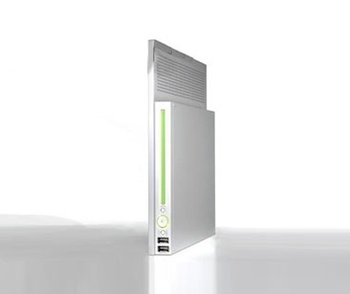
Xbox 360 Slim: Are Microsoft too scared to put out another piece of hardware, after the RRoD fiasco?

Xbox 360 Slim: Are Microsoft too scared to put out another piece of hardware, after the RRoD fiasco?

And I’m glad I’m not the only one who thinks the PS3 Slim doesn’t look as good as one had hoped. Instead of calling it the PS3 Slim, it really should be the PS3 Flat, because it’s as if they’ve taken the old PS3 and basically flattened it, making it actually lengthier in size. And as Examiner.com article mentions, it may be because it’s far too early the product lifecyle to have a slim SKU, as least compared to what happened with the PS2. Sony couldn’t make the PS3 Slim any smaller without having to suffer cost issues again, and in the end, they didn’t make it as small as it should be. I don’t think this is a problem for the Xbox 360 Slim, as the Xbox 360 is a year older and the PS3, and the technology it uses was already a bit out of date at the time it came out, and while incremental improvements have occurred, there’s large scope for miniaturization, which could help to both decrease cost and improve reliability. But I guess Microsoft’s Xbox 360 hardware division are still suffering from PTSD due to the RRoD issue, and they won’t be too keen to put out another piece of hardware. But I won’t be surprised to if the Xbox 360 Slim makes its appearance right around the time Natal comes out.

WordPress tells me I’ve nearly used up this week’s word limit, so I’ll have to stop now. Have a great week, and I’ll be back next week with the same mix of news, ranting, and outright lies.

PC Gaming FAIL: GTA IV Stutter, Freezing and Troubleshooting Tips

Saturday, August 8th, 2009

I’m a big fan of PC gaming. It’s not that I don’t own consoles, in fact, I own all three current generation ones. But I just prefer PC gaming for a couple of reasons. One, the types of games that PC’s are good at, strategy, simulation, are the types of games that I like. Two, the keyboard+mouse combo is much better than a gamepad with first and third person games, including sandbox ones, which are my favourite. Three, I prefer to sit at a desk to play games, than sitting on the floor or on the sofa – now this is just a personal preference, and I can see many (if not most) people preferring the other way. And lastly, PCs are tweakable and you get better graphics, more user modified content and easier access to command line consoles and such to “fix” broken games – see my rant on Fallout 3. Speaking of Fallout 3, I guess this blog entry is pretty much a follow up to that, and it’s all because I was stupid enough to buy yet another copy of GTA IV, this time on the PC (hey, it was on discount, and I just couldn’t resist).

I know I ranted on about the bugs in Fallout 3, but I think I may need to retract a few of my statements there, because compared to, GTA IV, Fallout 3 seems like  military grade level software, stable, bug free and won’t accidentally launch a nuke from time to time. GTA IV, to date, is probably the worst PC game I’ve played to date yet.

Now the game itself is quite excellent, and after finishing it (or nearly) on the Xbox 360, playing through it again on the PC actually somehow made the game better the second time around. The PC controls are better (well, driving aside), with better aiming and shooting. The “Independence FM” feature is excellent, and actually makes driving around tolerable, being able to listen to your own music. Plus all the reasons I’ve mentioned up top as to why I prefer PC gaming over consoles. But it’s the actual programming that’s the problem: GTA IV on the PC simply doesn’t work most of the time.

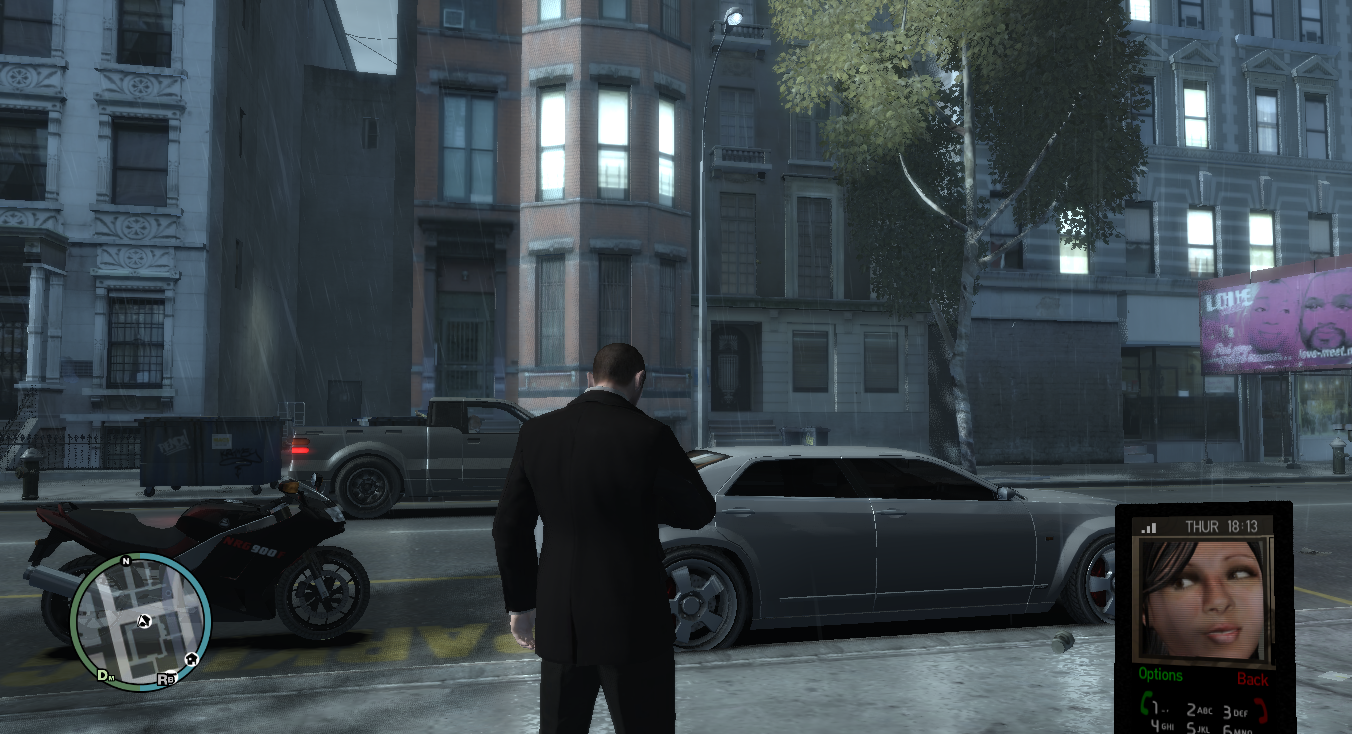
This is an actual in-game screenshot from my game, moments before a crash occured

This is an actual in-game screenshot from my game, moments before a crash occurred

Now, I’ve only recently got the game so I don’t know what it was like before the latest round of patching. I’ve read on some forums that suggest the older patches were better, and that the newer patches made things worse. Which is exactly the sort of thing that I touched upon in my Fallout 3 rant. But the problem goes further. At least with Fallout 3, there are workarounds which allowed you to at least play the game for an hour or two at a time. With GTA IV, and the latest 1.0.4.0 patch, you’re lucky to be able to get more than 20 minutes. The problem I have is that it will stutter (screen turns black, sound freezes, and then after about 10 seconds, everything is back to normal – repeat this every minute or so) and then freeze completely, requiring a shutdown through Task Manager. The problem happens randomly, and it can happen when your computer has been on for a day, or when it has just been booted into Windows. And even when the game is working, and just like on the console versions, the framerate isn’t very consistent and it’s certainly not smooth in the way Fallout 3 is smooth (unsteady framerates probably). But I can forgive Rockstar Games for this, since they’ve never been really good at this sort of thing going back to GTA III, which had ultra fast framerate on modern PCs unless you tweaked around with the settings, and GTA: SA, which still doesn’t give me smooth Fallout 3 type framerates on my C2D E8500 with ATi Radeon 4850 and 4 GBs of RAM. These things I can forgive, as long as you let me play the great game for more than 20 minutes at a time. The in-game benchmark gives me 50+ FPS, but the uneven framerate problem can’t really be shown in benchmarks like this which only shows the average framerate (so if the framerate was 1 FPS for half of the time, and 100 FPS for the rest, then the average is still 50 FPS).

And it’s not even a problem that Rockstar are unaware of – they even published the full list of error codes. I think the error I get is either the DD3D10 or the DD3D30 one, sometimes the RESC10 one as well, and the only way to run the game again is to reboot the computer. Now I’m aware that GTA IV is a complex game, more so than Fallout 3, which is kind of sparse in terms of objects (fits well into the nuclear wasteland scenario, though). But a C2D E8500, Radeon 4850 and 4 GBs of DDR3 RAM (in XP), should at least let me play for more than 20 minutes at a time. And the game definitely gets worse the more you play, and you get access to more islands. So I didn’t experience crashing until about a third way through the game, unlike others whose games crashed much earlier than that. It seems there’s a memory leak somewhere, but who knows.

But after extensive tweaking, I’ve been able to play for an hour at a time, not always, but a few times already. A lot of testing and tweaking was needed, and I’ve really just been testing things randomly really, but some of it might have worked. So I thought I would share some of the things I tried here. Now not all of them has worked, and I still get crashes often, but at least it’s a step in the right direction. So test them out yourselves, and hopefully, you’ll get to play the game for more than 20 minutes at a time. I won’t go through the more obvious things like closing down all non essential programs (I found closing down MSN Messenger made things a lot more stable), installing the latest drivers (or rolling back to drivers that allowed you to have a better GTA IV experience before), unrolling any overclocking you may be doing, and ensuring your memory isn’t broken by running memtest or your CPU is stable by running Prime95. Also, turn off the clip capture setting in the in-game menus, as that just consumes more resources and causes crashes faster. For the in-game resolution, try to use one with 75 Hz output, which seems to make the game run smoother, at least on my system.

Tip #1: Using command-line switches

GTA IV on the PC supports several command line switches that can be used to affect the game’s settings, some of them not available from the options section within the game. To use command line switches, first start the notepad program in Windows, from the File menu, select “Save As” and then navigate to the folder in which GTA IV is installed (by default, it should be “C:\Program Files\Rockstar Games\Grand Theft Auto IV”). When saving, make sure the “Save as type” setting is selected as “Text Documents (.txt)”, and then name the file “commandline”. So basically, you should now have a blank text file called “commandline” in your GTA IV folder (the same folder as the files “LaunchGTAIV”, “gta4Browser” …). Now that this file has been created, we’ll add several command line switches to it to use within GTA IV.

Tip #2: Adding the command-line switches

The switches that I have added to my commandline text file are as follows:

-fullspecaudio
-memrestrict 262144000
-windowed

The first one enables full spec audio, which unsets limits to the framerate and makes the game stutter more. This is to improve the framerate experience, but I’m not sure it has any effect on stability. Some have suggested trying -minspecaudio instead.

The second one, memrestrict, is something that the Rockstar tech support have recommend (thanks for the tip, but how about actually fixing the game, as opposed to workarounds?). The exact setting (the number following the switch) depends on your game settings, so have a look at this thread for information on which setting you need to use.

The third one enables windowed gaming mode, which gives you an ugly border around the game, but at least it makes using Task Manager to shut down the GTAIV.exe process (as opposed to a reboot) much easier when the games does indeed freeze. It also, at least on my system, seems to cause less freezing and crashes.

There are a bunch of other command line switches you can try, but some I found made things worse, rather than better.

Tip #3: Underclock your GPU

One theory is that GTA IV pushes your GPU to the limit and causes it (or the device drivers) to crash. It’s a programming error if this happens, but one that Rockstar either haven’t identified or aren’t able to fix right now. And even if it isn’t a programming thing, then people with computers that have poor ventilation or underpowered fans will also experience this as GTA IV uses 100% of your GPU for an extended period. You can underclock your GPU in many ways, but I use the software RivaTuner. Start the tool, under the “Main” tab, look for the drop down list that list your GPU/monitor combo, and just under that, to the right, there is a button you can click on next to the word “Customize …” click on that and click on the first icon in the pop-up. Check the “Enable low-level hardware overclocking” checkbox, you may need to reboot your PC if you’ve been using it for a while or have been overclocking before. Then, from the default clock position, move the slider to the left (lower clock), and lower the speed by 10 or 20 MHz. Press “Apply” to apply the changes. You can save the profile and create a shortcut so you don’t have to go through this every time, but I don’t mind doing it manually. This trick seems to work better on ATi cards, especially the newer Radeons, as they have dynamic underclocking (for example, my 4850 switches between 500 and 625 MHz, depending on usage), and this constant change might be one of the many reasons why GTA IV crashes.

Tip #4: Nvidia Maximum Pre-Rendered Frames

For Nvidia card users, there is also another thing they can try to boost framerates and/or reduce crashes. I don’t have an Nvidia card, so I can’t test it, but others have had success. This is a setting you’ll find in your Nvidia drivers, under “Managed 3D settings” I think (see screenshot) – set “Maximum pre-rendered frames” to “1” for the application “LaunchGTAIV.exe”. See this thread for more information. But other threads show that increasing this setting reduces the burden on the GPU (at the expense of the CPU), but might help with crashing. Something worth trying for Nvidia owners, I suppose.

I’m sure there are many other tips and tricks, some will work, some won’t, but with the above, I’ve at least been able to play the game for more than 20 minutes, and sometimes for up to an hour before the freezing starts again. And with the windowed mode, I can shutdown the GTAIV.exe process using Task Manager, and sometimes I won’t even need to restart Windows to play again. Suffice to say, the “auto-save” feature of GTA IV becomes increasingly useful, as trying to get back to a safehouse before the game crashes isn’t the type of suspense I was expecting from the game (though it is sometimes quite exciting).

So anyway, great game, bad implementation, worse patches. Just one of the many PC games that do this (Test Drive Unlimited is the other one that I’ve had a lot of problems with), and companies wonder why PC gaming is dying. But not all games are bad, some will work for hours on end without breaking a sweat. Call of Duty 4/World At War, World In Conflict,  Stardock’s Sins of a Solar Empire (at 1080p, full details, hundreds of ships in battle at the same time – no crashes!), Company of Heroes, Far Cry 2, Crysis – are just some of the games that don’t cause this type of headaches for their users, despite some of them being more CPU and GPU intensive. So it is possible, game developers, to make PC games that don’t crash. It’s not easy, given so many different configurations, but it is possible.

For now, it’s back to GTA IV, Task Manager, and reboots for me, all the time praying for a new patch that solves at least some of the problems. Well, at least I didn’t pay full price for the game (thanks to cdwow.com.au’s discount offer).

Update:

Having tried some more things, what I suggest is that at first, you only try the “windowed” command line and see how that works out. Also, make sure you close all other running programs, including any browser windows you may have open. Basically anything requiring a bit of memory or graphics memory should be closed, as it could lead to out of memory errors. And finally, if the game freezes on you (the sound may freeze or go on), don’t hit the reset button just yet – wait a bit and it will usually bounce back, at which point you can do a normal shutdown of the game, or in some cases, continue playing (I’ve often found that the game somehow becomes more stable after the first freeze, and after that, I can play for an hour without it crashing again).

Update #2:

ATI has released a new set of Catalyst drivers (9.8), which are official and stable, but not yet on their main websites (it’s posted on their blog). Some have experienced less crashes with this new driver, with sometimes better FPS as well. I’ve tried it, but only for a short while, and I haven’t noticed any positive differences. In fact, FPS seems to be a little lower, and I’ve already had the freezing problem. You may have better luck though, so try it out, and if it fails, then uninstall the driver using add/remove programs, then use Driver Sweeper to fully clean up the drivers, and finally re-install whatever drivers you were using before.