News Articles
Movies Software
DivX, XviD, DVD Subtitles Forum
DigiWiki Codecs

Username:
Password:  
Remember Login?
Sign Up
 

Software - > MP4Converter.net's MP4 Converter

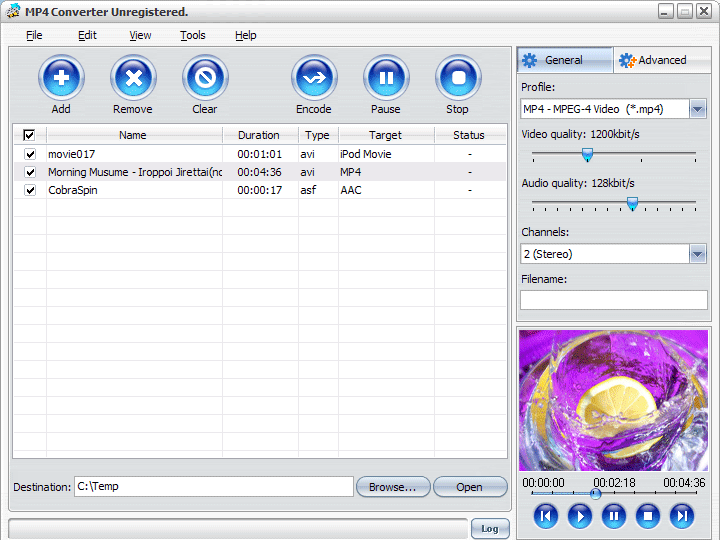
Screenshot
Enlarge Image Enlarge Image: Screenshot

Downloads


Join Our Newsletter
Title: MP4Converter.net's MP4 Converter
Author/Publisher: www.mp4converter.net (details)
Ease of use: Not Rated
Latest Version: 3.1.26.0314b (details)
OS Support: Windows 95 Windows 98 Windows Me Windows 2000 Windows XP
License: Shareware, $USD35.00
Date Added: Dec 15, 2006
Last Updated: Dec 15, 2006
Page Viewed: 3876 times

  Email Updates
email me whenever this software gets updated

Send to Friend   Send to Friend

User Rating:
Vote Now
User Comments:
Post Your Comments

Summary Links Images Ratings History Tools

Categories:

Supported File Formats:

Input Files: 3GP, AAC, AC3, AVC, AVI, DivX, DV, GIF, H.264, MOV, MP2, MP3, MP4, MPG, OGG/OGM, RM/RMVB, VCD, VOB, WAV, WMA, WMV
Output Files: AAC, MP3, MP4

Description:

MP4 Converter can convert video formats including DivX, VOB, VCD, DV, H.264/MPEG-4 AVC, H.264/PSP AVC, MPEG, 3GP, 3G2, Animated GIF, AVI, MOV, MP4, RM, WMV to MP4, and audio formats like AC3, WMA, MP2, MP3, OGG, AAC, WAV, APE, CUE, CDA and M4A files into M4A, AAC and MP3.

There are several eye-catching key features of the MP4 Converter including:

1.It features wizard for the beginners, offering guide of the conversion.

2.It has zoom and split functions.

3.It provides function of making the output file overwritten as the original or renamed to keep.

4.It supports multithreading and batch conversion to enable the high conversion speed.

5.It is also easy to use. The software provides optimized profiles for some MP4 players to use.

6.During the conversion you can use the default settings or set parameters of video and audio codec by yourself.

7.The whole process of conversion is controllable. You can pause, stop and continue at any moment during the conversion.

8.You can see the converting progress in preview window with its preview function.

Free download this powerful software and try it. The trial version of MP4 Converter is time-limited but with full functionality. We also like to share your experience of using the software and expect your email. We will deal with your email within one business day except weekends or holidays. You can get excellent software and after-sale service from us. Don’t hesitate any more, try it now!

Revision History:

Version 3.1.26.0314b
  • Release Date: Dec 15, 2006

Downloads:

Download: m-mp4-converter-for-win.exe Title: m-mp4-converter-for-win.exe
Link: Download
Size: 5.47 MB

Description: Download MP4 Converter


User Rating:

  Average Rating: Your Rating:
Registered Users: No ratings recorded
Non-Registered Users: No ratings recorded

User Comments:

Sorry, but you must be logged in to use this feature.

Please note that the forum has a separate login/registration system. You will need to sign up and login to the forum separately.

Username:
Password:
Remember Login?
 

Don't have an account? Sign up here
Lost your login/password?
Top Deals
Features

H.264 Zone: H.264 news, articles and downloads


Software Submissions