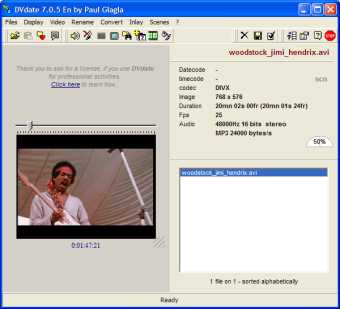
DVdate 8.x.x En is a upgrade of the interface of DVdate, a successful software appreciated by many digital video users all around the world. It is a very powerful application for all AVI files, and perhaps the best program in the world for avi DV files (the format of most digital camcorders).
The main functions of DVdate 8.x.x are:
- display a list of all AVI video clips loaded in it, for instance all AVI from a folder, or even all AVI files from all hard disks, and display them sorted by alphabetical order, or by file size, file date, or even by the datecode (= date of capture by the camcorder), timecode, duration...
- display many data about each AVI file, for instance codec of video or audio, image
size, duration for audio as well as for video (they are not always the same). For avi
DV files it indicates if it's Pal or NTSC, and if it's 4x3 or 16x9 image ratio, and of course the type 1 or 2. It displays also the datecode and timecode of each DV frame. It indicates with the letters iavs if the file is a strange DV type2 having an interleaved stream instead of a video stream.
- preview the video in the integrated player or in full screen. One may browse through
the frames, with frame by frame precision, or even browse from scene to scene. DV date
displays in real time the datecode and timecode of the current frame.
- convert the video files for example:
* from DV type 1 to DV type 2 and reciprocally
* from Pal to NTSC and reciprocally
* from an analogic video to a DV type 2 one.
* from strange DV type 2 to standard DV type 2
* from a DV 4x3 to a DV 16x9 (widescreen) and reciprocally
- extract the audio stream to a WAV file.
- inlay the datecode (or other texts containinf indo about the video) into the video frames. This function (also available for preview with DVdate) is highly personnalizable. You may choose the font, the color, the size,
fix a time difference, change the display format of the datecode. You may choose to
display automatically for a given number of seconds the datecode at every scene change, or at every new day. The position of the inlay may be easily changed in the video. The datecode may be displayed on two lines. The timecode may also be inlayed.
- fix the datecode included in the DV frames in order to compensate a time difference.
- fix the framerate of a video file.
- change the FOURCC of the codec of a video.
- change the date of a video DV file and replace it by its datecode.
- rename DV files using datecode or timecode or other data.
-edit the list of scenes of an avi file (either calculating them by video content or by gap in the datecode, or by equal intervalls). This list may be edited to add captions, merge scenes, or cut scenes.
- create a scn file, compatible with Studio from Pinnacle, containing the list of scenes.
- export the data contained in a scn file to a text file, or Word, Excel, OpenOffice.org Writer or OpenOfffice.org Calc file, giving for each scene the following data, separated by commas:
* rank of the scene
* start
* end
* datecode of start
* timecode of start
* duration
and for Word and Writer also a thumbnail from the video for each scene.
- Split a DV video into clips, one clip for a scene
- create a srt file containing subtitles displaying the datecode
- Display the RIFF header of an avi file, like Riffwalk - an old program by Microsoft -
used to do.
-DVdate can be launched from a script file to automate its functions.


 Home
Home


 dvdate_806en.zip