News Articles
Movies Software
DivX, XviD, DVD Subtitles Forum
DigiWiki Codecs

Username:
Password:  
Remember Login?
Sign Up
 

Software - > DivXMediaBuilder

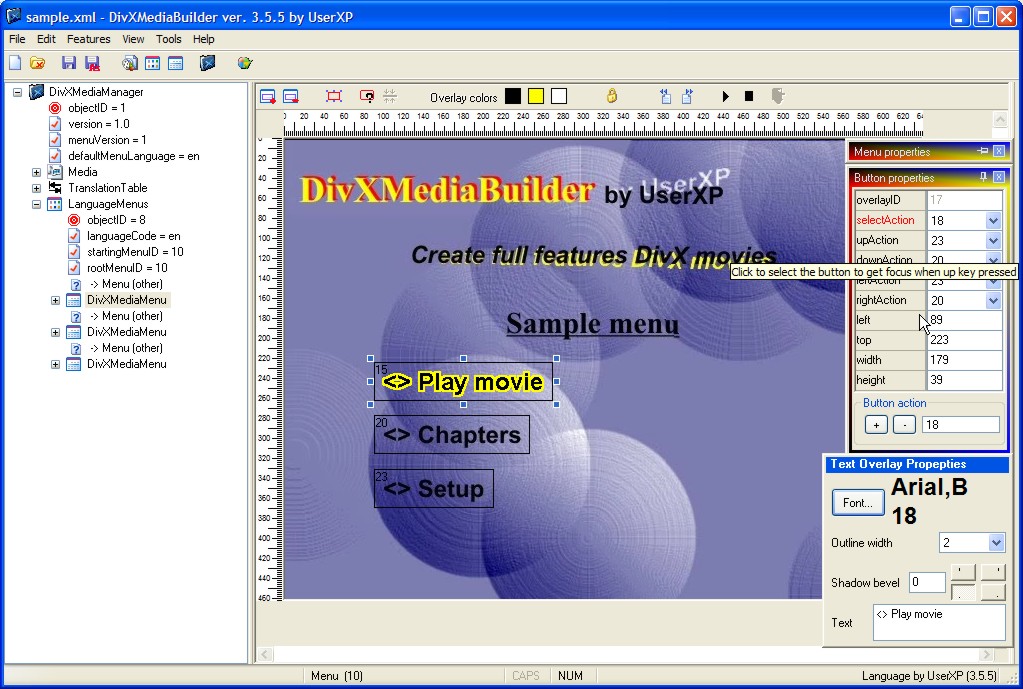
Main Screen
Enlarge Image Enlarge Image: Main Screen

Downloads


Join Our Newsletter
Title: DivXMediaBuilder
Author/Publisher: UserXP
Ease of use: Not Rated
Latest Version: 4.0.0 (details)
OS Support: Windows 2000 Windows XP
License: Freeware
Date Added: Apr 12, 2006
Last Updated: Feb 13, 2007
Page Viewed: 17785 times

  Email Updates
email me whenever this software gets updated

Send to Friend   Send to Friend

User Rating:
(2 votes)
Details / Vote Now
User Comments:
redin: The portuguese mirror this program...
More / Post Your Comments

Summary Links Images Ratings History Tools

Categories:

Supported File Formats:

Input Files: AVI, DivX, XML
Output Files: DivX, XML

Description:

DivXMediaBuilder is a program to create full feature DivX files (create the final .divx file).

Features:
  • Support menus, chapters and other features of new DivX format
  • Can create the final xml file that DivXMux needs.
  • Also can create the menu files with buttons and overlays of user choice. There are some overlays that come with the program, but a user can create their own. Here is a tutorial about how to create your own overlays and how to name it.
  • No help file yet.
  • Still in beta

Revision History:

Version 4.0.0
  • Release Date: Feb 13, 2007
  • A new submenu “New project with wizard…” at menu File. A dialog appears where you can add the files/movies you want, select/preview/change the menus will be created and finally create these menus. The menus can be:
    • Title menu – A menu where the user select the title/movie want to see
    • Chapter menu – After select a title/movie the user can select the chapter to play and/or
    • Setup menu – At previous menu (chapter) the user can go to setup menu where can select the audio and subtitle track.
    The above menus are auto created but the user can change them. Also no need to change/modify any action. The menus are ready for play.
  • A new submenu "Menu for Audio/Subtitles setup.." at menu Tools. You can use this to automatically create a setup menu for your file. This will work if the file has more than one audio tracks and/or at least one subtitle track.
  • Added more options for the titles, chapters and setup menus. Also a user can save the settings there.
  • Bug fixes.
View complete revision history

Downloads:

Download: Official Download Site Title: Official Download Site
Link: Download

Description: Download DivXMediaBuilder from the official site


Download: comctl32.zip Title: comctl32.zip
Link: Download
Size: 534 KB

Description: Download comctl32.ocx


Download: msvbvm60.zip Title: msvbvm60.zip
Link: Download
Size: 686 KB

Description: Download msvbvm60.dll


Download: divxmediabuilder.zip Title: divxmediabuilder.zip
Link: Download
Size: 2.55 MB

Description: Download DivXMediaBuilder - requires msvbvm60.dll, comctl32.ocx and DivXMux


User Rating:

  Average Rating: Your Rating:
Registered Users: (2 votes)
Non-Registered Users: (11 votes)

User Comments:

Sorry, but you must be logged in to use this feature.

Please note that the forum has a separate login/registration system. You will need to sign up and login to the forum separately.

Username:
Password:
Remember Login?
 

Don't have an account? Sign up here
Lost your login/password?
Top 10

Software Submissions