Software - > Collectorz.com Movie Collector -> Collectorz.com Movie Collector For Mac OS X

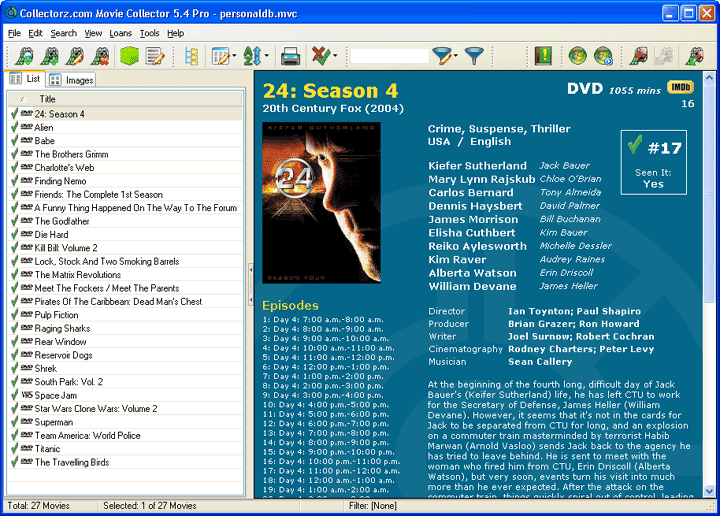
Movie List View
Enlarge Image Enlarge Image: Movie List View
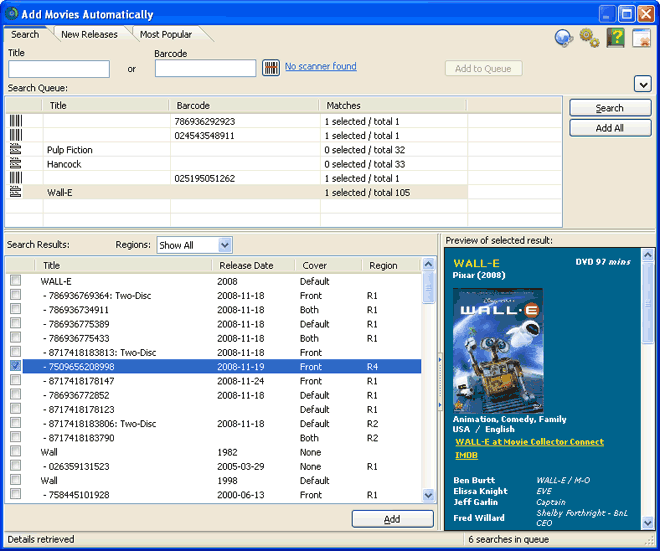
More Images More Images

Downloads


Join Our Newsletter
Title: Collectorz.com Movie Collector -> Collectorz.com Movie Collector For Mac OS X
Author/Publisher: Official Website
Ease of use: Not Rated
Latest Version: 3.3.1 (details)
OS Support: Windows 95 Windows 98 Windows Me Windows 2000 Windows XP Mac OS Windows Vista Windows 7
License: Shareware, $USD24.95
Date Added: Apr 22, 2003
Last Updated: Nov 24, 2009
Page Viewed: 35221 times

  Email Updates
email me whenever this software gets updated

Send to Friend   Send to Friend

User Rating:
(2 votes)
Details / Vote Now / Post Your Comments

Summary Links Images Ratings History Tools

Related Forum Threads:

Loading

Downloads:

Download: Official Download Site Title: Official Download Site
Link: Download

Description: Download Collectorz.com Movie Collector from the official site


Description:

From the Author :
Movie Collector is a program for organizing your personal collection of DVDs, VHS tapes, Laserdiscs, etc... You can use it to create a file with detailed information about your movie collection.

This file can be browsed, sorted and searched in various ways (e.g. find all movies Arnie plays in, sort your movies by Genre, etc...). Movie lists can be printed and exported to HTML or CSV files.

Sub Editions:

This software has the following sub editions:

Collectorz.com Movie Collector
  • Collectorz.com Movie Collector For Mac OS X <==

Categories:

Supported File Formats:

Input Files: DVD
Output Files: HTML, TXT, XML

Revision History:

Version 3.3.1
  • Release Date: Nov 24, 2009
  • Installation:
    • Movie Collector is now installed in /Applications instead of ~/Desktop
    • Need administrator credentials to install in /Applications folder
  • Syncing Up TO Connect:
    • The following fields will now be uploaded from your local data when up-syncing AND are now editable as "user fields" in Connect :
      • Format
      • Genres
    • Fixed: Several situations could cause unnecessary update actions
  • Upload your own cover images to Connect:
    • After syncing UP, you can now also upload the Cover Images for movies that don't have a cover image in Connect yet.
    • You can now also upload your own cover image on the Edit Movie page in Movie Collector Connect, using the Browse (or Choose File) and Upload buttons.
  • Syncing Down FROM Connect, improvements to prevent unwanted changes to local data:
    • Extra "Are you sure?" question before syncing down.
    • New layout of Sync screen, with a BIG Upload button and a small Download button.
    • Syncing down will never clear fields / make fields empty
    • Syncing down will never update or add to existing local data values, EXCEPT when the local field is still empty.
      For example: no Genres will be added to existing lists,
      Titles, Studios, Release Dates, Running Time, etc.. will not be overwritten.
    • For Personal fields (purchase data, notes, rating, etc...) full syncing will be maintained.
    • Syncing down will never un-link movies
  • Linking:
    • The question box "You have unlinked movies. Do you want to link them now?" now has a "Never ask for these movies again" checkbox.
    • Link Screen: When using "Search All" all exact barcode matches are now linked automatically (and removed from the queue)
    • If you upload unlinked movies, Connect will try to auto-link them by barcode.
    • After linking, the program does not auto-update the linked movies anymore, preventing unexpected (and possibly unwanted) data additions to your local entries.
  • Fixed:
    • Edit Lists: Merging credits didn't work
    • OPR-3201 support: Scanning with OPR-3201 jumped to main screen
    • Close button: now closes the database and exits Movie Collector
View complete revision history

User Rating:

  Average Rating: Your Rating:
Registered Users: (2 votes)
Non-Registered Users: (5 votes)

User Comments:

Thank You... good yeah..... good yeah.....
Posted by: LibertaChe, 06:47:20, Nov 27, 2007


Sorry, but you must be logged in to use this feature.

Please note that the forum has a separate login/registration system. You will need to sign up and login to the forum separately.

Username:
Password:
Remember Login?
 

Don't have an account? Sign up here
Lost your login/password?
Top 10

Software Submissions