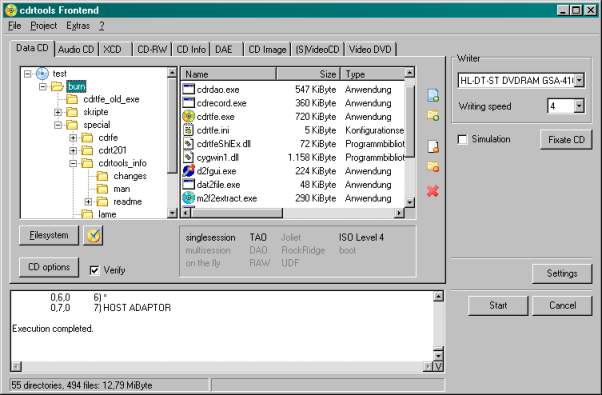
Software - > cdrtfe

Screenshot
Enlarge Image Enlarge Image: Screenshot

Downloads


Join Our Newsletter
Title: cdrtfe
Author/Publisher: Official Website
Ease of use: Not Rated
Latest Version: 1.3.5 (details)
OS Support: Windows 95 Windows 98 Windows Me Windows 2000 Windows XP
License: Open Source
Date Added: Apr 26, 2007
Last Updated: Apr 1, 2009
Page Viewed: 5184 times

  Email Updates
email me whenever this software gets updated

Send to Friend   Send to Friend

User Rating:
Vote Now

Summary Links Images Ratings History Tools

Related Forum Threads:

Loading

Downloads:

Download: Official Download Page Title: Official Download Page
Link: Download

Description: Download cdrtfe from the official site


Download: cdrtfe-1.3.5.zip Title: cdrtfe-1.3.5.zip
Link: Download
Size: 2.09 MB

Description: Download cdrtfe (installer version)


Archive Downloads Download Older Versions (1 downloads)...


Description:

A small open source burning application for Windows. cdrtfe is a win32 frontend for the cdrtools (cdrecord, mkisofs, readcd, cdda2wav), Mode2CDMaker and VCDImager. It can burn data discs (CD and DVD), Audio CDs, XCDs, (S)VCDs and DVD-Video discs.

Categories:

Main Categories: DVD/SVCD/VCD (MPEG-1/2)
Sub Categories:

Supported File Formats:

Output Files: DVD, SVCD, VCD

Revision History:

Version 1.3.5
  • Release Date: Apr 1, 2009
  • Download(s):
  • Data CD:
    • Warn, if Vol-ID is too long.
    • Warn, if Meta Data entries are too long.
    • Allow to write multisession discs wihtout Rock-Ridge filesystem. Setting via cdrtfe.ini: ForceMSRR=0 in [Data-CD]
  • Audio CD: m3u playlists can now have relative paths.
  • DAE:
    • Set reading and writing speed seperately for 1:1 copy.
    • Warn, if reading the TOC failed.
  • GUI:
    • Improved keyboard navigation with Tab/Shift-Tab in many dialogs.
    • Files in the Audio CD/(S)VCD project can now be opened with Enter.
    • The Taskbar entry can show the number and the size of the files of a project (Data CD, Audio CD, XCD). Settings via cdrtfe.ini: FileInfoTitle=1 in [General]
    • Folder selection dialog can now be closed with Esc.
    • Context menu adjusted.
    • Column width of ListViews can now be saved.
    • SpaceMeter can be disabled. Setting via cdrtfe.ini: SpaceMeter=0 in [General]
  • If calling ShellExecute fails, an error message is shown.
  • Registering and unregistering the ShellExtension should now work on Windows Vista. Admin privileges are still necessary.
  • Bugfixes:
    • Data CD, Meta Data: It wasn't possible to use just a single field.
    • DAE, 1:1 copy: Copy wasn't possible, if the path for the temporary files included spaces.
View complete revision history

User Rating:

  Average Rating: Your Rating:
Registered Users: No ratings recorded
Non-Registered Users:

User Comments:

Sorry, but you must be logged in to use this feature.

Please note that the forum has a separate login/registration system. You will need to sign up and login to the forum separately.

Username:
Password:
Remember Login?
 

Don't have an account? Sign up here
Lost your login/password?
Top 10

Software Submissions