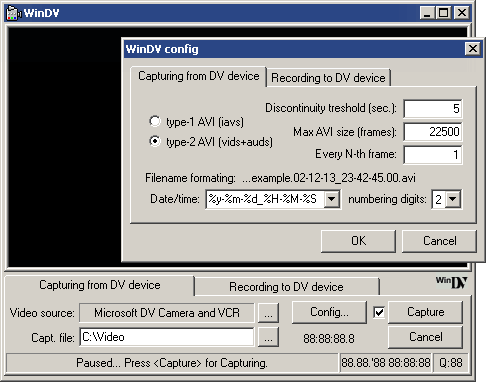
WinDV is a small and easy to use Windows application for capturing videos from DV device (camcorder) into AVI-files and for recording AVI-files into DV device via FireWire (IEEE 1394) interface. Capturing is very reliable thanks to use of large buffer queue. Timestamps recorded on DV tape by camcorder can be used to automatically split captured video into multiple files. During transmitting to DV, several AVI-files can be joined together to form final video recording.
Main Features:
- small & handy <100kB one-file WinDV.exe
- input / output - capturing from DV device to AVI files (both type-1 and type-2 supported) and recording vice versa
- no dropped frames - memory buffering
- automatic AVI splitting according to the timestamps on DV recordings - every video sequence can be saved into unique file
- easy AVI joining - record multiple files joined to the DV device just using wildcards
- preview of transmitted video in the window
- free - you can download it and use it as you like at no cost
Input Files: AVI, DV
Output Files: AVI, DV
Windows 98/Windows Me/Windows 2000/Windows XP
Version 1.2.3
- Release Date: May 29, 2003
- minor bugfixes and changes


 Home
Home


 Official Download Page