Software - > VideoReDo Plus -> VideoReDo TVSuite

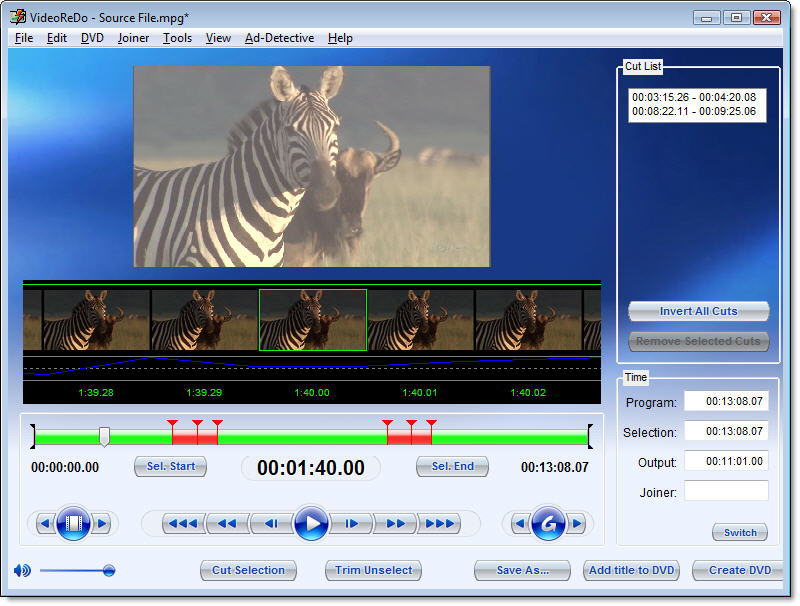
Screenshot
Enlarge Image Enlarge Image: Screenshot

Downloads


Join Our Newsletter
Title: VideoReDo Plus -> VideoReDo TVSuite
Sub Editions: VideoReDo TVSuite with H.264
Author/Publisher: Official Website
Ease of use: Not Rated
Latest Version: 3.1.5.564 (details)
OS Support: Windows 98 Windows Me Windows 2000 Windows XP Windows Vista
License: Commercial, $USD74.99
Date Added: Sep 13, 2005
Last Updated: Jul 7, 2008
Page Viewed: 25456 times

  Email Updates
email me whenever this software gets updated

Send to Friend   Send to Friend

User Rating:
Vote Now

Summary Links Images Ratings History Tools

Related Forum Threads:

Loading

Downloads:

Download: Official Download Site Title: Official Download Site
Link: Download
Size: 5.29 MB

Description: Download a trial version of VideoReDo Plus


Description:

VideoReDo Plus eliminates the quality and performance limitations of typical video editors by quickly editing in Native MPEG (smart rendering), changing only the few frames you change. So you experience a fast, easy, high quality result.

Automatic Repair Synchronization is for those situations where the source material may have transmission errors (Over-Air Broadcasts) or not have the perfect timing required by MPEG digital compression ( Camcorder or VHS to DVD ). VideoReDo Plus is the most reliable way to insure that your video files are in perfect sync prior to burning to DVD.

Frame accurate (frame level) video editing that precisely and reliably edits, cuts and joins at the specific frames you choose. A capability that goes far beyond typical MPEG tools that only cut on GOPs (rough cut-editing).

AdDetective? Commercial Detection takes the pain out of finding the best places to cut advertisements from your videos. AdDetective will scan your files for likely places where advertisements start and end. You can preview and change AdDetective recommendations before editing, or let VideoReDo Plus do the job automatically. The choice is yours.

Works with your standalone DVD Recorder to capture video. All you need to do is drop your DVD onto your PC and edit. We support source files from all major standalone DVD recorders including those that create DVD+R/RW, DVD-R/RW, and DVD-RAM.

Real-time preview of your edits allow you to check your work, before saving, to make sure you have selected the optimal frames to cut. Simply click on the preview button or keyboard command and VideoReDo Plus switches instantly to preview mode. You can navigate in preview mode just as you would in edit mode, and our unique preview option lets you tab and preview to each cut point live or on our screen so that you can quickly check each of your cuts.

Work with the widest variety of stream formats. VideoReDo Plus works with the widest variety of native stream formats. So whether you capture or save in program streams, transport streams, or VOB formats, VideoReDo can read them all. Our built in codec's and filters means that VideoReDo will not mess-up or interfere with your existing capture and playback tools.

Sub Editions:

This software has the following sub editions:

VideoReDo Plus

Categories:

Supported File Formats:

Input Files: AC3, DVD, MP3, SVCD, VCD, VOB
Output Files: AC3, BMP, DVD, MP3, SVCD, VCD, VOB

Revision History:

Version 3.1.5.564
  • Release Date: Jul 7, 2008
  • NEW: Authoring: NTSC closed captions are preserved even if video is recorded for DVD authoring
  • NEW: Authoring: Added new "automatic" pan and scan option which lets the user change the mode using the player's menus.
  • NEW: DVD menus, added additional options for DVD title button highlights, underline, text color, left arrow.
  • NEW: Added new COM method, AdjustAudioSync() to adjust the sync of the currently open video.
  • NEW: DVRMS output, added option to remove stream tags to the Tools>Options>DVRMS page. This allows thumbnails to be displayed in Vista MCE.
  • NEW: Added an option to only allow a single instance of VideoReDo.
  • NEW: Ability to read proprietary Humax 8000 transport stream files.
  • Enhance: Added capability to automatically QuickStreamFix DVD titles from the open DVD title screen.
  • Enhance: Added ability to set language code on the Tools>Options>Startup page
  • Enhance: Stream selection, preserve edits if switching to a different audio stream for the currently open video.
  • Enhance: Thumbnails: replaced audio graph "log option" with "db scaling".
  • Change: New easier to understand dialogs when trying to close a file or exit the program with unsaved edits.
  • Change: Audio volume changes will show settings in db in addition as well as X factor.
  • Change: Authoring, default compliant GOP size reduced from 18 to 15 for better closed captioning compatibility.
  • Change: Authoring, new checkbox "Include closed caption" sets max GOP size to 15, Only enabled for NTSC video.
  • Change: Authoring, if source stream is labeled "progressive" it will be changed to interlaced during DVD authoring.
  • Change: Authoring, Crop and Resize, "Maintain aspect ratio" will respect the preset settings such as pillar box to standard.
  • Change: Authoring, video cropping and resizing. Additional selections added to the preset list.
  • Change: Burning, DVD erase time estimates are accurate by taking into account the current burner speed setting.
  • Change: DVRMS Output, added undocumented metadata substitution keyword, {FILE} to copy output filename into metadata area.
  • Change: GUI, added option to Shift+Tools>Options to allow for resizing of the fine-tune slider.
  • Change: Tilter/Menu editor will automatically select first text box in title editor to show sizing handles.
  • Change: If source file is from a Tivo, Trim and Copy will automatically copy the Tivo header to the output file.
  • Change: Transport stream output, PCR interval added to the Tools>Options>Transport page.
  • Change: Transport stream output, PCR interval now defaults to 90 msec for NTSC and 40 msec for PAL.
  • Fix: Ad Detective, too many scene markers (>1000) could result in a crash due to threading conflict.
  • Fix: Audio output, converting LPCM 48KHz audio to LPCM 44.1 audio caused a crash.
  • Fix: Authoring, if the authoring process aborted due to bad data, burner would try to burn an empty DVD
  • Fix: Authoring, if user selects a manual folder on Tools>Options>DVD but left folder blank, authoring would display error=3
  • Fix: Authoring, Improved reliability and accuracy of estimated time remaining.
  • Fix: Authoring, yellow triangle would display even though output was continuing.
  • Fix: Authoring, estimated file output size incorrect after running Ad Detective.
  • Fix: Selecting "Combine" when merging overlapping cuts results in wrong estimated sizing.
  • Fix: Authoring, menu navigation problem with 16:9 menus used in a 4:3 display.
  • Fix: Authoring, if AC3 bit rate changes in the middle of a file, add silent frames to preserve audio sync.
  • Fix: When the DVD menu template was being saved with a new name, the name wasn't being properly stored in the file.
  • Fix: Authoring, multiple titles with different audio encodings might cause some titles to lose audio if first title is MPEG audio.
  • Fix: Authoring, when recoding large GOPs with PAL video could cause authoring to hang when recoding.
  • Fix: Authoring could sometimes mistake MPEG audio stream for AC3.
  • Fix: Clicking on DVD output folder browse button would hang the application if the default drive no longer existed.
  • Fix: Additional information displayed in the log file if the VIDEO_TS folder is too large to be burned.
  • Fix: Saving HD material to a DVRMS file would sometimes result in incorrect file duration
  • Fix: NTSC closed captioning could become corrupt from some digital broadcasts
  • Fix: DVRMS metadata fields, Title, subtitle and description could be filled with lots of spaces if metadata wasn't being changed.
  • Fix: GOP reduction using fast encoder could cause bit rate to drop too low resulting in blocky picture.
  • Fix: When reducing GOPs some GOPs would be incorrectly marked as "Closed".
  • Fix: When reducing GOPs, extremely corrupt source video could cause memory overflow error in MPEG decoder.
  • Fix: GOP reduction, remove error message if encoding bit rate exceeds sequence header bit rate.
  • Fix: Titling and DVD menu screen show scroll bars even when not needed.
  • Fix: Help file, some pages displayed incorrectly when default font size in Internet Explorer set to Large fonts.
  • Fix: Main screen, joiner time in lower right of main screen would be blanked when a new file is opened.
  • Fix: AC3 audio not being properly detected if the source file is an MPEG1 program stream (e.g. LiteOn DVD recorder)
  • Fix: Fixed problem where preview mode could hang at a cut when program was running in scene mode.
  • Fix: Quickstream Fix, auto expand buffer sizes to reduce chance of buffer overflows.
  • Fix: Thumbnails, audio sync adjustment would not be reflected in the thumbnail display.
  • Fix: Adding a title to 50 FPS or 60 FPS, 720p video could create a sync issue.
  • Fix: Titling and DVD Template menus, Copy and paste would not work repeatedly.
  • Fix: Title defaults were being saved in the VideoReDo Plus folder rather than the TVSuite application data folder.
  • Fix: Topfield output, marked AC3 PID streams in the Topfield header with an 0x2000 so that they can be played.
  • Fix: Transport stream files, Incorrect "Video not found" when opening an ATSC stream with video stream type of 0x80.
  • Fix: Transport stream files, fix for transport streams where program map sections cross transport stream boundaries
  • Fix: Transport stream output, added a default language descriptor for audio streams when building a new program map on the Tools>Options>Transport page.
View complete revision history

User Rating:

  Average Rating: Your Rating:
Registered Users: No ratings recorded
Non-Registered Users: (10 votes)

User Comments:

is ok
Posted by: michanny, 14:18:02, Dec 12, 2008


Sorry, but you must be logged in to use this feature.

Please note that the forum has a separate login/registration system. You will need to sign up and login to the forum separately.

Username:
Password:
Remember Login?
 

Don't have an account? Sign up here
Lost your login/password?
Top 10

Software Submissions