|
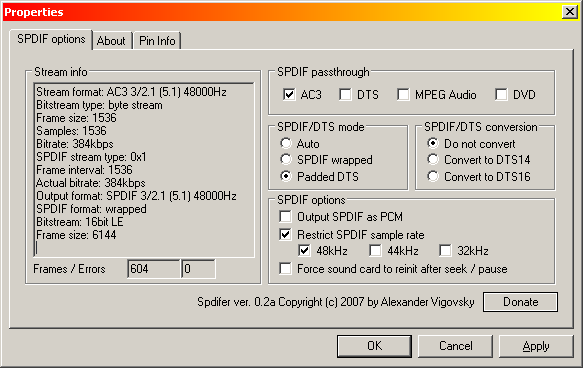
Spdifer is a DirectShow filter that allows media players to passthrough multi-channel sound to the digital (SPDIF) output without any change, so an external receiver can decode it.
Spdifer is a DirectShow filter that allows media players to passthrough multi-channel sound to the digital (SPDIF) output without any change, so an external receiver can decode it.
To use this filter just select the formats you want to passthrough, and it will be used by the player automatically. NOTE! You should disable other decoder filters to prevent the decoding of the filter's output. To use Spdifer in conjunction with AC3Filter, disable formats enabled in Spdifer at the AC3Filter's 'System' page, and disable 'SPDIF' format.
Supports passthrough for AC3, DTS and MPEG Audio (including mp3) formats. All passthrough features of the 'big brother' AC3Filter filter are supported:
- SPDIF as PCM trick
- DTS output mode change
- Sample rate check
- Sound card reinitialization
Main Categories: Audio
Sub Categories:
Input Files: AC3, DTS
Windows XP/Windows Vista
Version 0.3b
- Release Date: Jul 31, 2009
- Download(s):
|

|
Rate this software:
Your Rating:
You have not voted yet!
Average: 4.00/5
Total Ratings: 1
|
|
|
| |
|
|
|
|

 Home
Home


 spdifer_0_3b.exe