Digital Digest -> Software ->

BDSup2Sub

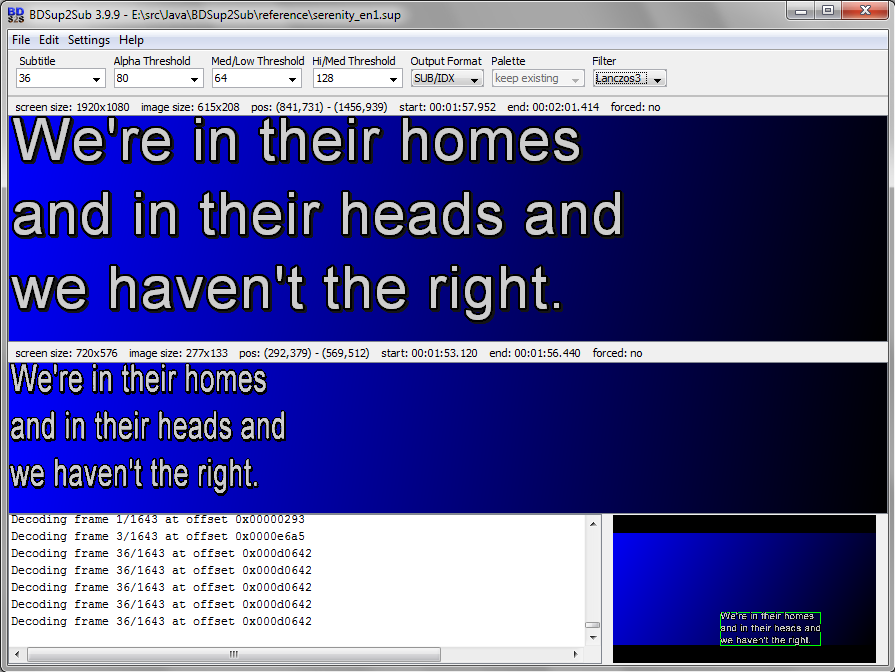
BDSup2Sub convert Blu-Ray SUPs into DVD SUB/IDX files
Author/Publisher:
Language: English
Ease of use: Not Rated
Latest Version: 4.0.0 (details)
OS Support: Windows XP Java
License: Open Source
Last Updated:
Page Viewed: 14403 times

Downloads:

Download: BDSup2Sub.jar   BDSup2Sub.jar

Description:Download BDSup2Sub - requires Java Runtime
Version:4.0.0 (added Dec 15, 2009 - view changelog)
Size:700 KB


Show All Downloads & Links (1 more)

Old Version Downloads (28 downloads)

Screenshots & Images:

Screenshot

Description:

BDSup2Sub convert Blu-Ray SUPs into DVD SUB/IDX files


Categories:

Supported File Formats:

Input Files: SUP
Output Files: SUB

OS Compatibility:

Windows XP/Java

Revision History:

Version 4.0.0
  • Release Date: Dec 15, 2009
  • Download(s):
  • Changed: BDSup2Sub is now open source (see integrated HTML help for details about repository and license)
  • Changed: reworked built-in HTML help.
  • Changed: added "recent files" menu.
  • Changed: output format is now persistent. Changed order of output formats in listbox.
  • Changed: added option "apply move settings" to conversion dialog that let's you choose whether to apply the existing "move all" settings or not when a new stream is loaded.
  • Changed: "move all" decodes/scales each frame before moving. Added a progress bar since this takes a little longer now.
  • Changed: added tooptip for the links in the HTML help. Also anchors inside the document are now supported.
  • Changed: added chapter entries in context menu of built-in HTML help.
  • Changed: built-in HTML help can now be opened in external browser (via context menu). "copy" only enabled if text selected.
  • Changed: the cancel button in the conversion dialog now cancels loading a stream.
  • Fixed: moving subtitles that are cropped during import could result in erratic subtitle positions or inappropriate warnings.
  • Fixed: conversion settings dialog didn't open when no subtitle was loaded and INI file was missing or the item convertResolution in the INI was either missing or set to false.
  • Fixed: erasing the extension in the file browser of the export dialog could lead to erratic behavior if the path contained dots. Generally, path separators were ignored when stripping the extension from file names.
View complete revision history

Rate this software:

Your Rating:
You have not voted yet!

Average: 3.82/5
Total Ratings: 8


Features

High Definition DVD Zone: Blu-ray/HD DVD news, articles and downloads


Software Submissions