|
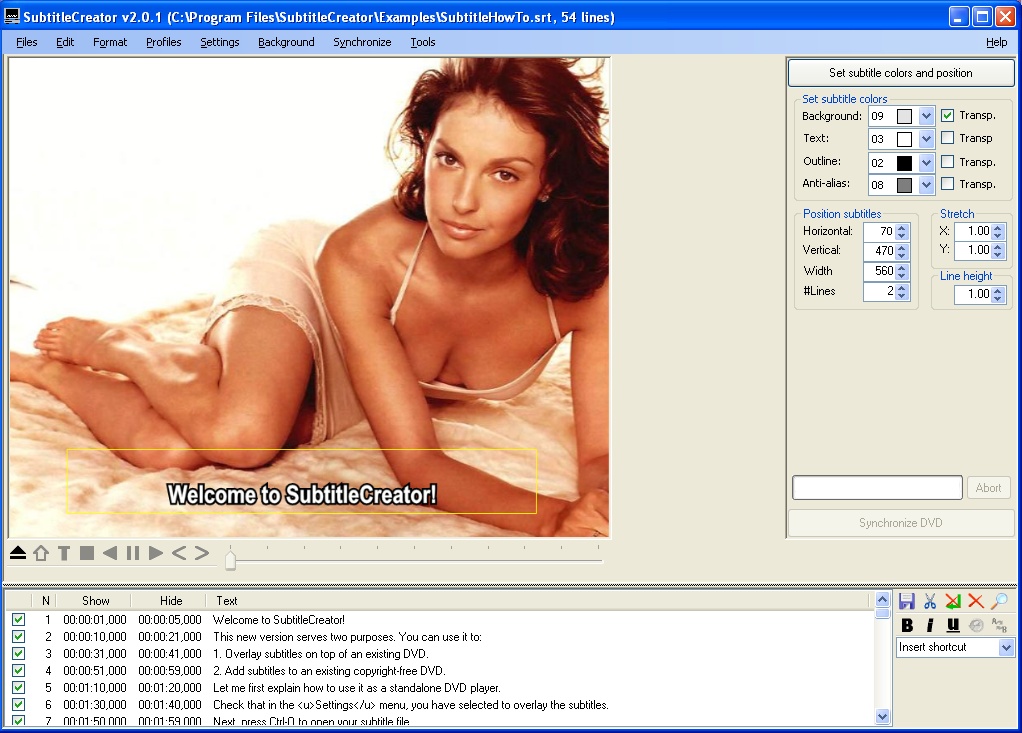
A tool for adding your own subtitles to DVDs, by outputting subtitles to a format accepted by DVD authoring tools
From the Official Site:
SubtitleCreator v1.8 allows you to convert ASCII based text files in SubRip?s SRT or MicroDVD?s SUB format to the binary SUP format expected by DVD authoring tools such as IfoEdit or ReJig. As such, you are able to create and add your own subtitles to a DVD. Since version 1.8, you can also manipulate existing subtitles, for example to shift them or to change their colors. Additionally, the GUI has changed considerably, and you can use a different rendering method, which should be useful for Persian fonts. In many ways, SubtitleCreator is similar to Gandalf?s program srt2sup, but there are some new features as well, such as DVD playback, which are marked with an (*):
- Convert SubRib (*.srt) or MicroDVD (*.sub) files to IfoEdit (*.sup) files
- Load the corresponding IFO file (thanks to the SubRip sources), such that you can use the same color palette as used by the original subtitles (*)
- Based on the IFO color palette, it tries to select white text, a black outline and a silver anti-alias color on a transparent gray background (*)
- Based on the IFO file, it determines whether we are dealing with PAL or NTSC, and sets the subtitle window position appropriately (*)
- Uses the line breaks you defined in the *.srt source, such that dialogs stay on different lines. However, the maximum number is defined by you, and if it doesn?t fit the window, the subtitles are joined and, if necessary, shrunken (*)
- You can now also use italics, bold, or underlined subtitles (*)
- You can also use <L>, <l> and <s> for LARGE, large, and small text (*)
- Preview and position your subtitles (using a screenshot as background)
- Deselect subtitles that you don?t want
- Automatically deselects credit lines (with @, or http) (*)
- Choose the font that you like to use
- Use profiles for default font and subtitle window position settings (*)
- You can join several subtitle files, e.g. if the original subtitle consisted of two parts (*)
- Synchronize the subtitles using time shifting
- Synchronize the subtitles using frame rate conversion (*)
- Synchronize the subtitles using the original subtitle *.sup: you can select matching subtitles in the new and original subtitle and match them (*)
- Save the synchronized subtitle file
- Stretch subtitles in horizontal and vertical direction (*)
- Specify how many lines you wish to use for the subtitle (*)
- Specify whether you want SC to automatically wrap lines (*)
- Specify whether you want SC to generate bitmaps of the subtitles for you (*).
- Specify whether you want SC to remove double spaces and other types of annoyances (*)
- When opening a MicroDVD?s SUB file, special formatting commands are automatically recognized, like {Y:i}, {Y:b} and {Y:bi}
- You can define your own shortcuts in the configuration file, e.g. <s M> gives you the music symbol (*)
- You can search for a subtitle string.
Input Files: SRT, SUB, SUP
Output Files: SRT, SUB, SUP
Windows 2000/Windows XP/Windows Vista
Version 2.3 RC1
- Release Date: Jul 13, 2008
- New features:
- Finish translation was added by Ropsi
- Added a snapshot feature (frame grabber), so you can take a snapshot of the DVD (including subtitles)
- It's now possible to specify the color and (semi)transparency per subtitle: transparency is no longer on/off, but can take a value between 0 (transparent) and 15 (opaque)
- You can import external images (GIF or PNG, (semi-)transparent): the images can be imported using the <p>ImageName.png</p> tags. Since regular subtitles may only contain four colours, the images may look different, since the colors will be mapped to the four most useful colors in the current palette. So changing the palette may give different results too.
- You can mix and match subtitle sources, e.g. combine a SUP file with several images and regular text. When you save it to an SRT file, all SUPs and images will be saved as images.
- You can overrule not only the subtitle position (which was already possible), but also the color and transparency. The syntax is as follows:
<w x,y,width,#Lines ci=b,f,o,a,k t=b,f,o,a />
where the first part denotes the position of the subtitle area, ci is the color index in the current palette for background, foreground, outline, antialias, and karaoke, and t its transparency.
Note that the ci... part is optional, and that the height of the subtitle area is expressed as a number of lines in the current font.
- Added an option (Format|Render method|Drop shadow) to draw subtitles with a semi-transparent drop shadow
- Added opening binary subtitles inside the main window: basically, this makes the Manipulate SUP window superfluous.
- Added support for Drag-Drop of *.idx and *.sup files. Added support for Drag-Drop of color palette (in the color box).
- Minor improvement to the title display, so that the first and last part is always retained
- Bug fixes:
- Fixed a remaining bug of the SRT to SUP conversion. When SC was generating a Subtitle with a solid background, the top left pixel was not set to the right color. This should be OK now.
- The Help->Manual command is working with Acrobat Reader 8.
- Restored the possibility to generate overlapping subtitles i.e. subtitles that have an infinite duration when the end time of one subtitles is equal to the start time of the next one OR better when the end time is 0, as was possible with version 2.1.
- Added the possibility to open SUP files where some SubPics have no STP_DSP, and show them having an end time of 0. This allows to conserve this information and write it again when saving the subtitle file.
- Fixed a bug in Google translate - still didn't protect against too frequent querries, causing Google to consider SC an automatic virus or something like that.
- Fixed HD-SUP reading bugs : see http://forum.doom9.org/showpost.php?p=1086426&postcount=287 and http://forum.doom9.org/showpost.php?p=1086901&postcount=288 for details of the bugs.
- Fixed an out of memory exception bug that occured when opening HD-SUP files thanks to the help of Wackyphill. Had to add a Gc.Collect(). Bug description here: http://forum.doom9.org/showpost.php?p=1089962&postcount=313
- Fixed a bug : when adding a negative delay (.srt and .sup files) there was an exception. See following thread: http://forum.doom9.org/showthread.php?p=1088131
- Fixed MRU bug : When opening a subtitle (srt) that SC finds corrupt, there is an exception but sometimes the subtitle is put in the MRU (Most Recently Used) list. When subsequently opening SC there always occurs an exception, bec. SC was trying to open this same file. This version of SC fixes this bug. Now the corrupt file is removed from the MRU list at the next opening.
- Fixed a long subtitle bug: when filling a whole page with subtitle text, the memory buffer was too small, causing the memorywriter to crash.
- Fixed a bug when using the DVD wizard across different hard disks
- In case of languages without spaces, e.g. Chinese, I split the string at a point without spaces.
- When opening SUP files that have more than 1 SP_DCSQT, only the first one is used. This enhances the compatibility with DVDSupEncode. See following message for details about the solved problem: http://forum.doom9.org/showpost.php?p=1076316&postcount=281
View complete revision history
|

|
Rate this software:
Your Rating:
You have not voted yet!
Average: 3.25/5
Total Ratings: 9
|

 Home
Home


 SetupSubtitleCreator_v2_2.exe