

 Home
HomePage 2 of 3: Using TMPGEnc: Converting DivX/XviD files to MPEG 2
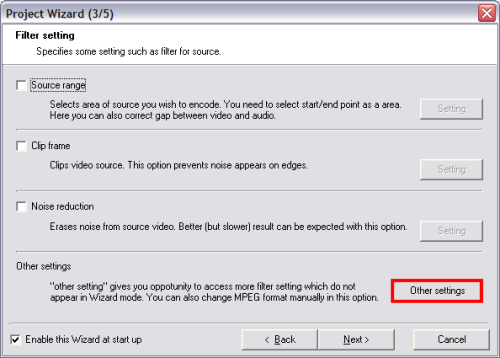
On the next screen, just leave everything the way it is (unless you know what your doing) and click the "Other Setting" button at the bottom on the right (red). (Screen Shot Below)
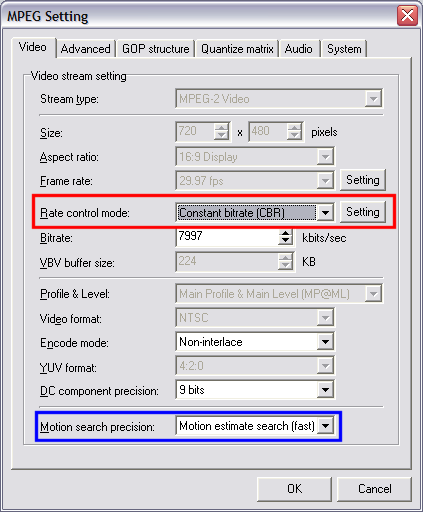
From this screen, select "Constant bitrate (CBR)" for the "Rate control mode:" (red), as your source movie is not that good for "2pass VBR". You do not need to set the "Bitrate" as we are going to do that part later. In the "Motion search precision" box, select "Motion estimate search (fast)" (blue), click "OK" on that screen, then click "Next". (Screen Shot Below)
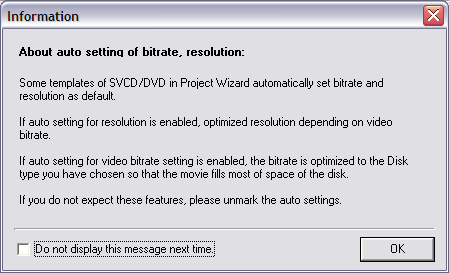
(After clicking "Next", this warning screen may pop up. Just click "OK" to get rid of it.) (Screen Shot Below)
From this screen, select "Constant bitrate (CBR)" for the "Rate control mode:" (red), as your source movie is not that good for "2pass VBR". You do not need to set the "Bitrate" as we are going to do that part later. In the "Motion search precision" box, select "Motion estimate search (fast)" (blue), click "OK" on that screen, then click "Next". (Screen Shot Below)
(After clicking "Next", this warning screen may pop up. Just click "OK" to get rid of it.) (Screen Shot Below)


