

 Home
Home

Page 1 of 1: Watch or Preview DVD Files on your Hard Drive
How to use Media Player Classic (MPC) to watch the DVD from your hard drive.
Download Media Player Classic (MPC) if you haven't done so already. The latest in MPC 6.4.8.7 . The first download link for it is for Windows 2000/XP platform. The second download link for it is for Windows 98/98SE/ME. You will need a "Unzipping" program such as "WinZip" to unzip the .zip file you downloading. - http://www.divx-digest.com/software/...r_classic.html
(MPC is not to be confused with Windows Media Player. They are two different programs.)
Playing the files from your hard drive
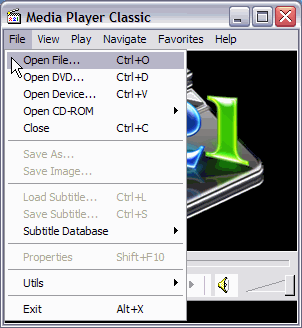
Open up MPC. Click "File", then click "Open File". (Screen Shot Below)
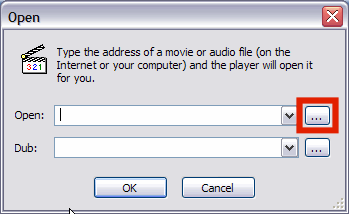
On the screen that pops up, click the browse button (the red square). (Screen Shot Below)
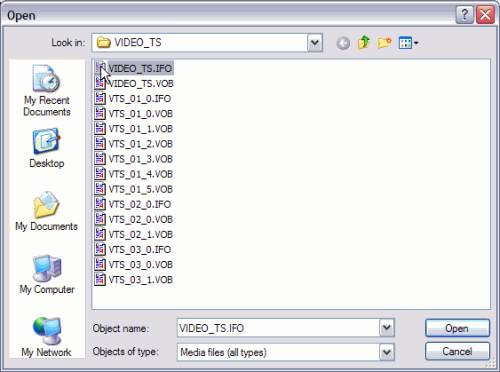
After clicking the "Browse" button, navigate to the "VIDEO_TS" folder of the ripped DVD and select the "VIDEO_TS.IFO" file. (Screen Shot Below)
MPC will now load your files and start playing the movie as if it were reading from the DVD itself.
