

 Home
HomePage 3 of 4: How To Create IFO Files from Just VOB Files
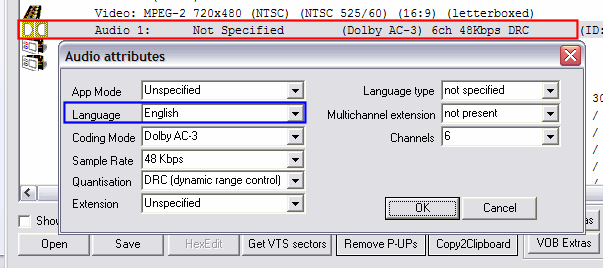
Now double click "Audio 1: Not Specified" (red). Then the audio attributes screen will come up. Select "English" for the language (blue), then hit OK. [Screen Shot Below]
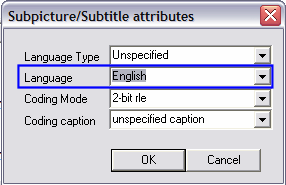
Do the same thing for "SubPicture 1" (blue), which is right underneath "Audio 1". [Screen Shot Below]
Those previous steps were for "VTS_01_0.IFO", go ahead and do the exact same thing and change the language for the Audio and SubPicture for "VIDEO_TS.IFO" .
Do the same thing for "SubPicture 1" (blue), which is right underneath "Audio 1". [Screen Shot Below]
Those previous steps were for "VTS_01_0.IFO", go ahead and do the exact same thing and change the language for the Audio and SubPicture for "VIDEO_TS.IFO" .


