

 Home
Home

Page 1 of 4: How To Create IFO Files from Just VOB Files
In this guide I will show you how to create .IFO files from just .VOB files.
Software you will need:
IfoEdit
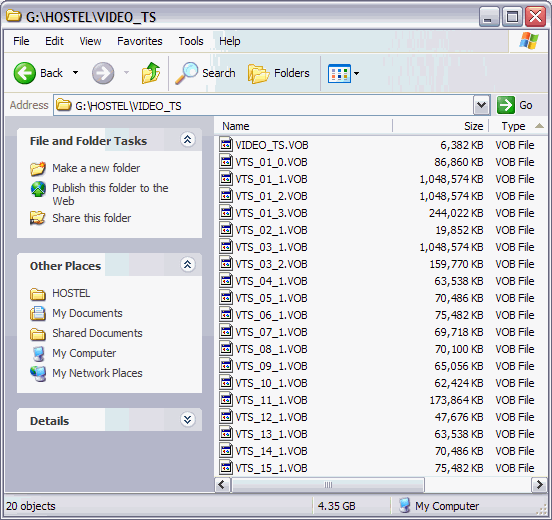
This is what I am starting out with, just 15 individual .VOB files from the movie Hostel. (I deleted all of the .IFO and .BUP files prior to making this guide) [Screen Shot Below]
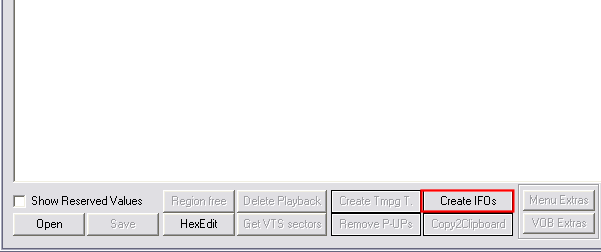
Start IfoEdit and the press the "Create IFOs" button at the bottom (red). [Screen Shot Below]
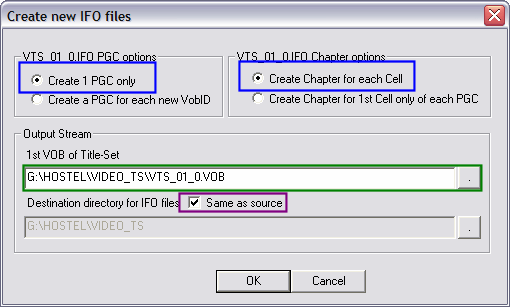
After pressing the "Create IFOs" button, this screen will come up. Here just leave the default buttons selected (blue). In the "Output Steam" section, load your first VOB file (green). Now tell IfoEdit where you want to save the newly created IFO files it will create, preferably in the same folder as your VOB files, so put a check mark in the box that says "Same as source" (purple). When you are finished, click the "OK" button. [Screen Shot Below]
Software you will need:
IfoEdit
This is what I am starting out with, just 15 individual .VOB files from the movie Hostel. (I deleted all of the .IFO and .BUP files prior to making this guide) [Screen Shot Below]
Start IfoEdit and the press the "Create IFOs" button at the bottom (red). [Screen Shot Below]
After pressing the "Create IFOs" button, this screen will come up. Here just leave the default buttons selected (blue). In the "Output Steam" section, load your first VOB file (green). Now tell IfoEdit where you want to save the newly created IFO files it will create, preferably in the same folder as your VOB files, so put a check mark in the box that says "Same as source" (purple). When you are finished, click the "OK" button. [Screen Shot Below]

