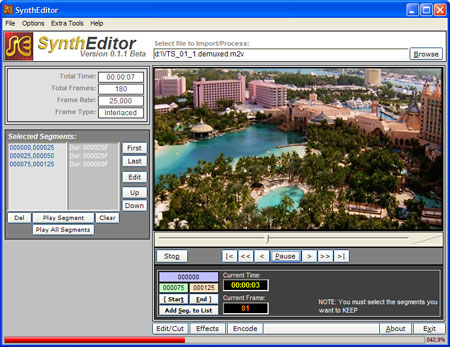
From the Author:
SynthEditor is my personal attempt to make AviSynth available to everyone.
Those who know AviSynth realize that it is one of the most powerful tools in the world of Video Editing applications but it is, also, the most difficult for everyone that doesn't know what an AVS script is. Even for advanced users it's not easy to write the simplest script without the use of external tools.
I know that there are other tools using AviSynth but I think they are too hard to be used by newbies.
The objective of this tool is to make AviSynth available to everyone since first day but I also want to make it powerful and flexible enough to fill the advanced users needs.
To achieve my objectives I'm expecting all the collaboration i can get from you... feel free to request features, suggest improvements help me with sample scripts, filters, effects, etc.
Input Files: AVI
Output Files: AVI, MPG
Windows 2000/Windows XP
Version 0.1.1beta
- Release Date: Mar 30, 2006
- Fixed a bug on the "Encode Video Only" routine (the bitrate could be badly calculated)
- Added video Encoding using QuEnc;
- Now the selected Encoder will be saved along with the "project file"
- Added a "Target Format" option -- this is important. Make your choice based in what you will be doing with the final file. If you choose "Generic MPEG" the BitRate will be calculated to fit the exact final target size. If you choose "DVD" the BitRate will be smaller to make room for DVD packetizing and NAVPACK overhead. This option will be saved on the project file.
- Now when Frame Type is detected/selected as "Progressive" Field Order is disabled/ignored.
- AvInfo no longer needed... I was using AvInfo to deal with DV and Uncompressed AVI files' Frame sizes... I coded internal routines to deal with those kind of streams.
- MediaInfo.exe no longer needed... now SynthEditor works with a mediainfo.dll included on the package.
- Added a "Force Aspect Ratio" option on the Import Dialog
- Added a "channel mapping" routine when dealing with 5.1AC3 files - thanks for the tip dragongodz and tebasuna51 (doom9 forum)
- You can now use AVI files with wav audio format... please note... WAV audio... I'm working on mp3 yet
- Added a AmplifyDB(9) on the Audio script to compensate QuEnc's "loss on audio level" encode... my thanks to Ebobtron for remembering of it
- Corrected the MaxBitrate parameter... now SynthEditor will subtract the Audio Bitrate to the MaxBitrate.
- Fixed a few more minor bugs


 Home
Home


 Official Download Page