|
|
Version 3.5.2249
- Release Date: Sep 18, 2008
- September 17, 2008 Added Blu-ray output
- Added option to close Slide Options without saving changes
- Added ability to drop images / videos into "Contents of Slide" list in Slide Options when at least one layer exists.
- Changed default layer outline color to white
- Enhanced DVD output to properly exclude Simulate option for DVD media
- Improved display of Safe Zone to increase usability
- Fixed bitsetting problem affecting some DVD burners
- Fixed problem where Video File output could ignore Include Audio option
- Fixed problem in Record Sound dialog related to illegal characters
- Fixed crash condition caused by layer duplication
- Fixed sync problem affecting some video output
- Fixed retrieval of track information for audio CDs
- Fixed display of outlines and drop shadows on Show Captions during playback
- Fixed issue where drop shadows could be drawn incorrectly on rotated video layers
- Fixed issue where outlines could be drawn incorrectly on rotated video layers
- Fixed crash condition related to 50 fps video output
- Fixed video layer sync problem affecting some formats
- Fixed rare crash condition that occurred when collecting show files to DVD/CD
- Fixed problems with audio volume in some output formats
- Fixed issue with display of layers in Slide Options
- Fixed blurry menu display for Share Show content when using some browsers
- Fixed problems with cropping video layers
- Fixed problem with reported length of HD-preset video files
- Fixed issue in which WMV output could exhibit jerky motion
- Fixed problem where some caption options failed to use decimal values
- Fixed problem with files created in Record Sound dialog
- Fixed problem with display of video thumbnail rendering dialog
Version 3.2.2047
- Release Date: Dec 4, 2007
- Added option to save audio tracks in MP3 format
- Fixed problem where certain audio files could not be added to slides
- Fixed problems with audio options in menus
- Fixed sync problem that could affect Flash output
Version 3.2.2042
- Release Date: Nov 20, 2007
- Greatly increased encoding quality for YouTube output
Version 3.2.2040
- Release Date: Nov 15, 2007
- Fixed problem with Download More Menus link in Menus tab of output dialogs
Version 3.2.2039
- Release Date: Nov 14, 2007
- Added option to create Video for Devices
- Added option to create video for YouTube
- Fixed problem where Slide Options could fail to display all layers
- Enhanced the Download Extras feature to increase usability
- Fixed crash condition caused by Duplicate Layer feature
Version 3.1.2018
- Release Date: Oct 21, 2007
- Fixed installation problem affecting older editions of Windows
- Fixed application hang related to use of caption macros and Precision Preview
Version 3.0.1974
- Release Date: Aug 15, 2007
- Fixed thumbnail display problems affecting some editions of Windows
Version 3.0.1966
- Release Date: Aug 2, 2007
- Fixed "Add to Show" so it now inserts objects after the selected slide
- Fixed problem where show thumbnail change did not register as change to show
- Optimized dialogs to make them more responsive
- Fixed problem with time stamps for backup files
- Fixed label for Close / Cancel button in Record Slide Timing dialog
- Fixed problem where track information was not retrieved properly for audio CDs
- Fixed crash condition related to scaling which only affected some images
- Fixed problem where screen saver output would not loop properly
- Fixed problem where trimmed audio was not included in Executable based output properly
- Fixed display problems affecting some editions of Windows
- Fixed problem where File List could fail to indicate which files are used in the show
- Fixed problem where background images on menus could be reset incorrectly
- Fixed crash condition which could occur on older editions of Windows
Version 3.0.1942
- Release Date: Apr 20, 2007
- Changed the Auto option under Adjustments into a button
- Fixed problem with drop shadows on partially transparent menu objects
- Fixed problem with menu thumbnails that contain transparency
- Fixed problem where the Resolution field in Video File dialog could fail to update
- Fixed problem where video rendering dialog could display incorrect aspect ratio
- Worked around problems with DirectShow
Version 3.0.1934
- Release Date: Mar 15, 2007
- Fixed problem where captions could fail to appear during preview playback
Version 3.0.1932
- Release Date: Mar 10, 2007
- Fixed problem where disabled captions could cause UI anomalies
- Fixed problem where shared shows would only use show thumbnails from a show
Version 3.0.1930
- Release Date: Mar 6, 2007
- Fixed problem where Video CD menus could be numbered incorrectly
- Fixed rare condition where audio could end early in video based output
- Fixed problem where some dialogs failed to recognize PSA as an audio file type
- Fixed problem where Include Original Files failed to function for Background images
- Fixed problem where show thumbnail could fail to be set after pasting slides into an empty show
- Fixed problem where layer Drop Shadow color could be reset incorrectly
Version 3.0.1924
- Release Date: Feb 24, 2007
- Fixed rare condition that could occur when including original files in Video CD output
Version 3.0.1907
- Release Date: Jan 30, 2007
- Fixed crash problem with using extended characters in captions.
Version 3.0.1906
- Release Date: Jan 27, 2007
- Fixed problem where caption selection could become difficult after changing the Aspect Ratio of a show
- Fixed problem where some menu options were not stored properly in saved menus
- Fixed problem where drop shadows would not appear properly on menus
- Changed each Add / Browse option to include "Add From Media Source Option
Version 3.0.1904
- Release Date: Jan 26, 2007
- Fixed problem with EXE based output where Limit Display Size of Images would not affect menus properly
- Fixed problem where the caption control rectangle in Slide Options would fail to appear
- Fixed problem where focus would shift to the File List after using Go To Slide #
- Fixed problem where stopping preview playback via slide selection could result in the wrong slide being selected
- Fixed problem where a menu thumbnail could fail to appear after being selected via the Set Show Thumbnail dialog
Version 3.0
- Release Date: Dec 13, 2006
- Multiple Layers Per Slide- Now you can add an unlimited number of photo and video layers to each slide in ProShow Gold 3.0. With multiple layers, the sky's the limit on what you can express in your slide show.
- Motion Effects on Layers- Bring each layer to life with motion effects. Add effects like Pan, Zoom, and Rotate to any layer on a slide.
- Crop and Rotate Your Photos- Make a good photo even better. ProShow Gold 3.0 allows you to crop and rotate your photos and videos conveniently.
- Red-Eye Removal- Now you can easily fix those distracting red-eye photos with ProShow Gold 3.0. Just use the red-eye removal tool to correct any photo in your show.
- New Caption Effects- Animate your captions with more effects than ever before. New caption effects include Galactic Scroll, Curling, Zoom Out, and Wag Opacity.
- Enhanced Zooming Control- Zoom out further than ever before!
- Specify Transition Effects- Take control of your transition effects. ProShow Gold 3.0 lets you decide what effects are used when randomizing transitions.
- New Output Formats- ProShow Gold 3.0 has expanded its output options to allow you more flexibility in the ways you share your slide shows. You can now output to Flash Video (FLV), Windows Media Video (WMV), and QuickTime. Additionally, you can specify custom video compression settings.
- Startup Tutorial- Don't know where to start? ProShow Gold 3.0 has a startup tutorial that will guide you through the basic steps of creating your first slide show.
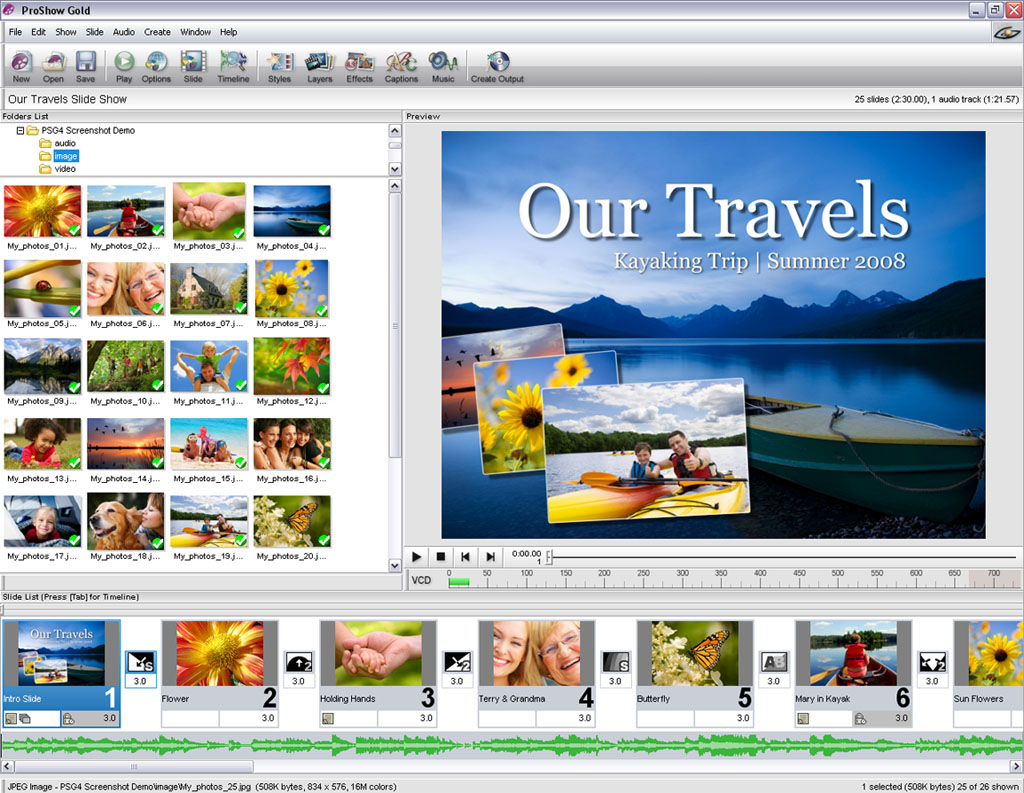
- Slide Timeline- ProShow Gold 3.0's new slide Timeline view gives you complete control over timing your shows. Now you can toggle between the normal Slide List view and Timeline view to accurately sync your audio to certain scenes in your slide show.
- New Waveform Bar- Now you can view your audio file's waveform in the Soundtrack bar with ProShow Gold 3.0. This makes it easy to determine at a glance where your songs begin and end.
- Enhanced Slide Previews- It's easier than ever to work within the slide options area of ProShow Gold 3.0. Expandable preview pane provides a magnified view of your show, making it easier to see fine details.
- Favorites Pane- Make all your important folders available at your fingertips with ProShow Gold 3.0. Simply right-click on a folder to add it to the Favorites Pane.
- Please refer to the Revisions Page for more information
Version 2.6.1777
- Release Date: Jul 29, 2006
- Fixed stability issues caused by loading images containing EXIF fields.
Version 2.6.1775
- Release Date: Apr 7, 2006
- Fixed problems with some images containing color profiles.
Version 2.6.1774
- Release Date: Mar 12, 2006
- Fixed problems with creating CD output on some systems
- Fixed various problems with creating ISO files from shows
- Fixed a few stability problems
- Fixed problem with moving the 1st caption 'down' on a customized menu
- Fixed problem where red 'X' icon that resets the end time for an audio track was disabled after adding a new track
- Fixed problem where 'drop shadow' didn't work on thumbnail images on customized menu
- Fixed crash problem while decoding corrupted EXIF data
- Fixed problem loading saved menu files.
- Fixed problems with disappearing menu thumbnails after canceling encoding
- Fixed crash problem with encoding video from shows that use a lot of image corrections (brightness / blackpoint / etc.)
- Improved the way Proshow rotates images based on EXIF orientation fields
|
|
|
 |
|