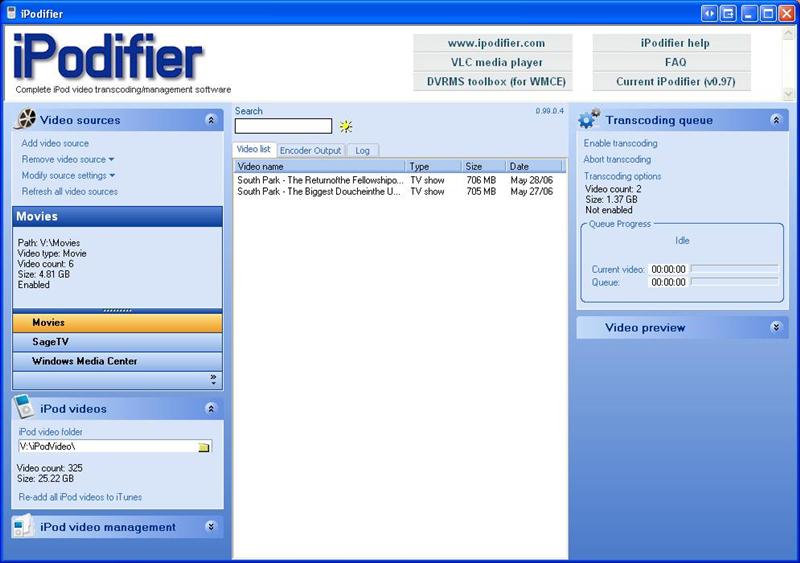
If you have TiVo, Windows Media Center, SageTV or some other device to capture TV content, iPodifier will automatically grab the content from these sources and put it on your iPod, nicely organized into video playlists. You missed The Daily Show lastnight? It will be on your iPod for the train ride in the morning.
Basically, iPodifier is an application that automates the process of getting videos onto your iPod. Unlike other transcoding software that simple re-encodes the video into an iPod compatible format, iPodifier takes it a few steps further. iPodifier automates the entire process of getting video from any source onto your iPod. iPodifier will automatically:
Check for new video
Transcode new video into an iPod compatible format
Add the transcoded video to iTunes
Organize videos into video playlists
Sync your iPod
In addition to automating these basic functions, iPodifier also does the following:
Accepts video from a wide variety of sources (i.e. TiVo, Bittorrent, SageTV, Windows Media Center)
Monitors multiple video source directories for new video and adds new videos to the transcoding queue
Manage quotas for TV shows (i.e. lets you set how many South Park's you want to keep on your iPod)
Creates a Podcast for any show (comming soon)
Video preview window allows you to preview any of your source or transcoded iPod videos
dvr-ms files are handled natively (DVRMSToolbox is no longer necessary) using the latest version of ffmpeg
metadata (i.e. showname, episode and description) contained in the dvr-ms file is captured and xferred to iTunes
If you have bittorrent files or any other downloaded TV series, if you use the file naming convention: Showname-S01E01 Episode.xxx, then the season and episode numbers will be transferred to iTunes.
video source wizards have been improved to make selection of appropriate resolutions for iPod/iPhone easier
metadata for SageTV is now captured from xml info file rather than filename (much more reliable)
iPodifier can be started minimized and with encoding enabled by using the command-line switch "/START" (i.e. start iPodifier using ipodifer.exe /START).You can then put a shortcut to iPodifier in your Startup folder and it will start automatically on reboots


 Home
Home


 Official Download Page