|
A software to preview a live video stream, record it in direct-to-disk or grab images from the stream
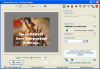
Main Screen |
A software to preview a live video stream, record it in direct-to-disk or grab images from the stream.
Additional Features:
- You may preview in full screen or in a window a video stream coming from a DV camcorder via firewire, an analogic video card, a Usb webcam. It is even possible with some MovieBoxes from Pinnacle. Naturally, if there is an audio stream, you may listen to it.
- You may capture this stream to the hard-disk in the native format, in DV (Pal or NTSC), or in Windows Media Video (Wmv). The capture may be scheduled at any future date and time.
- You may change the audio stream, for instance take the stream from a sound card (Line in or Microphone) to replace the audio in a DV stream. There is even a feature to fix the audio/video sync issues when capturing from a video device and a different audio device. The audio may be advanced or delayed to reduce a constant gap.
- You may extract images from the stream and save them in bmp or jpeg. You may snap these images automatically at regular time intervals (intervalometer).
- You may "inlay" the date and time into the video frames, either the current date and time, or if it's a DV stream, the datecode, ie the date and time when the video has been shot. The font, the position etc.. of the inlay is adjustable. You may even set it to appear automatically at every scene change for a given duration. You may also modify the datecode before displaying or capturing it, for instance if you have missed a time difference.
- You may launch several instances of CaptureFlux simultaneously, each one with a capture device, even if some devices are of the same type, for instance are DV cameras (each one gets a rank number to distinguish them).
Output Files: AVI, DV, WMV
Windows 2000/Windows XP
Version 6.0.4
- Release Date: Aug 1, 2008
- better compatibility with some external boxes like DVC100, boxes with chipset Uli M9205...
View complete revision history
|

|
Rate this software:
Your Rating:
You have not voted yet!
Average: 3.10/5
Total Ratings: 10
|

 Home
Home


 captureflux_60en.zip